
In the enterprise world, data is both an asset and a challenge. As organizations grow, so does the volume of information flow through their systems – financial transactions, supply chain records, customer data, and more. Managing this data effectively is key to maintaining performance, compliance, and strategic insight.
For companies running an ERP, the ability to handle large datasets without compromising system efficiency is a business imperative. Archiving plays a central role here — moving historical or infrequently used data out of the operational environment while preserving access for audit and analysis.
By leveraging Dynamics 365 Dataverse, enterprises can establish a unified, scalable framework for long-term data management in Microsoft Dynamics CRM and ERP systems. Dataverse not only ensures compliance and cost efficiency but also provides secure, governed access to archived data for analytics, reporting, and decision-making.
Archiving data in Dynamics 365
Dynamics 365 F&O manages a vast range of transactional data – from invoices and purchase orders to ledger entries and customer records. As these datasets grow, they begin to affect both operational efficiency and system performance. Without a clear data management strategy, organizations often encounter:
- Performance degradation — Large volumes of historical data can slow down queries, reports, and everyday processes.
- Rising storage costs — Maintaining all legacy data within the live environment increases database expenses unnecessarily.
- Compliance complexity — Regulatory requirements demand long-term record retention, even when that data is no longer actively used.
- User inefficiency — Cluttered systems make it harder for users to access relevant, up-to-date information.
A structured archiving approach addresses these challenges by relocating historical data to a secure, cost-effective repository, preserving accessibility for reporting and audits while optimizing the performance of the core operational system.
Why use Dataverse for archiving purposes?
Dataverse serves as a secure, scalable foundation for business data, making it an ideal choice for archiving information from D365 F&O. It provides the flexibility, governance, and integration needed to efficiently manage historical data while keeping it accessible for ongoing insight and analysis.
Key advantages include:
- Seamless integration – Native connectivity between Dynamics 365 applications and Dataverse enables smooth data transfer and synchronization.
- Security and compliance – Role-based access, auditing, and governance controls ensure sensitive information remains protected and compliant with corporate and regulatory standards.
- Rich data modeling – Dataverse supports complex relational structures, business rules, and workflows, mirroring the logic of operational systems.
- Data accessibility and analytics – Archived data can be easily surfaced through the Power BI Dataverse connector for Dynamics 365, allowing decision-makers to derive insights without impacting live environments.
- Cost efficiency – Optimized storage tiers within Dataverse provide a cost-effective way to retain large datasets over time.
- Extensibility – Custom tables and entities can be created to replicate existing Dynamics 365 data models and accommodate evolving business needs.
Read more: How to leverage Dynamics 365 and Power Platform to support a modern data estate
By leveraging Dataverse as an archival platform, organizations maintain control, compliance, and visibility across the entire data lifecycle.
High-level archiving architecture
Before implementation, it’s important to understand how data flows between Dynamics Finance and Operations and Dataverse within the broader Microsoft Dataverse architecture. A well-structured archiving framework ensures smooth data movement, consistent schema mapping, and secure long-term storage.
Typical archiving flow
- Source system: The process begins with Dynamics 365 Finance and Operations modules such as General Ledger, Procurement, or Sales.
- Archiving triggers: Scheduled batch jobs or event-based triggers identify data ready for archiving — for instance, transactions older than two years.
- Data extraction: Historical data is exported from Dynamics 365 F&O using the Data Management Framework or OData services.
- Data transformation: Extracted data is mapped and transformed to match the Dataverse schema and business rules.
- Data loading: The transformed data is loaded into Dataverse using Data Integrator, Power Automate, or custom APIs.
- Archival access: Users can access archived data through Power BI, Power Apps, or custom portals for analytics and reporting.
- Data retention policies: Governance rules define how long data remains archived before being deleted or moved to long-term storage.
Take control of your business operations
Discover how Confiz services can simplify your complex workflows and improve decision-making.
Get a Free QuoteConfiguring Dynamics 365 F&O and Dataverse for long-term archiving
To enable long-term retention and archiving, certain configurations must be completed within the Power Platform and Dataverse environments:
1. Enable managed environments
- In the Power Platform Admin Center, navigate to “environments”.
- Select your environment and enable “Managed Environments” to apply governance and monitoring capabilities.
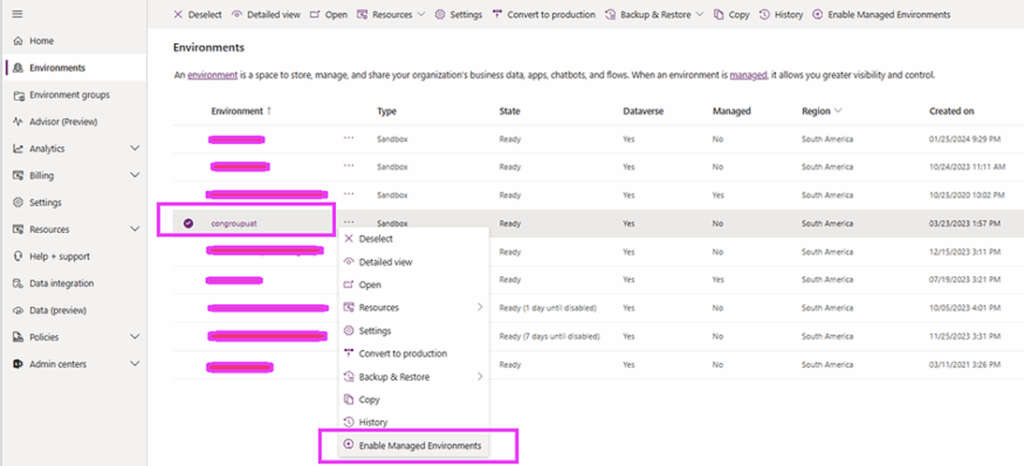
- Choose management options aligned with your organizational requirements and click “enable”.

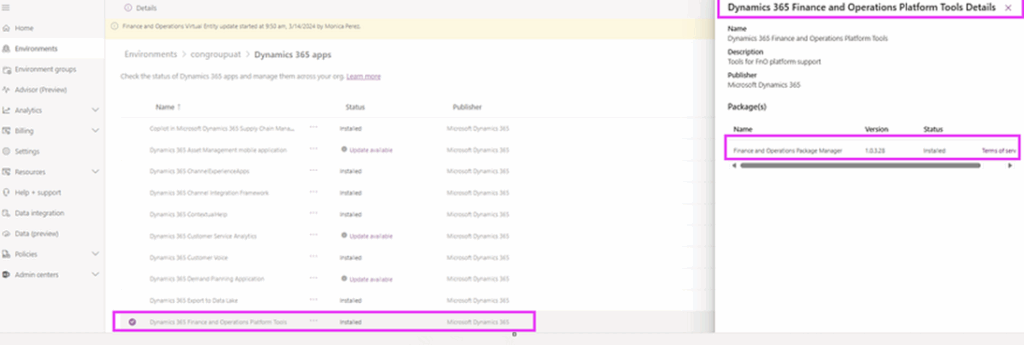
2. Update virtual entities
- In Dynamics 365 F&O, ensure “Finance and Operations Virtual Entities” are updated to the latest status.
- Verify that the environment includes the “Dynamics 365 Finance and Operations Platform Tools Details” package.

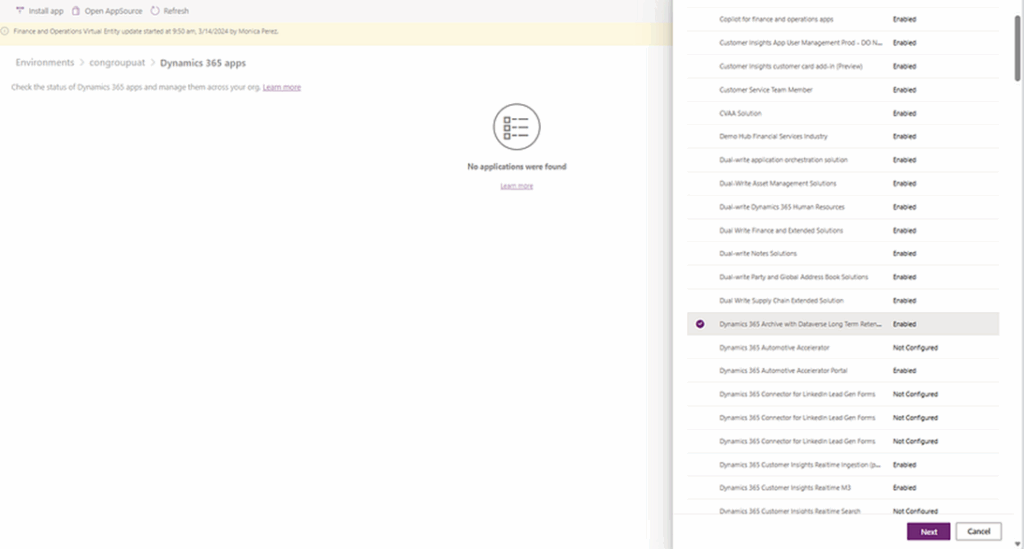
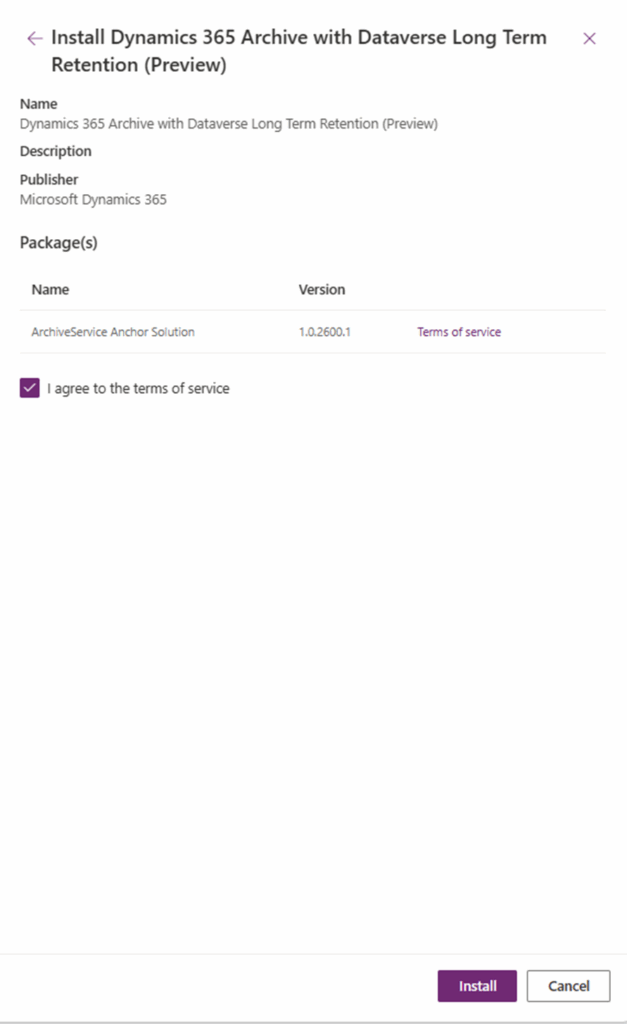
3. Install the archiving solution
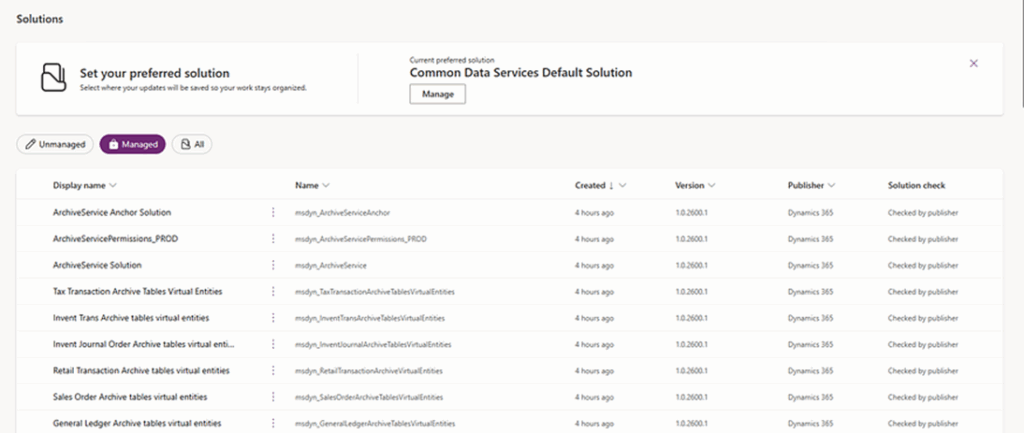
- Install the Dynamics 365 Archive with Dataverse Long-Term Retention solution to enable synchronization between F&O and Dataverse.
- Once installed, confirm that all required components are active under “Solutions Installed”.


3. Enable synapse link profile creation
- Enable Synapse link profile creation in the Power Apps portal.
You must perform the following configuration in a note:
https://make.preview.powerapps.com/environments/@@DATAVERSER_ENV_ID@@/exporttodatalake?athena.mdl=true. Replace@@DATAVERSER_ENV_ID@@with the globally unique identifier (GUID) of the environment. You can find this in the Power Platform admin center or Lifecycle Services.
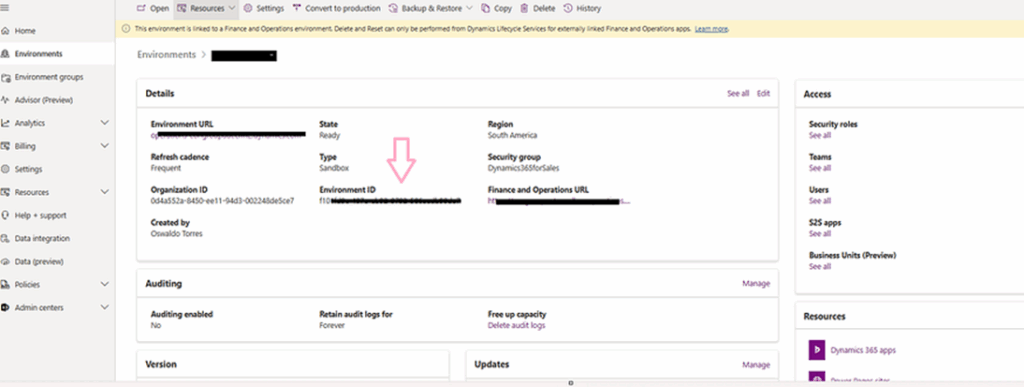
- Open the URL in a new browser window.

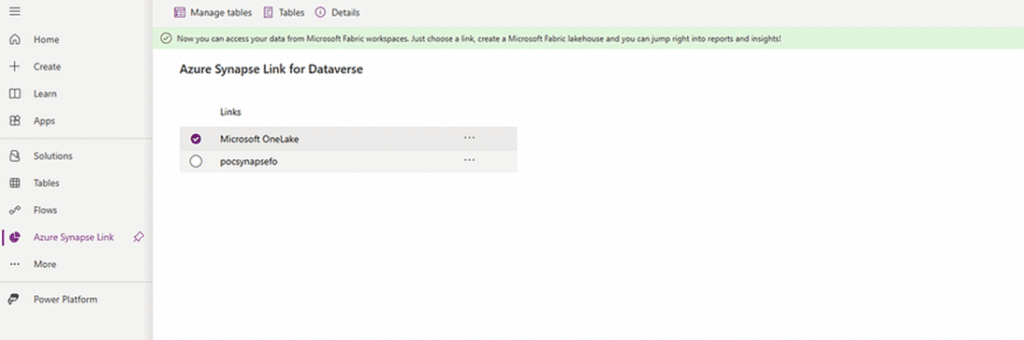
- Select “Microsoft OneLake” and “Manage tables”. Search for “Bi-entity”, select the entities that appear in the list, and then select “Save”.
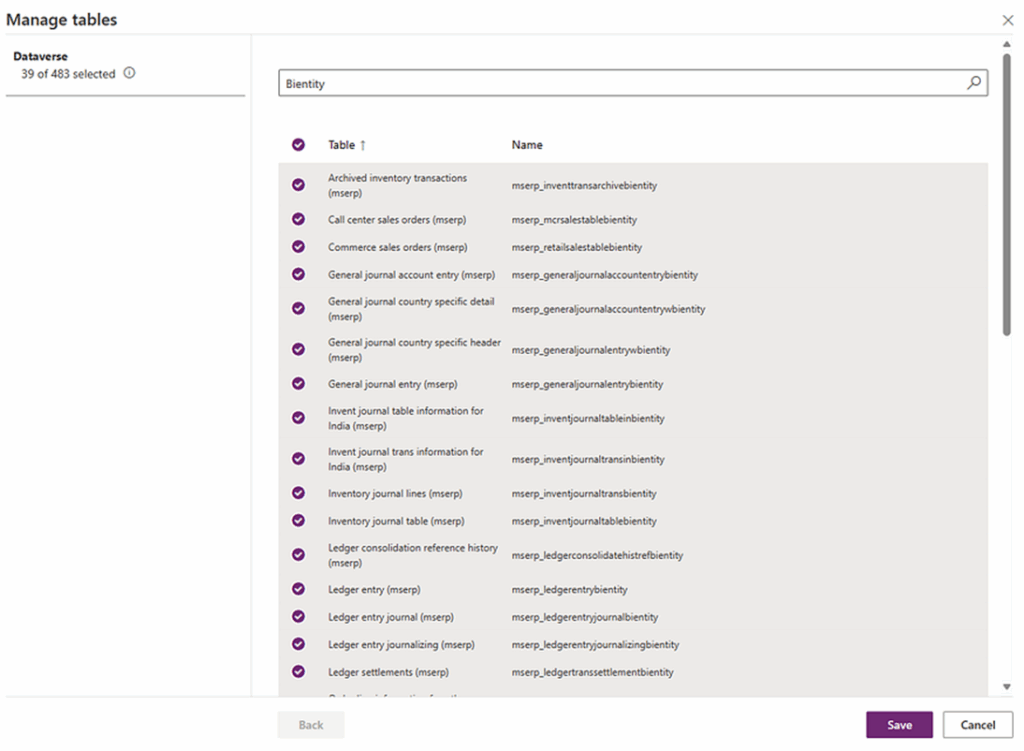
- Review the list of tables that allow for file customization. Select only the ones you need to avoid unnecessary data synchronization under the Dataverse long-term retention feature.
Accelerate growth at an unprecedented pace
Discover how Confiz can help you take control of your daily operations, increasing growth and revenue.
Book a Free Consultation4. Enable data archival in Dynamics 365 F&O
- Once the environment is configured, the next step is to allow the “Archive to use the Dataverse Long-Term Retention” feature directly within Dynamics Finance and Operations.
- This feature integrates the archival service with Dataverse, automating data movement and retention workflows.
Further readings: Power Platform Integration with Finance & Operations Apps for business efficiency
To enable the feature:
- Navigate to “Feature Management” in Dynamics 365 Finance and Operations.
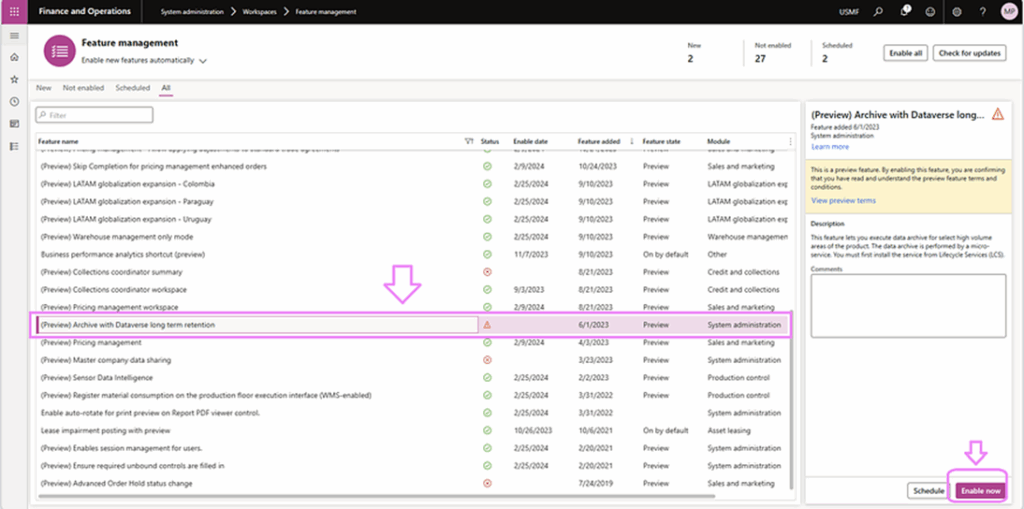
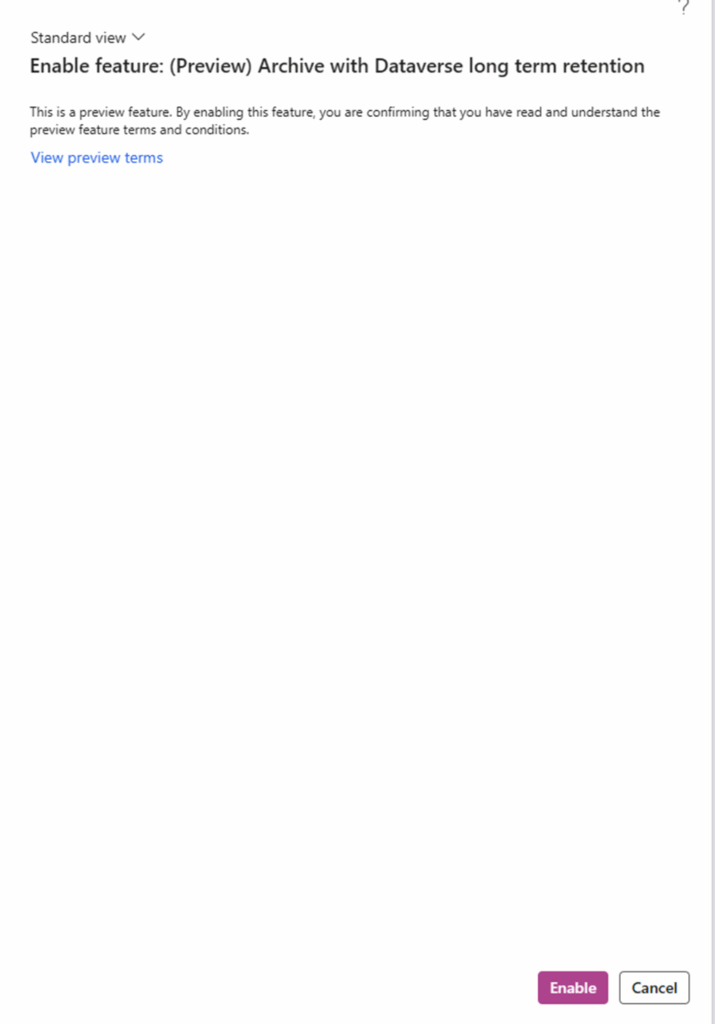

- Locate and enable the “Archive with Dataverse Long-Term Retention” option to activate the service.
For example, we will create a new long-term retention job — “Sales Orders”.

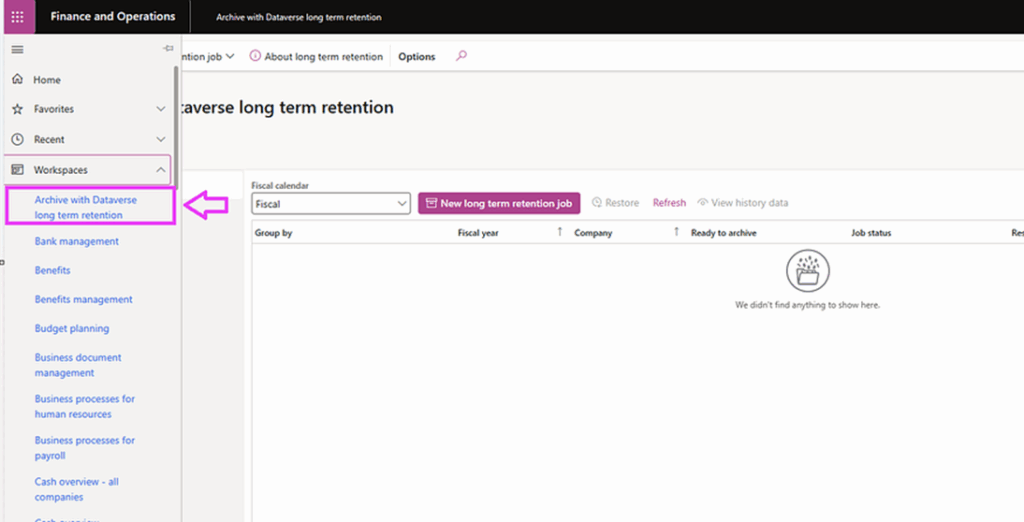
- After activation, a dedicated “Archive with Dataverse Long-Term Retention” workspace will appear under the “Workspaces” list. This serves as the control center for monitoring and managing archival jobs.
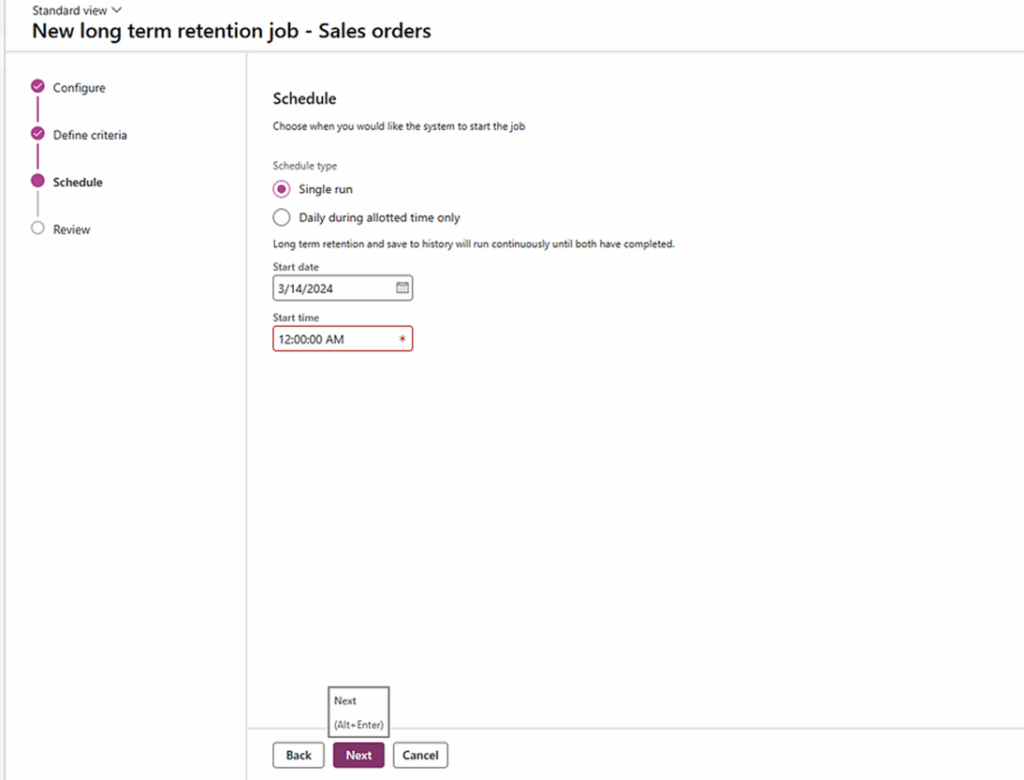
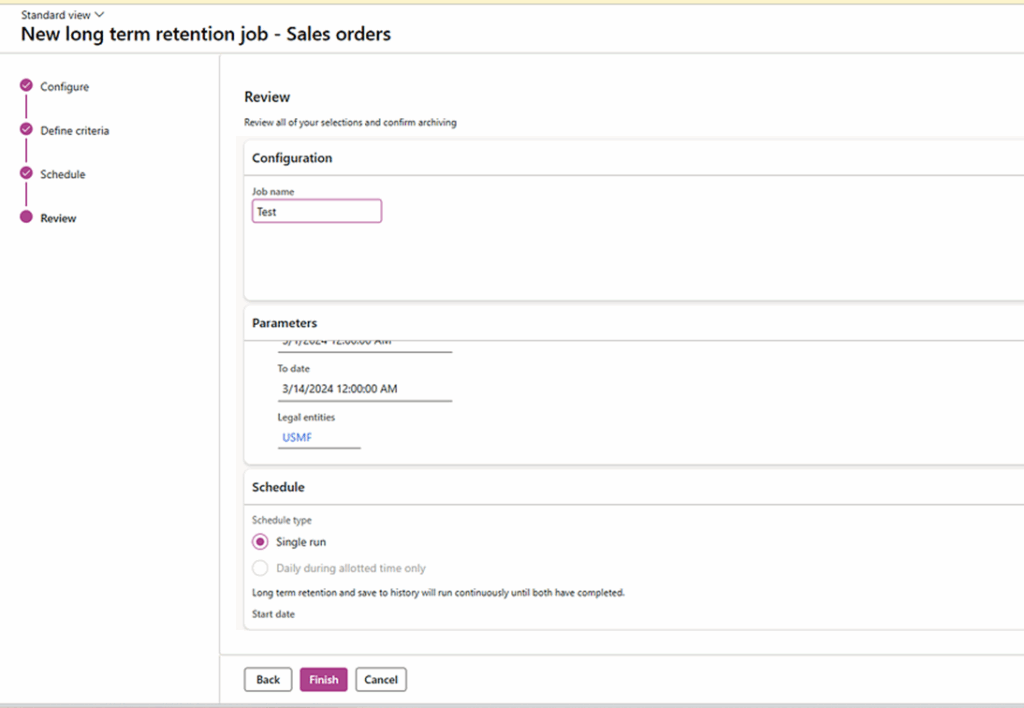

- Within the workspace, create a new long-term retention job — for example, archiving “Sales Orders” — to define what data should be moved, retained, and synchronized with Dataverse.
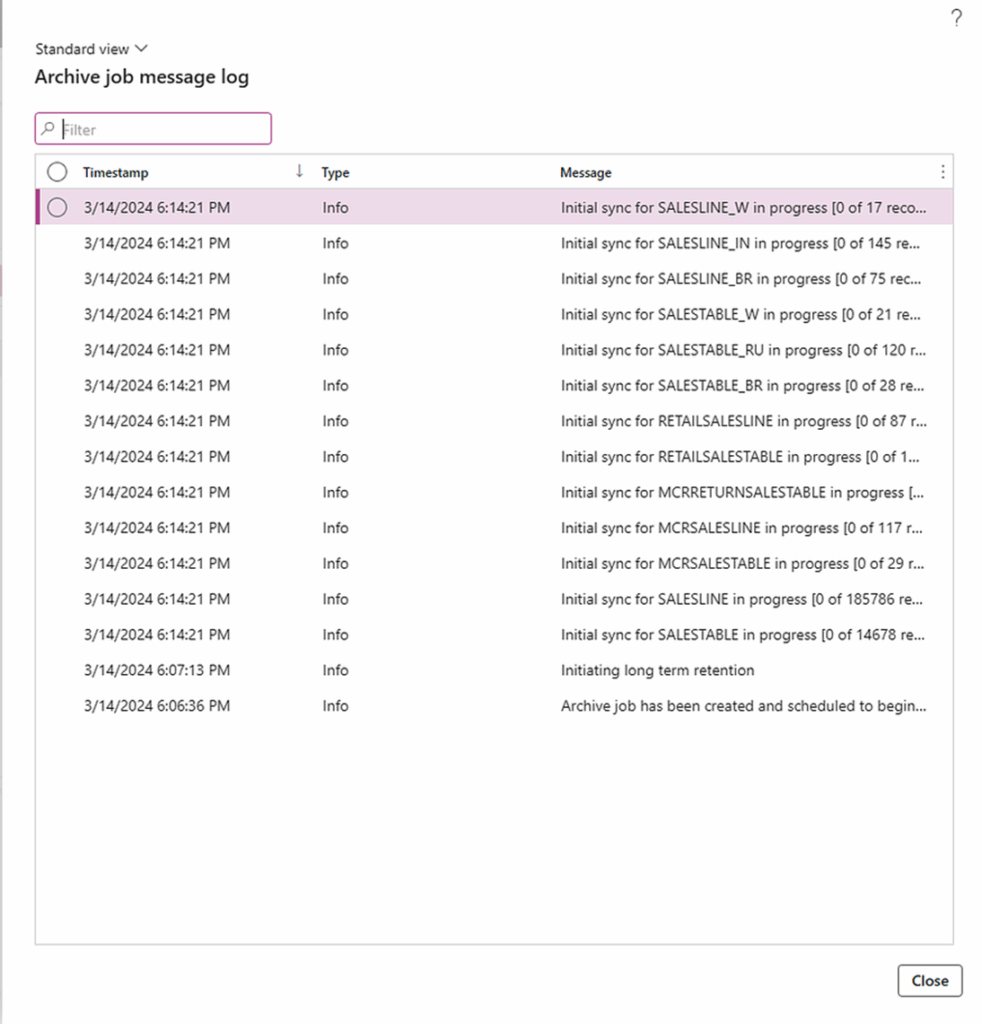
This setup ensures historical records are efficiently transferred from operational databases to a secure Dataverse environment. By strategically managing Dynamics 365 Dataverse storage, organizations can optimize performance, reduce costs, and maintain compliance while ensuring archived data remains accessible for reporting and analysis.
Conclusion
Archiving data from Dynamics 365 Finance and Operations into Dataverse enables organizations to manage historical records efficiently while keeping systems fast, compliant, and cost-effective. It not only enhances performance and reduces database load but also ensures long-term data accessibility for analytics and audits across the Microsoft Power Platform.
With a clear strategy for governance and automation, Dataverse becomes a cornerstone of modern enterprise data management – helping businesses achieve both scalability and control. At Confiz, we help enterprises design and implement optimized data archiving and retention frameworks within Dynamics 365.
Connect with us at marketing@confiz.com to explore how our experts can help streamline your data management strategy.