Microsoft provides a robust workflow engine designed to support approvals, escalations, and decision-driven business processes. In enterprise scenarios, workflows are rarely static. Approval paths often depend on organizational hierarchy, business rules, or transactional context.
To support automated approval workflows and flexible enterprise workflow management, Dynamics 365 Finance & Operations (D365 FO) allows developers to define workflow participants programmatically using X++. This capability enables dynamic participant resolution, ensuring that work items are always routed to the right users at the right time.
This blog explains how workflow participants work in D365 FO, why they matter, and how to implement custom workflow participant providers using X++.
Understanding workflow participants in D365 FO
Workflow participants in Dynamics 365 Finance and Operations are the users or roles responsible for executing workflow steps. These participants can be:
- Individual users
- User groups
- Role-based participants
- Dynamically resolved users (for example, line managers or escalation paths)
By leveraging X++, developers can dynamically assign participants based on transaction data, organizational hierarchy, or custom logic. This is especially useful for implementing workflow approvals and escalations that reflect real-world business structures.
Why workflow participants matter
Correctly defining workflow participants is essential for effective business process automation in D365 FO. Key benefits include:
1. Streamlined approval flows
Clearly defined participants ensure that approval tasks are routed correctly, reducing delays and manual intervention across approval cycles.
2. Support for approval hierarchy
Dynamic participant resolution allows workflows to follow the approval hierarchy in Dynamics 365, ensuring approvals move through appropriate management levels.
3. Line manager–driven approvals
Workflow participants enable the implementation of line manager approval workflows, in which approvals are automatically routed to a requester’s reporting manager.
4. Improved accountability and auditability
Each workflow action is recorded, supporting workflow audit trail and compliance requirements, and making approval history transparent and traceable.
5. Scalable enterprise workflows
As organizations grow, workflows can be extended to support new roles, departments, and escalation paths without redesigning the entire workflow framework.
Take control of your business operations
Discover how Confiz services can simplify your complex workflows and improve decision-making.
Get a Free QuoteImplementing workflow participants using X++
To define workflow participants programmatically, developers create a custom participant provider by implementing the WorkflowParticipantProvider interface. This provider determines, at runtime, which users are assigned to a workflow step.
High-level implementation approach
- Create a custom class implementing WorkflowParticipantProvider
- Define participant tokens using getParticipantTokens()
- Resolve users dynamically in the resolve() method
- Register the provider in the Application Object Tree (AOT)
- Configure the provider in the workflow designer
This approach enables flexible, rule-driven automated approval workflows.
Creating a custom workflow participant provider
To assign workflow participants dynamically, a custom participant provider must be created. This provider determines how users are resolved at runtime based on transactional context and organizational hierarchy.
Further readings: How to create a custom workflow in Dynamics 365 Finance and Operations
The following steps explain how to create and configure a custom workflow participant provider in D365 FO.
- Create a new class extending WorkflowParticipantProvider.
- Override the getParticipantTokens method to retrieve and return the required participants.
- Create the resolve method for the workflow provider interface. The resolve method is part of the WorkflowParticipantProvider interface.
- In the AOT, expand the Workflow > Providers node.
- Right-click the node for the provider type for which you are creating a custom provider and then choose to create a new provider. For example, right-click the ParticipantAssignment node and then click New Participant Assignment Provider.
- Right-click the node for the new customer provider and then click Properties.
- Supply the following properties for the custom provider.
Property | Description |
Name | The name for the custom provider. |
Label | The label for the custom provider. |
HelpText | A description for the custom provider. |
AssociationType | Specifies whether the workflow provider is used at the company or global level. |
AvailableForAllWorkflowTypes | Specifies whether the workflow provider can be used for all workflow types. |
ProviderClass | The custom workflow provider class that defines the behavior of the custom provider. You created this class earlier in this procedure. |
- If you set the AvailableForAllWorkflowTypes property to No, then you should specify which workflow types the custom provider can be used with. Expand the node for the custom provider.
- Right-click the Workflow Types node and then click New Workflow Type.
- Select the new node. In the Properties list, set the WorkflowType property to the name of the workflow type that the custom workflow provider will be used with.
- Save the changes for the custom provider.
- Built the relevant model.
Example code
Case: To assign workflow to PR originator’s manager.
/// <summary>
/// Class for PR Workflow Participant Provider
/// </summary>
public class PRWorkflowParticipantProvider implements WorkflowParticipantProvider
{
public WorkflowParticipantTokenList getParticipantTokens()
{
WorkflowParticipantTokenList participantTokenList = WorkflowParticipantTokenList::construct();
participantTokenList.add(“FROMPRORIGINATORMANAGER”, “@:PROriginatorManager”);
return participantTokenList;
}
public WorkflowUserList resolve(WorkflowContext _context, WorkflowParticipantToken _participantTokenName)
{
WorkflowUserList workflowUserList = WorkflowUserList::construct();
if (_participantTokenName == “FROMPRORIGINATORMANAGER”)
{
PurchRFQCaseTable PurchRFQCaseTable;
PurchReqLine PurchReqLine;
DirPerson dirPerson;
DirPersonUser personUser;
hcmWorker worker, currentWorkerManager;
select firstonly PurchRFQCaseTable
where PurchRFQCaseTable.RecId == _context.parmRecId();
select firstonly PurchReqLine
where PurchReqLine.PurchRFQCaseId == PurchRFQCaseTable.RFQCaseId;
if(PurchReqLine)
{
worker = hcmWorker::find(PurchReqLine.Requisitioner);
currentWorkerManager = HcmWorkerHelper::getManagerForWorker(worker.RecId);
select User, PersonParty from personUser
join dirPerson
where currentWorkerManager.Person == dirPerson.RecId
&& personUser.PersonParty == dirPerson.RecId;
workflowUserList.add(personUser.User);
}
}
return workflowUserList;
}
}
Configuring the workflow
Navigation path:
Workflow designer → Workflow step → Assignment
- Assignment Type: Participant
- Participant Type: Role-based
- Participant: PR originator manager (custom provider)
When the workflow is submitted, the work item is automatically routed to the originator’s line manager.
This configuration supports scalable workflow approvals and escalations without manual assignment.
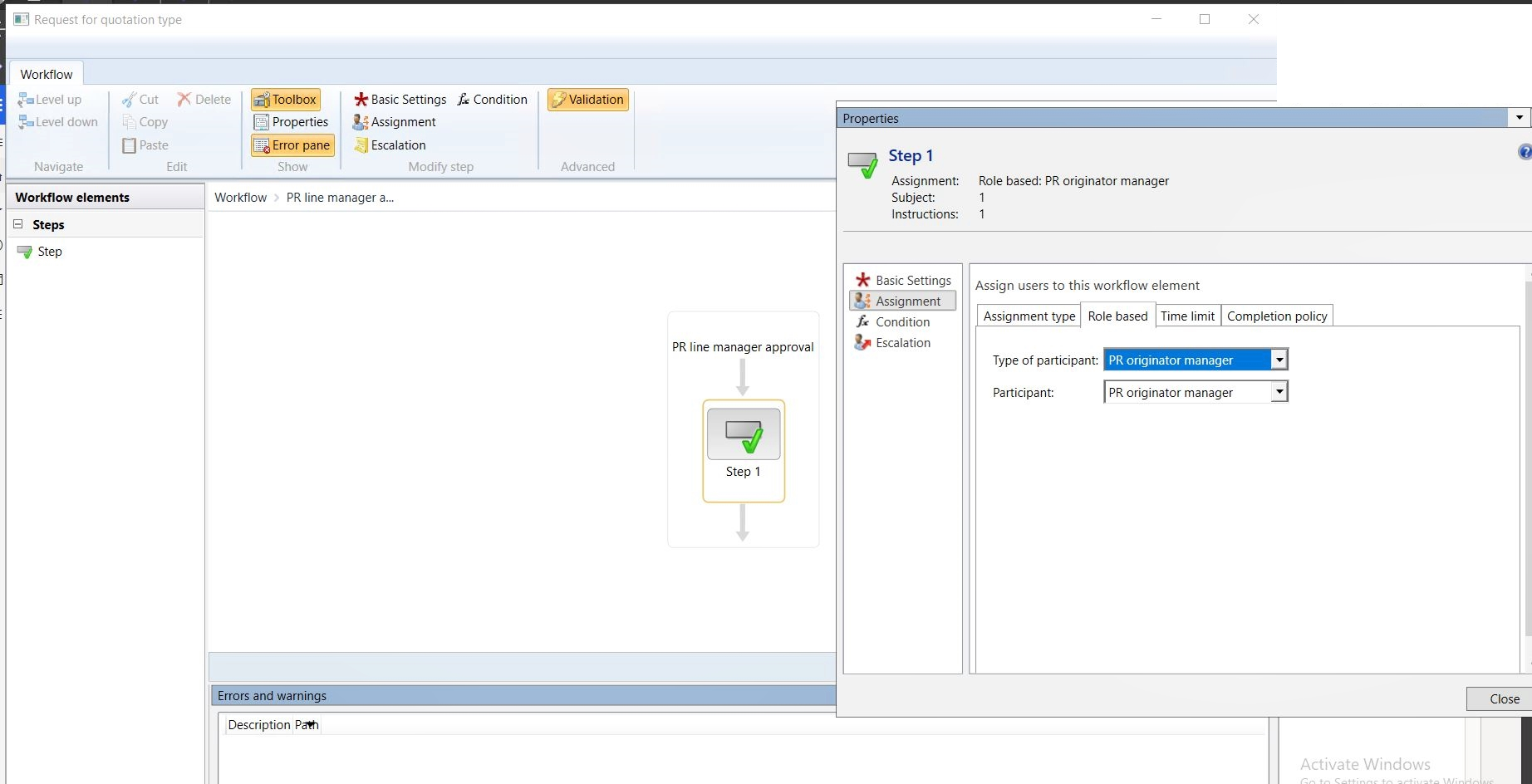
When the workflow is submitted, the work item is assigned to the originator’s line manager.
Accelerate growth at an unprecedented pace
Discover how Confiz can help you take control of your daily operations, increasing growth and revenue.
Book a Free ConsultationConclusion
Workflow participants in Dynamics 365 Finance & Operations provide a clear and controlled way to manage approval responsibilities across automated business processes. By configuring participant providers in X++ and dynamically resolving approvers, organizations can ensure that workflow assignments accurately reflect approval hierarchies, line management structures, and contextual business rules.
These capabilities help functional and technical teams maintain consistent approval routing, improve transparency through auditable workflow actions, and support scalable workflow automation across enterprise processes.
We are a trusted Dynamics 365 implementation partner, so if you need support implementing or optimizing workflow approvals and participant logic in D365 FO, contact us at marketing@confiz.com.