
For any retail or commerce consultant, managing multiple client environments, each with its own set of customizations in the Dynamics 365 Store Commerce app, can be a challenge. Maintaining separate Commerce SDK solutions for each client often results in code duplication, increased maintenance effort, and complex deployments.
What if we tell you there’s a smarter way to streamline this process? Yes, it’s possible! Utilize a single Commerce SDK structure to serve multiple clients efficiently.
In this blog, we will guide you through the process of structuring, configuring, and maintaining a unified Commerce SDK that works across multiple clients, ensuring reusability, version control, and maintainability — all in alignment with Microsoft’s recommended SDK model.
Why should you use a single SDK structure?
Using a single SDK structure streamlines development, reduces maintenance overhead, and improves consistency across platforms. It enables faster integration, better scalability, and a more unified developer experience.
Here’s why adopting a single SDK structure is a smart move for teams building and maintaining APIs or software platforms:
| Challenge | Without Unified SDK | With Unified SDK |
| Code maintenance | Multiple repositories, duplicate code | One codebase, reusable modules |
| Shared components | Must apply SDK version updates to all projects | Update once, apply to all clients |
| Build/Deploy | Hard to synchronize shared logic | Single pipeline with client-specific configuration |
Implementing a Unified Commerce SDK for multiple clients: Steps to get started
Implementing a Unified Commerce SDK can significantly enhance the efficiency of managing multiple client environments. Below, we’ll walk you through a clear, step-by-step approach to structuring, configuring, and maintaining a unified SDK that can seamlessly serve multiple clients with minimal complexity.
Step 1: Create a base SDK
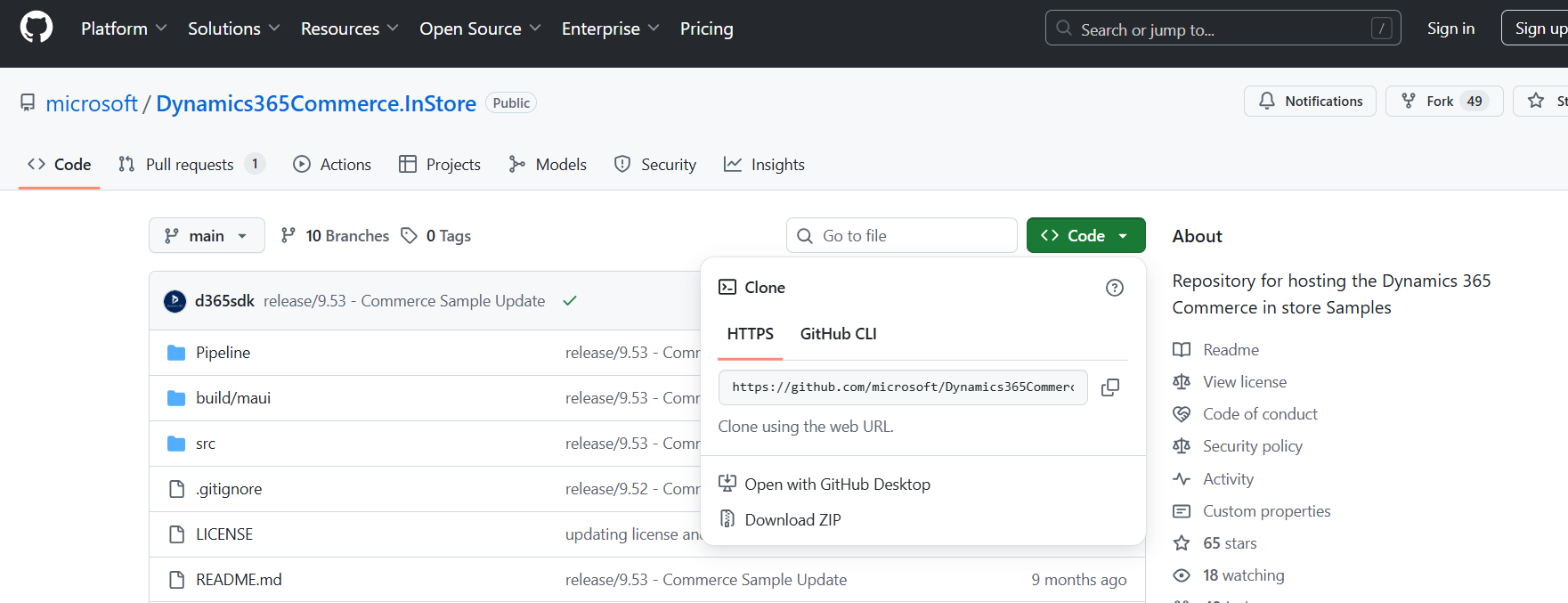
- Download the latest Commerce SDK from Microsoft’s GitHub or NuGet feed.
- Keep the SDK under a root directory, such as C:\Projects\CommerceSDK\src.
- Ensure the SDK version is consistent with your D365 Commerce environment.
Step 2: Define shared components
Create a folder src/Shared and include all reusable components:
- Common triggers (e.g., PostEndTransaction logging, hardware station checks)
- Utility classes (e.g., tax calculation helpers, response parsers)
- Service classes (e.g., EFT communication, ZATCA integration, API clients)

These components can then be imported or extended by client-specific modules.
Take control of your business operations
Discover how Confiz services can simplify your complex workflows and improve decision-making.
Get a Free QuoteBenefits of a Unified Commerce SDK
Implementing a single, modular Commerce SDK for multiple clients provides both immediate operational efficiencies and long-term scalability. By centralizing and standardizing your approach, you gain a significant competitive edge and streamline both the development and maintenance processes. Below are the key benefits of adopting a unified Commerce SDK:
1. Centralized code management
A unified SDK means all customizations, shared utilities, and integrations are maintained in a single codebase. This centralization reduces duplication and eliminates inconsistencies, allowing for faster bug fixes and smoother enhancements. With everything in one place, managing updates and implementing changes becomes simpler and more efficient.
2. Faster SDK upgrades
When Microsoft releases a new version of the Commerce SDK, you only need to apply and test it once, rather than updating each client’s SDK separately. This significantly reduces the time and effort spent on version upgrades, ensuring that all clients benefit from the latest features and improvements without disruption.
Read more: Building custom pages in the Dynamics 365 Store Commerce app
3. Improved reusability
By structuring your SDK with reusable components, you can extend core functionalities like ZATCA integration, EFT device handling, and receipt formatting across multiple clients. With minimal configuration changes, these core modules can be easily adapted to suit different client needs, enabling faster development cycles and reducing the need to reinvent the wheel for each new client.
4. Streamlined devOps and deployment
A unified SDK simplifies your DevOps and deployment pipelines. With client-specific build configurations (e.g., ClientA.build.json, ClientB.build.json), you can manage all your clients from a single pipeline. This streamlines the deployment process, reducing manual intervention and minimizing deployment errors, ensuring faster and more reliable releases.
5. Consistency across clients
Enforcing uniform patterns, naming conventions, and folder structures ensures that all projects follow the same best practices and coding standards. This consistency not only simplifies development and debugging but also helps in maintaining a high level of quality across all client implementations. Standardized workflows and structures reduce confusion, making it easier for developers to transition between different client projects.
6. Reduced maintenance cost
With a unified SDK, you significantly reduce the number of redundant repositories and eliminate the need for maintaining multiple versions of similar code. Fewer repositories and a cleaner version control system lead to lower maintenance costs. Your team spends less time managing old code, allowing them to focus on adding new features and solving business-critical challenges.
7. Easier onboarding for developers
The standardized structure of a unified SDK makes it easier for new developers to get up to speed quickly. They can easily understand the modular framework and begin contributing without needing to learn the intricacies of different client setups. This reduces the learning curve, making it faster to onboard new team members and scale your development capacity.
8. Scalable and future-proof
A modular architecture ensures that your SDK can easily adapt to new clients, regions, or custom requirements without requiring a rewrite of the core logic. As business needs evolve and new functionalities are required, the framework remains flexible, allowing for seamless integration of new features while staying aligned with Microsoft’s composable commerce vision.
Accelerate growth at an unprecedented pace
Discover how Confiz can help you take control of your daily operations, increasing growth and revenue.
Book a Free ConsultationConclusion
Adopting a unified Commerce SDK is more than just a technical upgrade; it’s a strategic decision that can significantly enhance your Dynamics 365 Store Commerce development lifecycle. By centralizing code, streamlining maintenance, and ensuring reusability across multiple clients, this approach delivers substantial benefits in terms of efficiency, consistency, and long-term scalability. Whether you’re managing updates, enhancing deployment processes, or reducing development time, a unified SDK allows you to drive higher-quality outcomes with less overhead.
Ready to transform your Dynamics 365 environment? Connect with us at marketing@confiz.com to discover how Confiz can help you boost system performance, streamline operations, and enhance business agility with Dynamics 365 Finance & Operations.