
In today’s financial environment, finance leaders are expected to close faster, improve accuracy, and maintain stronger control over financial data. Yet account reconciliation in Dynamics 365 often remains a resource-intensive process, still dependent on manual reviews, repetitive checks, and spreadsheet-based tracking. This slows the close cycle, increases the risk of errors, and limits visibility into unresolved issues.
Microsoft Dynamics 365 Finance & Operations (D365 F&O) provides a strong foundation for financial management. Adding an AI-powered Account Reconciliation Agent extends that foundation by making reconciliation more efficient, controlled, and scalable.
The Account Reconciliation Agent compares subledger activity with general ledger balances, identifies discrepancies, and recommends corrective actions. These may include updating posting profiles, adjusting configurations, or resolving mismatches before they affect reporting accuracy. It also creates a record of identified issues and resolutions, improving consistency and strengthening audit readiness over time.
This blog examines how an AI-driven reconciliation agent in D365 F&O can help organizations modernize reconciliation, reduce manual effort, and improve speed, accuracy, and control of financial close.
The challenge: Why manual reconciliation remains a bottleneck
Account reconciliation is a critical financial control that supports reporting accuracy, compliance, and confidence in the numbers. Whether teams are reconciling bank accounts, vendor balances, customer accounts, or tax-related entries, the objective is the same: identify gaps early and ensure balances are accurate.
The issue is that reconciliation is still manual in many organizations. Finance teams often work through large transaction volumes, investigate mismatched entries, and resolve timing differences across ledgers. During the month-end close, this effort becomes even more demanding, adding pressure to an already time-sensitive process.
Even with ERP systems in place, reconciliation often depends on manual review, follow-up, and adjustment. This makes the process slower, harder to scale, and more exposed to inconsistency. AI creates value here by reducing manual effort, improving exception-handling speed, and increasing reconciliation consistency.
The solution: An AI reconciliation agent built into D365 F&O
The AI Account Reconciliation Agent extends standard reconciliation in D365 Finance & Operations by adding intelligence to a process that is still manual in many organizations.
Using machine learning and intelligent matching logic, the agent can review large volumes of transactions, identify likely matches, and surface corrective actions for exceptions. Instead of requiring teams to manually scan hundreds or thousands of entries, it helps reduce review time and improves consistency in how issues are handled.
The agent is not designed to replace finance teams. It is designed to increase their capacity by accelerating reconciliation, reducing manual effort, and allowing teams to focus on exceptions that require judgment.
Take control of your business operations
Discover how Confiz services can simplify your complex workflows and improve decision-making.
Get a Free QuoteHow does the AI account reconciliation agent work
Prerequisites for enablement
Before using the AI Account Reconciliation Agent, the administrator must enable the required features in the Finance & Operations environment.
The following prerequisites must be met in the Feature management workspace:
- Immersive Home must be enabled
- Agent Management must be activated
Once these features are turned on, the reconciliation agent can be accessed and used within the D365 Finance environment.
Read more: How to perform bank reconciliation in Dynamics 365 Finance using excel bank statement import?
What does the agent deliver?
The AI Account Reconciliation Agent improves reconciliation by reducing manual review and helping teams resolve exceptions faster.
Key benefits include:
- Faster month-end close
By automatically matching transactions and surfacing exceptions, the agent shortens the reconciliation cycle.
- Improved accuracy
It reduces manual errors and applies reconciliation logic more consistently.
- Stronger financial control
Finance leaders gain clearer visibility into unreconciled balances and higher-risk transactions.
- Lower manual effort
Teams spend less time on repetitive reviews and can focus more on analysis and decision-making.
- Better audit readiness
System-tracked actions and documented exception handling support audit transparency and compliance.
How are exceptions identified?
The agent is designed to detect mismatches between ledger and subledger activity.
For example, if a direct entry is posted to an Accounts Payable main account instead of being recorded through the appropriate subledger process, the agent flags it as an exception. The same logic applies across other modules, including Accounts Receivable and Bank.
This allows the system to identify exception scenarios module by module and highlight transactions that require review.
Example scenarios across modules
The agent can surface reconciliation exceptions in multiple financial areas:
1) Accounts Payable
If a transaction is posted directly to the main account, the agent can detect the mismatch and flag it for review. 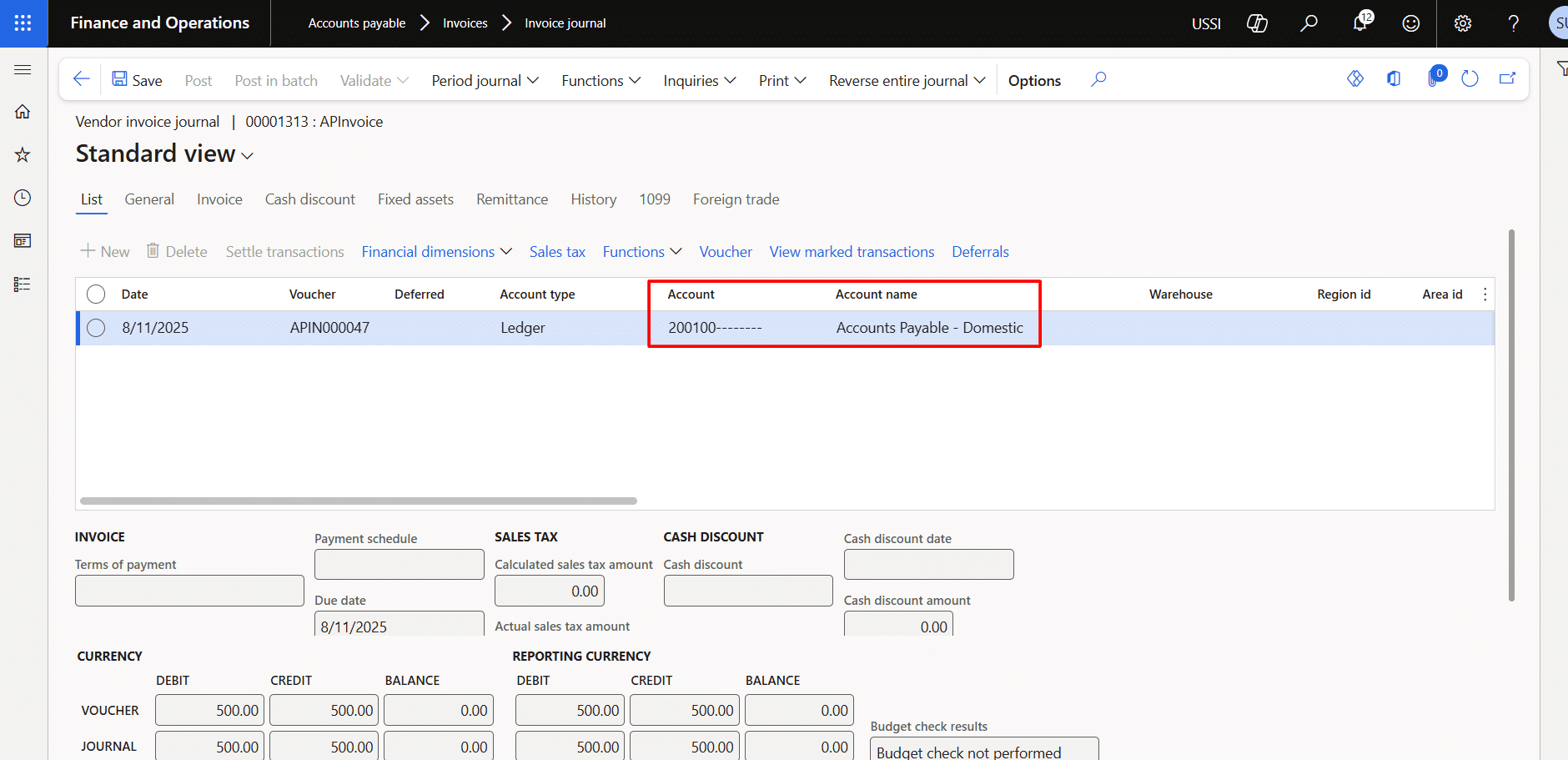
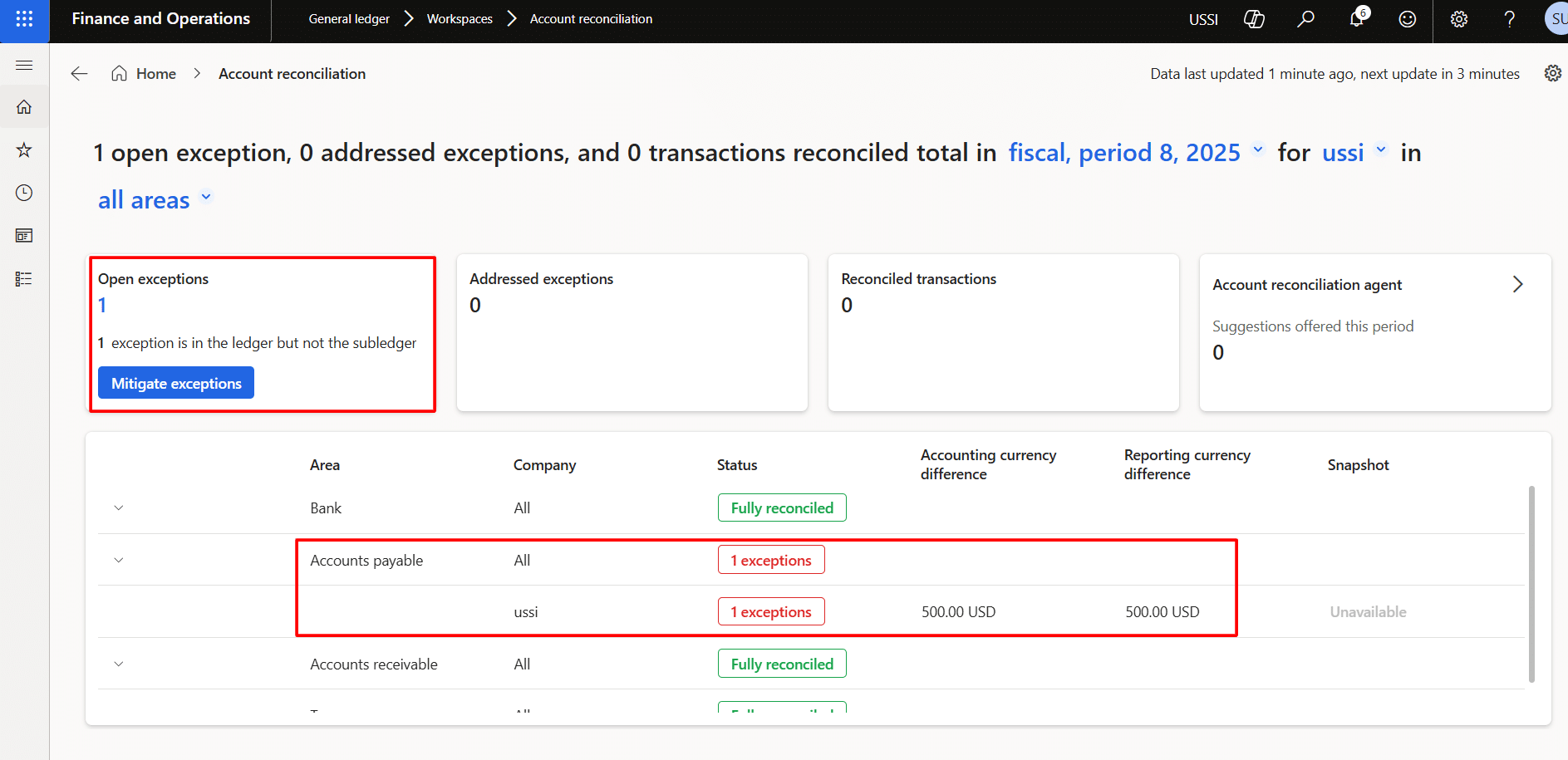
2) Agent behavior
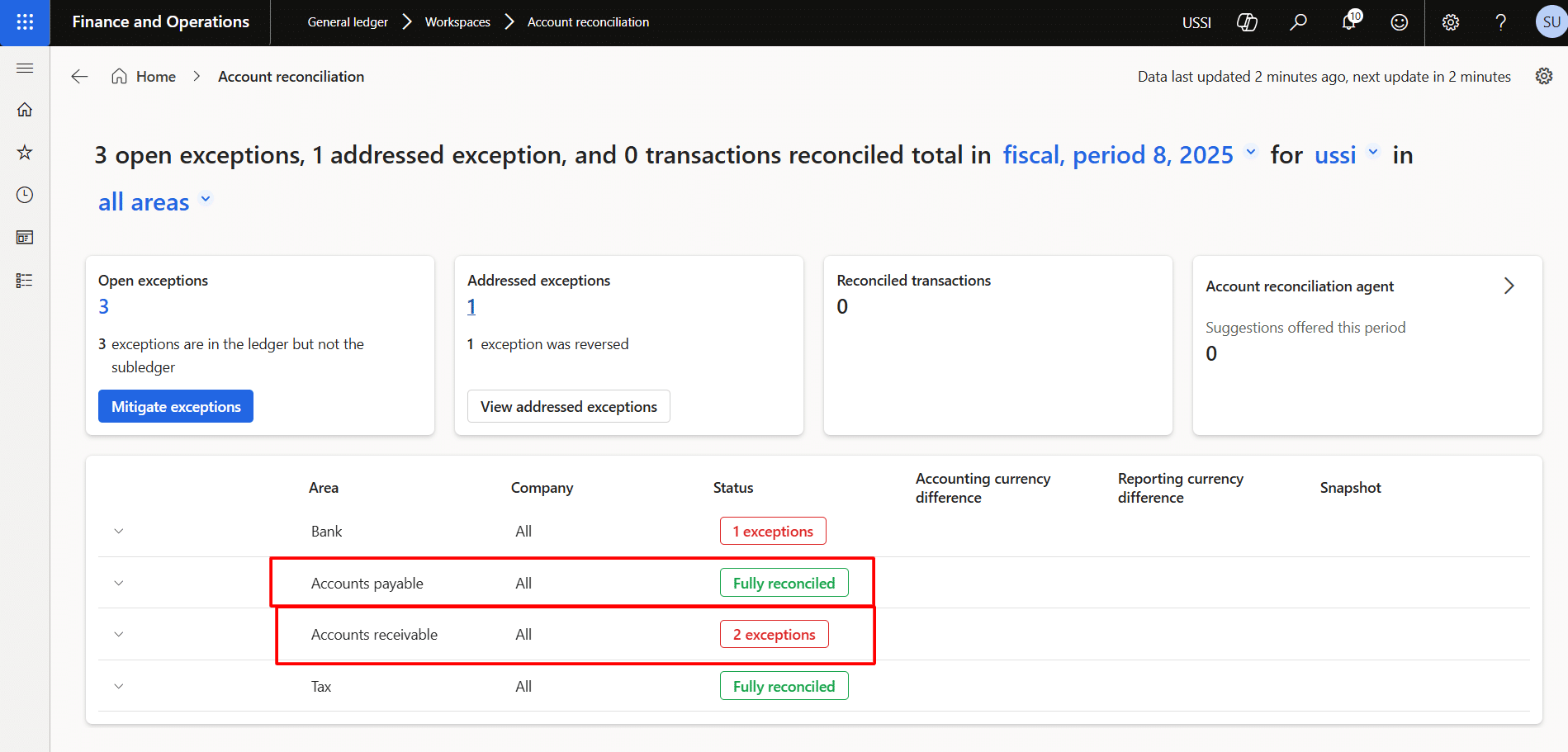
The agent showed the exception module-wise.
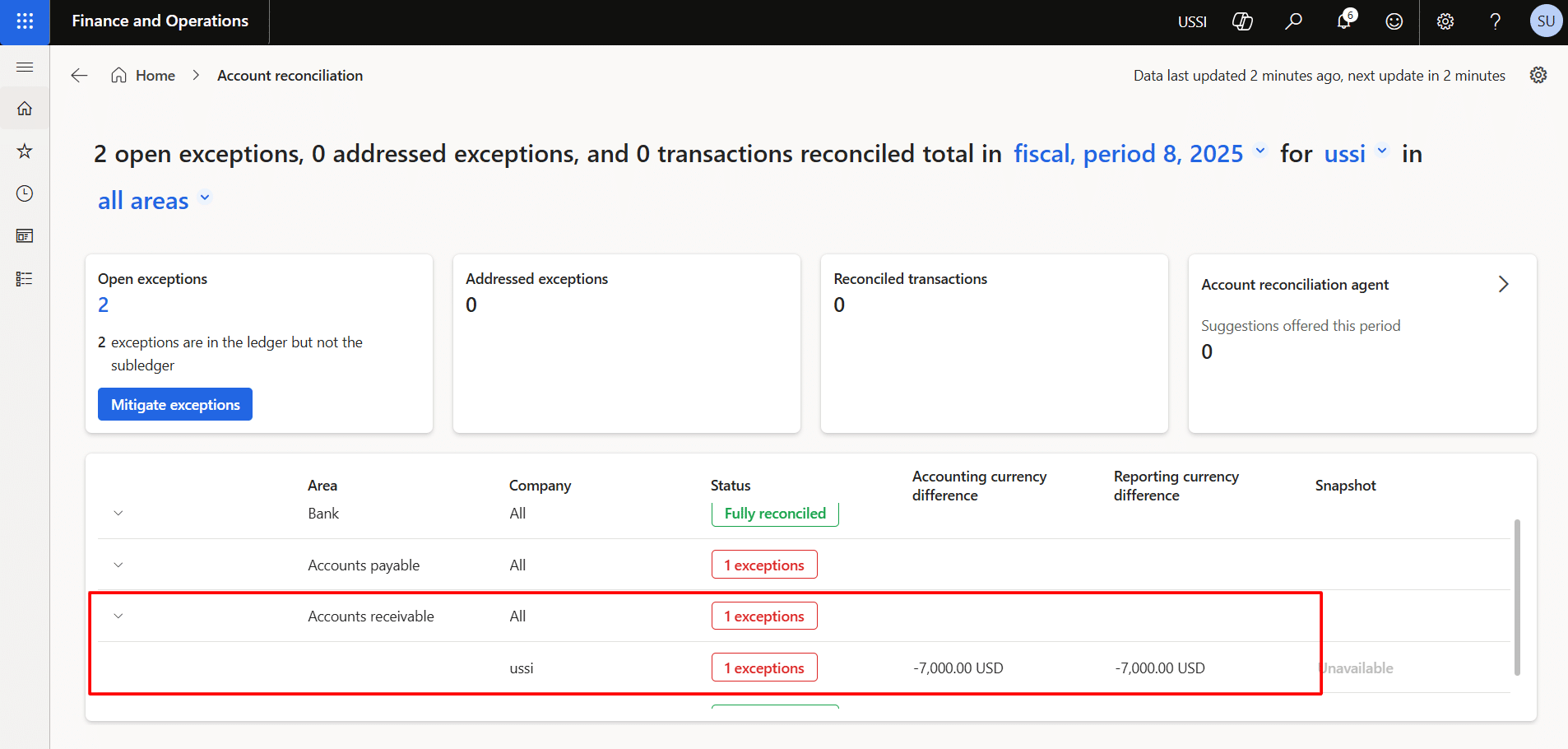
3) Accounts Receivable
If an entry is posted directly to the main account without the required subledger linkage, the system identifies the exception and may recommend reversing the entry.
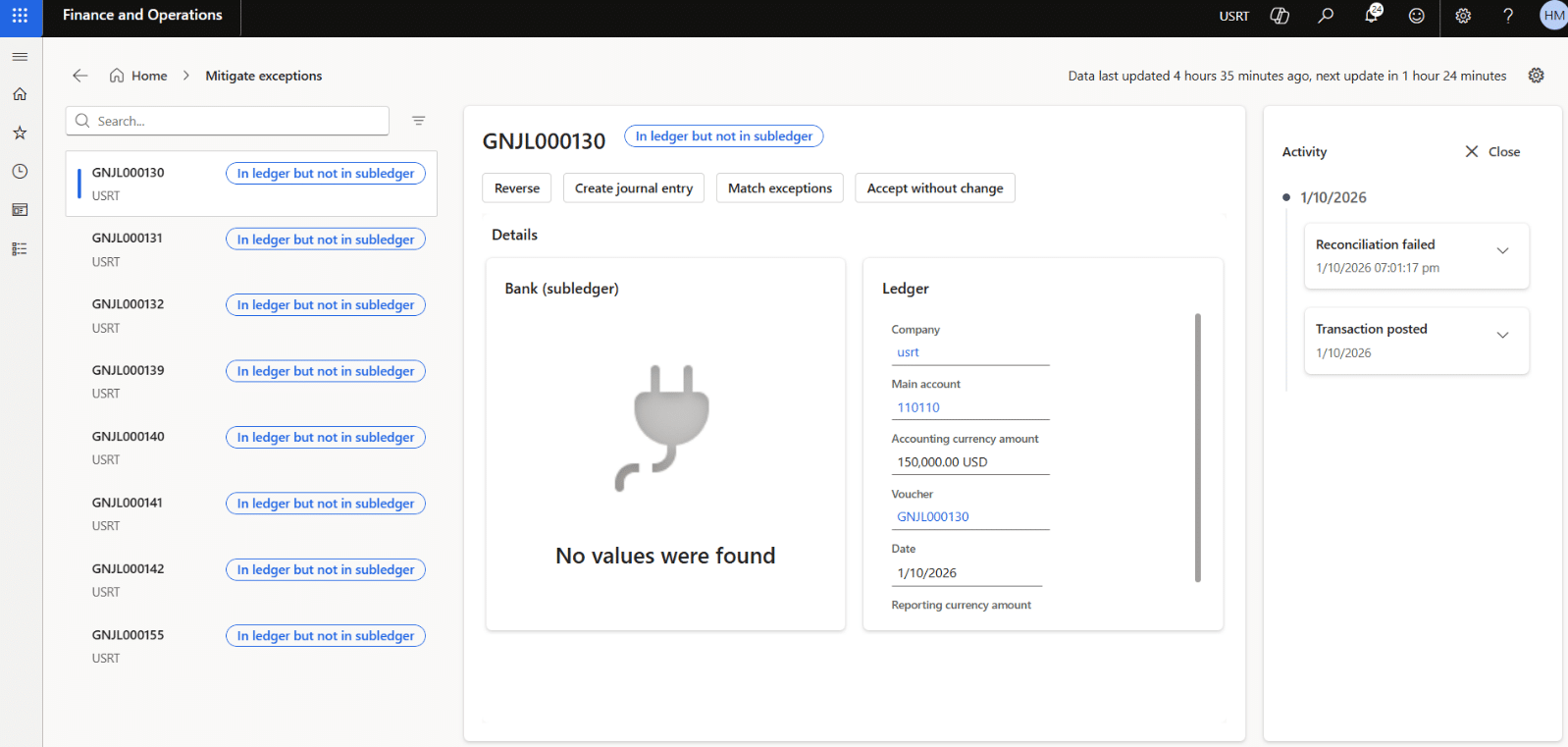
4) Details of the exception
5) Bank
If a bank-related entry is posted directly to the main account, the exception is shown after the reconciliation batch job runs.
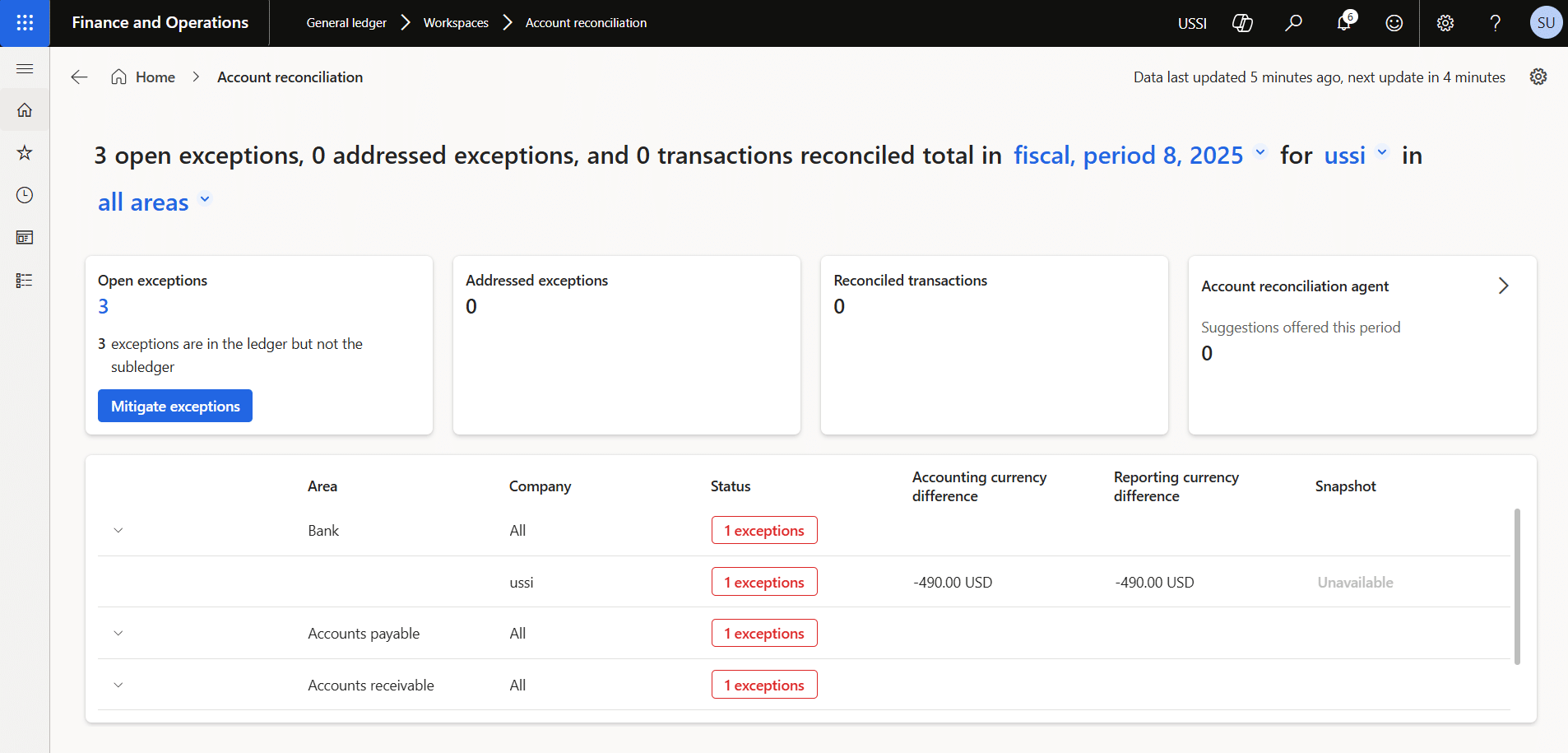
These examples show how the agent helps identify posting issues that may otherwise delay reconciliation or affect financial accuracy.
Further reading: Guide to get started with bank account lifecycle management in Dynamics 365 Finance & Operations
How does exception mitigation work?
Once an exception is identified, the agent provides users with mitigation options to resolve it.
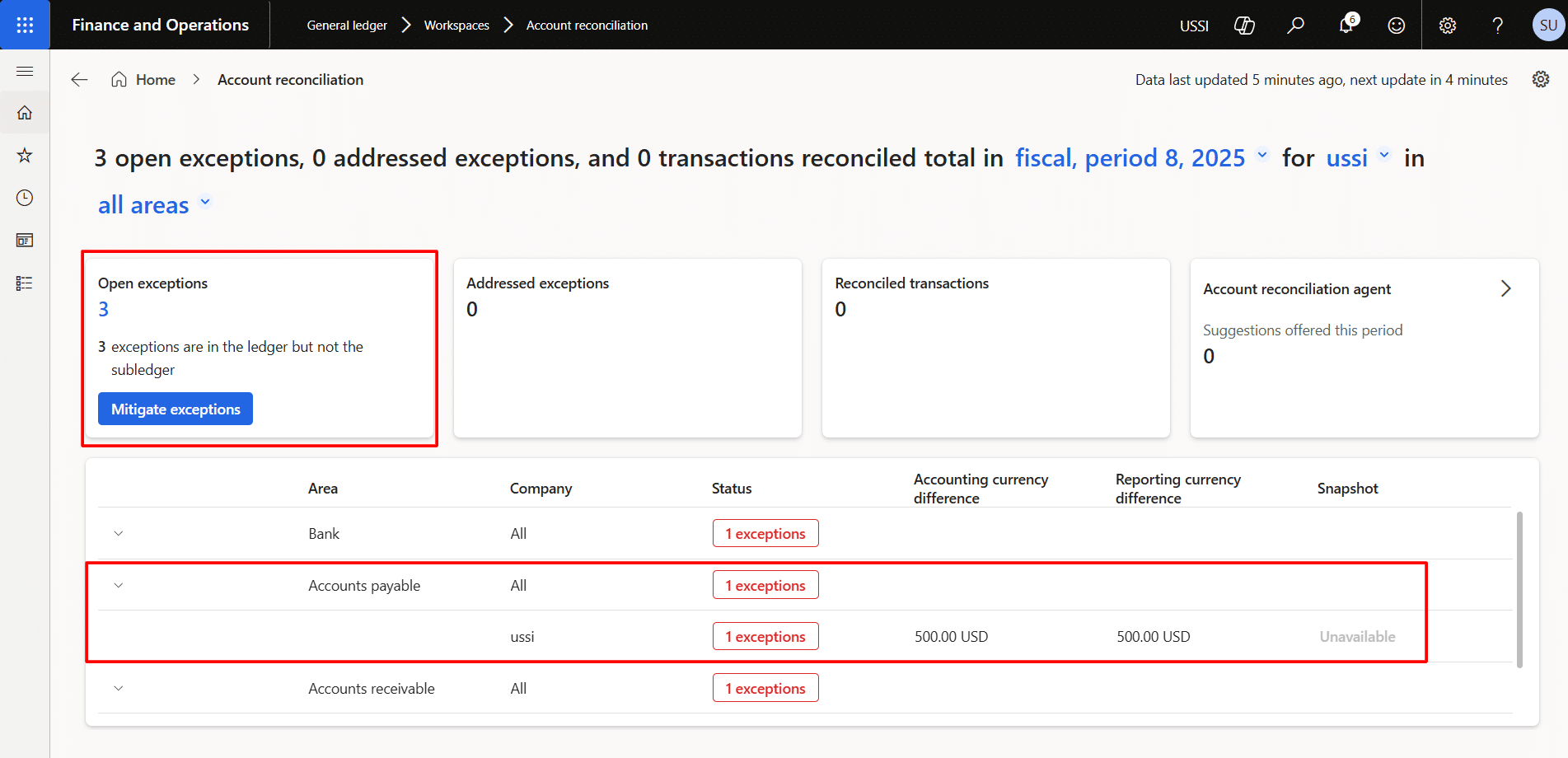
Open Exceptions represent transactions that do not match between the ledger and subledger. For these transactions, the system provides four action paths:
- Reverse
This does not post an automatic reversal. Instead, it takes the user to the page where the reversal can be completed. - Create journal entries
This does not post an entry automatically, but it directs the user to the page where the required journal action can be taken. - Link transactions
This option is used when the related transaction exists in the subledger but is not properly linked in the ledger. - Accept changes
This allows the user to acknowledge and accept the transaction as is.
These options give finance teams a structured way to resolve exceptions while maintaining control over the final action.
Accelerate growth at an unprecedented pace
Discover how Confiz can help you take control of your daily operations, increasing growth and revenue.
Book a Free ConsultationExample of a reversal process
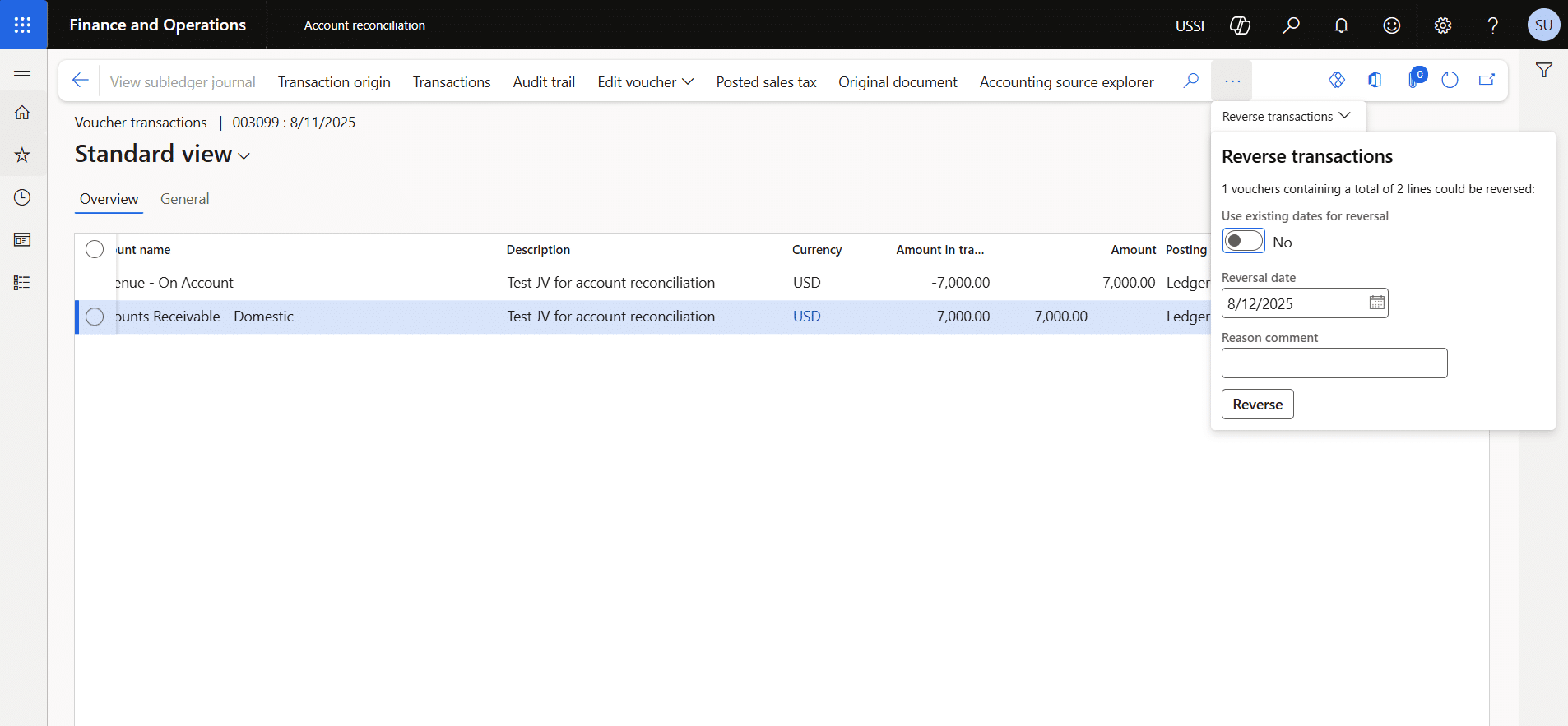
Let’s proceed with posting the reversal for the Accounts Receivable entry. 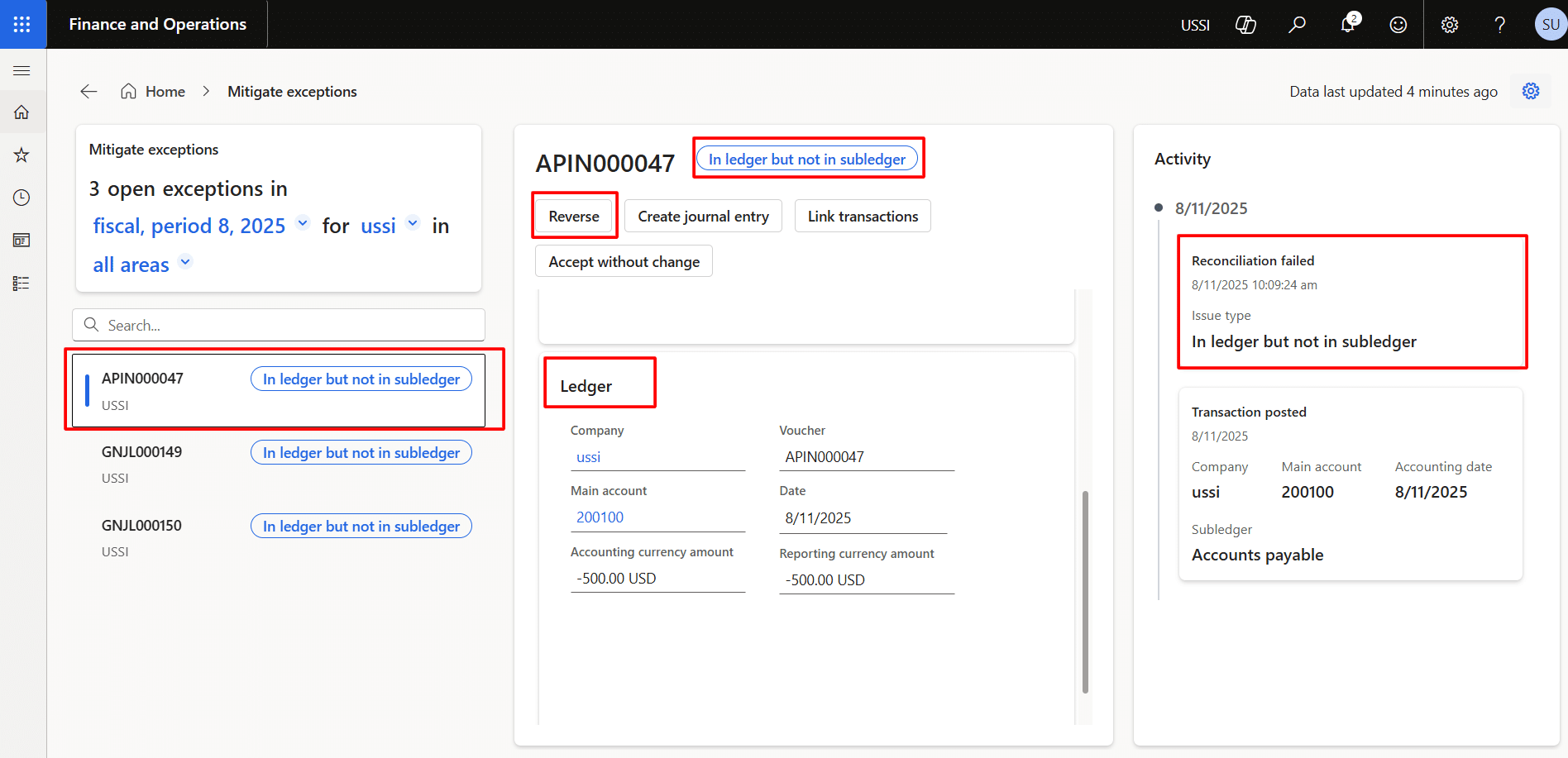
Upon clicking on reverse, provide the reason comment. 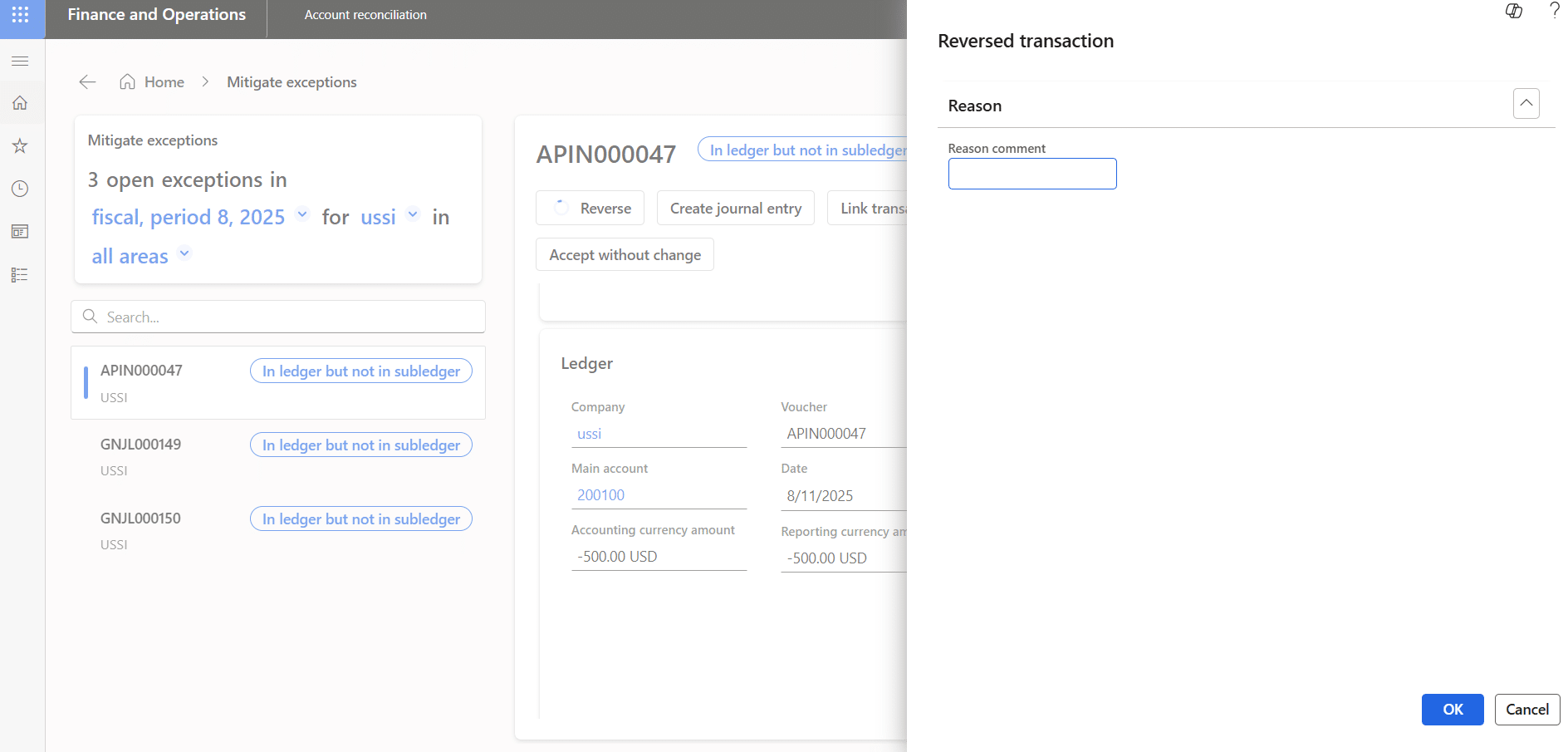
Then the system takes the user to the page where he can reverse the transactions. There, provide the date and click on reverse.
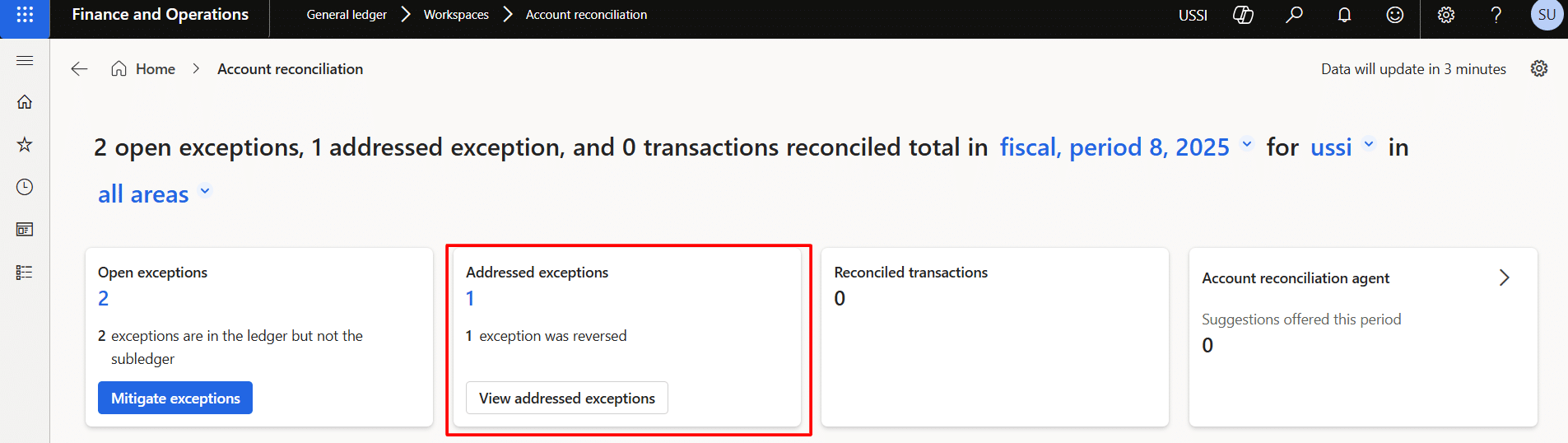
After mitigating the exceptions, the system starts to show them the addressed exceptions.
Now, let’s run the batch job again for the accounts reconciliation agent.
Path: System administration > Batch jobs
Conclusion
The Account Reconciliation AI Agent in D365 Finance transforms reconciliation from a manual, time-intensive activity into a more intelligent, controlled process. Automatically matching transactions, identifying exceptions, and guiding corrective action helps reduce manual effort, improve accuracy, and strengthen financial oversight.
For finance leaders, the value is clear: faster reconciliation, better visibility into unresolved issues, and a more scalable approach to financial control. Rather than replacing finance teams, the agent supports them by removing repetitive work and enabling greater focus on analysis, decision-making, and risk management.
Need expert guidance on how to modernize reconciliation in D365 Finance? Contact us at marketing@confiz.com to explore how Confiz can help you build a more efficient, accurate, and AI-enabled finance function.