
Efficiency in enterprise systems rarely comes from massive overhauls. More often, it comes from small design decisions that remove friction from daily work. In Dynamics 365 Finance and Operations, one of those decisions is to enable users to select multiple records in a single action, rather than repeating the same task repeatedly.
That is why multi-select functionality in Dynamics 365 Finance and Operations matters. It improves how users interact with forms, dialogs, and lookups by allowing them to choose multiple values at once. For business leaders, that means faster execution, fewer repetitive actions, and smoother processes across purchasing, sales, reporting, and batch operations.
This capability is especially useful when teams need to work with multiple vendors, sales orders, items, or accounts within a single workflow. Instead of selecting each record individually, users can complete the task in a single step and move directly into action. For organizations investing in usability and process efficiency, this is a practical enhancement with immediate impact.
From a development standpoint, Microsoft provides standard classes such as SysLookupMultiSelectCtrl and SysLookupMultiSelectGrid to support this behavior. That makes multi-select lookup in D365 not just possible but clean and scalable when implemented correctly.
In this article, we will look at two common scenarios. First, we will add multi-select capability to a form field. Then, we will extend the same concept to a SysOperation dialog used in batch processing. Together, these examples show how multi-select lookup in D365 X++ can support both usability and operational efficiency.
Why multi-select matters in business applications?
Users expect ERP systems to support the way they work. When a process requires selecting a group of records, forcing one-by-one selection slows execution and adds unnecessary effort. Over time, those extra clicks pile up into delays, frustration, and avoidable inefficiencies.
A well-designed multi-selected experience solves that problem. It allows users to:
- Process multiple records faster
- Reduce repetitive data entry
- Support batch-oriented workflows more naturally
- Improve accuracy when handling related transactions
In practical terms, this capability helps teams move faster without changing the underlying business process. It simply makes the system easier to use. That is the real value behind how to create a multi-select lookup in D365. It is not only about code. It is about making the product work better for the people using it every day.
Read more: Migrate and modernize your ERP with Dynamics 365: A business value guide
How does multi-select work in D365 FO?
At a high level, multi-select follows a straightforward pattern. The system provides a lookup that supports selecting multiple records, stores the chosen values, links them to a form or dialog field, and passes them to the business logic.
This approach gives developers a structured way to build an X++ lookup control multiple selection experience without reinventing the wheel. Microsoft’s framework classes handle the selection mechanism, while your customization defines what users can select, where the values are stored, and how the system uses them.
That structure makes the feature flexible enough for both transactional forms and processing dialogs.
Take control of your business operations
Discover how Confiz services can simplify your complex workflows and improve decision-making.
Get a Free QuoteExample 1: Adding a multi-select lookup to a form field
Let’s start with a common scenario. Suppose a business wants users to select multiple sales orders directly from the PurchTable form and store those values in a custom field for later use.
This is a practical example of implementing a multi-select form control in D365 FO that supports real business workflows without overcomplicating the design.
Step 1: Create a table extension for PurchTable
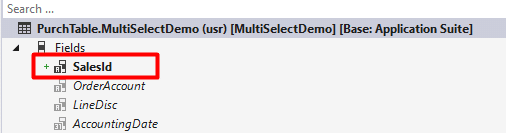
Step 2: Create a form extension for PurchTable
- Add the new SalesIds field to the form design.
- Copy the OnLookup event handler for this field (right-click → Copy event handler method).
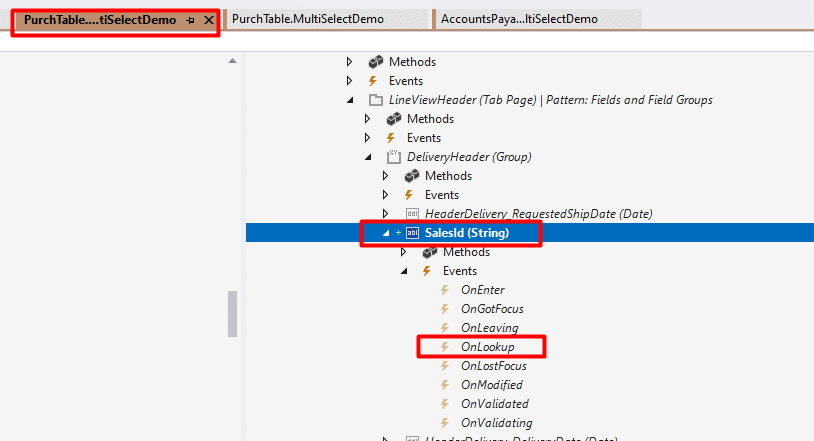
Step 3: Create a helper class for the multi-select lookup
public class MultiSelectHelper extends SysLookupMultiSelectGrid
{
FormRun callerFormRun;
str callerFormdatasourceName;
FieldId populateFieldId;
FormRun parmCallerFormRun(FormRun _callerFormRun = callerFormRun)
{
callerFormRun = _callerFormRun;
return callerFormRun;
}
str parmCallerFormdatasourceName(str _callerFormdatasourceName = callerFormdatasourceName)
{
callerFormdatasourceName = _callerFormdatasourceName;
return callerFormdatasourceName;
}
FieldId parmPopulateFieldId(FieldId _populateFieldId = populateFieldId)
{
populateFieldId = _populateFieldId;
return populateFieldId;
}
public void setSelected()
{
callingControlId.text(SysOperationHelper::convertMultiSelectedValueString(selectedId));
str callingControlStrTxtVal = SysOperationHelper::convertMultiSelectedValueString(selectedStr);
callingControlStr.text(callingControlStrTxtVal);
if (callerFormRun && callerFormdatasourceName && populateFieldId)
{
FormDataSource locDatasource = callerFormRun.dataSource(callerFormdatasourceName);
if (locDatasource)
{
Common recordToPopulate = locDatasource.cursor();
recordToPopulate.(populateFieldId) = callingControlStrTxtVal;
}
}
}
/// <summary>
/// Static method to open the multi-select lookup
/// </summary>
/// <param name = “_query”>Query for lookup</param>
/// <param name = “_callingCtrl”>Calling control</param>
/// <param name = “_ctrlIds”>Control for selected IDs</param>
/// <param name = “_ctrlStrs”>Control for selected strings</param>
/// <param name = “_selectField”>Selection field</param>
/// <param name = “_queryRun”>Optional QueryRun</param>
/// <param name = “_formRun”>Caller form run</param>
/// <param name = “_formDatasource”>Caller datasource name</param>
/// <param name = “_fieldId”>Field ID to populate</param>
public static void lookup(
Query _query,
FormStringControl _callingCtrl,
FormStringControl _ctrlIds,
FormStringControl _ctrlStrs,
container _selectField,
QueryRun _queryRun = null,
FormRun _formRun = null,
str _formDatasource = ”,
FieldId _fieldId = 0)
{
MultiSelectHelper lookupMS = new MultiSelectHelper();
lookupMS.parmCallingControl(_callingCtrl);
lookupMS.parmCallingControlId(_ctrlIds);
lookupMS.parmCallingControlStr(_ctrlStrs);
lookupMS.parmQuery(_query);
lookupMS.parmQueryRun(_queryRun);
lookupMS.parmSelectField(_selectField);
lookupMS.parmCallerFormRun(_formRun);
lookupMS.parmCallerFormdatasourceName(_formDatasource);
lookupMS.parmPopulateFieldId(_fieldId);
lookupMS.run();
}
}
Step 4: Create an event handler class and paste the copied lookup
class PurchTableForm_EventHandlers
{
/// <summary>
///
/// </summary>
/// <param name=”sender”></param>
/// <param name=”e”></param>
[FormControlEventHandler(formControlStr(PurchTable, SalesId), FormControlEventType::Lookup)]
public static void SalesId_OnLookup(FormControl sender, FormControlEventArgs e)
{
FormRun fr = sender.formRun() as FormRun;
FormStringControl stringControl = sender as FormStringControl;
Query query = new query();
QueryBuildDataSource qbds;
qbds = query.addDataSource(tableNum(SalesTable));
qbds.fields().dynamic(false);
qbds.fields().clearFieldList();
qbds.fields().addField(fieldNum(SalesTable, SalesId));
qbds.addGroupByField(fieldNum(SalesTable, SalesId));
qbds.addRange(fieldNum(SalesTable, DataAreaId)).value(SysQuery::value(curExt()));
MultiSelectHelper::lookup(query, stringControl, stringControl, stringControl, conNull(), null, fr, formDataSourceStr(PurchTable, PurchTable), fieldNum(PurchTable, SalesId));
//cancel the call to super() to prevent the system from trying to show
FormControlCancelableSuperEventArgs cancelableSuperEventArgs = e as FormControlCancelableSuperEventArgs;
cancelableSuperEventArgs.CancelSuperCall();
}
}
- Build and synchronize the database
- Build your model and sync the database.
- Test the form
- Open the PurchTable form, find your new field, and click the lookup button.
- You should now be able to select multiple sales orders.
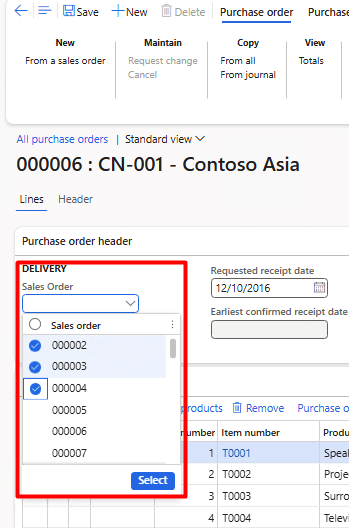
- How the data is stored
- The selected SalesIds are saved as a Semicolon-separated string in the extended field 000002;000003;000004
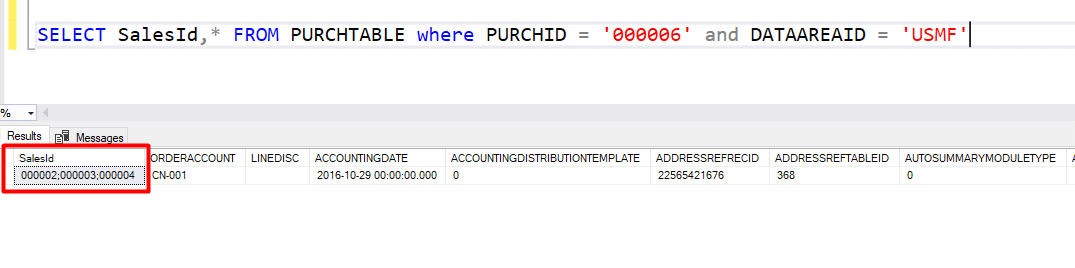
Example 2: Using multi-select in a SysOperation dialog
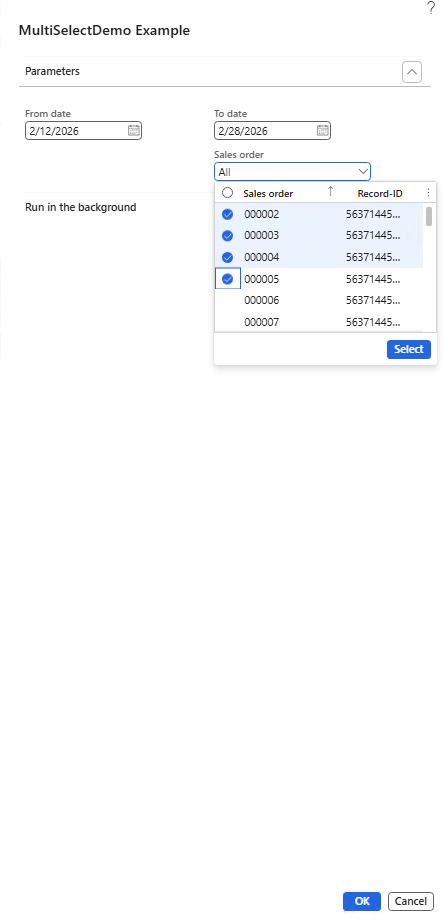
Form-based selection helps users during day-to-day transactions, but many organizations also need this capability in reporting, background processing, or scheduled jobs. This is where D365 FO multi-select parameter SysOperation becomes especially useful.
In this scenario, a user selects multiple Sales IDs in a dialog before running a process. The system then passes those selections into the service logic. This pattern gives teams more flexibility while preserving control and structure in Dynamics 365 batch job parameters.
1. Contract class
/// <summary>
/// Contract class for Sales Report batch job parameters
/// </summary>
[DataContractAttribute]
[SysOperationContractProcessing(ClassStr(MultiSelectDemoUIBuilder))]
[SysOperationAlwaysInitializeAttribute]
class MultiSelectDemoContract implements SysOperationInitializable, SysOperationValidatable
{
FromDate fromDate;
ToDate toDate;
List salesIdSet;
[DataMemberAttribute,
SysOperationLabel(literalStr(“@SYS80661”)),
SysOperationHelpText(literalStr(“@SYS315362”)),
SysOperationDisplayOrder(‘1’)]
public TransDate parmFromDate(TransDate _fromDate = fromDate)
{
fromDate = _fromDate;
return fromDate;
}
[DataMemberAttribute,
SysOperationLabel(literalStr(“@SYS328564”)),
SysOperationHelpText(literalStr(“@SYS315363”)),
SysOperationDisplayOrder(‘2’)]
public TransDate parmToDate(TransDate _toDate = toDate)
{
toDate = _toDate;
return toDate;
}
/// <summary>
/// Parm method for Sales ID Set (multi-select)
/// </summary>
[DataMemberAttribute,
SysOperationLabel(literalStr(“@SYS9694”)),
SysOperationHelpText(literalStr(“@SYS9694”)),
SysOperationDisplayOrder(‘3’),
AifCollectionTypeAttribute(identifierStr(SalesId), Types::String)]
public List parmSalesIdList(List _salesIdSet = salesIdSet)
{
salesIdSet = _salesIdSet;
return salesIdSet;
}
/// <summary>
/// Method to initialize parameter values
/// </summary>
public void initialize()
{
this.fromDate = today(); // to initialize value of from date
}
/// <summary>
/// Method to Validate parameter values
/// </summary>
public boolean validate()
{
boolean isValid = true;
if (!this.fromDate)
{
isValid = checkFailed(“@SYS97591”);
}
if (!this.toDate)
{
isValid = checkFailed(“@SYS97592”);
}
if (this.fromDate && this.toDate && this.fromDate > this.toDate)
{
isValid = checkFailed(“@SYS91020”);
}
return isValid;
}
}
2. Controller class
/// <summary>
/// Controller class for Sales Report batch job
/// </summary>
public class MultiSelectDemoController extends SysOperationServiceController
{
protected void new()
{
super(classStr(MultiSelectDemoService), methodStr(MultiSelectDemoService, processOperation), SysOperationExecutionMode::Synchronous);
}
/// <summary>
/// Sets the caption of the job
/// </summary>
/// <returns>Caption of the job</returns>
public ClassDescription caption()
{
return “MultiSelect Example”;
}
public static MultiSelectDemoController construct(SysOperationExecutionMode _executionMode = SysOperationExecutionMode::Synchronous)
{
MultiSelectDemoController controller;
controller = new MultiSelectDemoController();
controller.parmExecutionMode(_executionMode);
return controller;
}
/// <summary>
/// Method which is run while calling the corresponding menu item
/// </summary>
/// <param name = “args”>Arguments passed from the menu item</param>
public static void main(Args _args)
{
MultiSelectDemoController controller;
controller = MultiSelectDemoController::construct();
controller.parmArgs(_args);
controller.startOperation();
}
}
3. Service class
/// <summary>
/// Service class for Sales Report batch job
/// </summary>
public class MultiSelectDemoService extends SysOperationServiceBase
{
/// <summary>
/// Main processing method
/// </summary>
public void processOperation(MultiSelectDemoContract _contract)
{
FromDate fromDate;
ToDate toDate;
List salesIds;
ListEnumerator se;
SalesId salesId;
str salesIdList = ”;
// Get parameters from contract
fromDate = _contract.parmFromDate();
toDate = _contract.parmToDate();
salesIds = _contract.parmSalesIdList();
// Print From Date
info(strFmt(“From Date: %1”, date2Str(fromDate, 321, DateDay::Digits2,
DateSeparator::Slash, DateMonth::Digits2, DateSeparator::Slash,
DateYear::Digits4)));
// Print To Date
info(strFmt(“To Date: %1”, date2Str(toDate, 321, DateDay::Digits2,
DateSeparator::Slash, DateMonth::Digits2, DateSeparator::Slash,
DateYear::Digits4)));
// Print selected Sales IDs
if (salesIds && salesIds.elements() > 0)
{
info(strFmt(“Number of Sales IDs selected: %1”, salesIds.elements()));
se = salesIds.getEnumerator();
while (se.moveNext())
{
salesId = se.current();
salesIdList += salesId + ‘, ‘;
info(strFmt(“Sales ID: %1”, salesId));
}
// Remove trailing comma and space
if (strlen(salesIdList) > 0)
{
salesIdList = subStr(salesIdList, 1, strlen(salesIdList) – 2);
}
info(strFmt(“All selected Sales IDs: %1”, salesIdList));
}
else
{
info(“No Sales IDs selected”);
}
// Your actual business logic would go here
// For example, processing sales orders within the date range
// and for the selected Sales IDs
info(“Sales Report processing completed successfully!”);
}
}
4. UIbuilder class
/// <summary>
/// UI Builder class to customize the dialog for Sales Report
/// </summary>
public class MultiSelectDemoUIBuilder extends SysOperationAutomaticUIBuilder
{
DialogField dialogFromDate;
DialogField dialogToDate;
DialogField dialogSalesId;
MultiSelectDemoContract contract;
public void build()
{
contract = this.dataContractObject();
dialogFromDate = this.addDialogField(methodStr(MultiSelectDemoContract, parmFromDate), contract);
dialogToDate = this.addDialogField(methodStr(MultiSelectDemoContract, parmToDate), contract);
dialogSalesId = this.addDialogField(methodStr(MultiSelectDemoContract, parmSalesIdList), contract);
}
public void postRun()
{
//Super();
}
/// <summary>
/// Post build – called after dialog is built
/// </summary>
public void postBuild()
{
super();
//from date
dialogFromDate = this.bindInfo().getDialogField(this.dataContractObject(), methodStr(MultiSelectDemoContract, parmFromDate));
dialogFromDate.fieldControl().mandatory(true);
//to date
dialogToDate = this.bindInfo().getDialogField(this.dataContractObject(), methodStr(MultiSelectDemoContract, parmToDate));
dialogToDate.fieldControl().mandatory(true);
dialogSalesId.value(‘All’); // To add default value
dialogSalesId = this.bindInfo().getDialogField(contract, methodStr(MultiSelectDemoContract, parmSalesIdList));
dialogSalesId.registerOverrideMethod(methodStr(FormStringControl, lookup), methodStr(MultiSelectDemoUIBuilder, salesIdLookup), this);
if(dialogSalesId)
{
dialogSalesId.lookupButton(2);
}
}
/// <summary>
/// Custom lookup for Sales ID field
/// </summary>
private void salesIdLookup(FormStringControl _control)
{
Query query = new Query();
QueryBuildDataSource qbds;
qbds = query.addDataSource(tableNum(SalesTable));
qbds.addSelectionField(fieldNum(SalesTable, SalesId));
qbds.addSelectionField(fieldNum(SalesTable, RecId));
SysLookupMultiSelectGrid::lookup(query, _control, _control, _control, conNull());
}
}
Accelerate growth at an unprecedented pace
Discover how Confiz can help you take control of your daily operations, increasing growth and revenue.
Book a Free Consultation5. Testing the SysOperation example
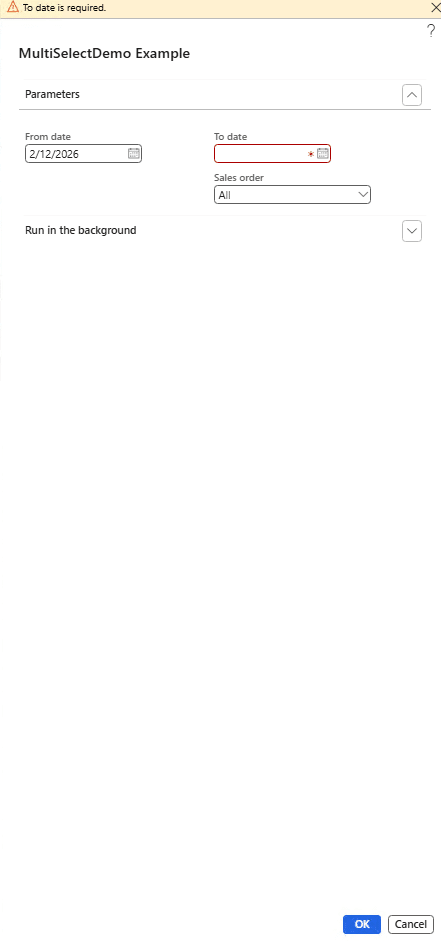
- Create a menu item pointing to the MultiSelectDemoController class.
- Open the menu item → fill in the dates and select multiple Sales IDs via the lookup.
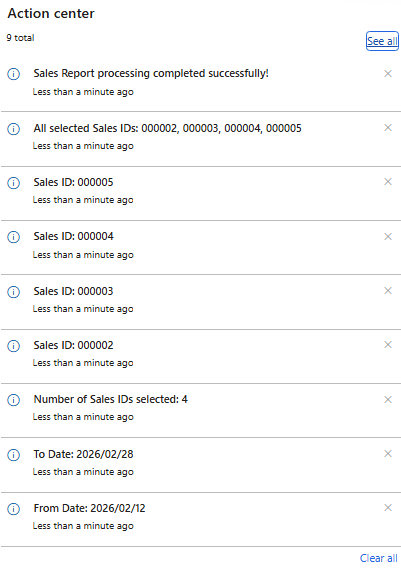
- Run the job and check the infolog for the selected values.
Conclusion
Multi-select functionality may seem like a small enhancement, but it can make a real difference in Dynamics 365 Finance and Operations. It simplifies record selection, reduces repetitive effort, and helps users complete tasks more efficiently.
The examples in this article show how this can be applied in both forms and SysOperation-based processes, making D365 FO more practical and user-friendly.
If you’re looking to optimize or extend Dynamics 365 Finance and Operations, Confiz helps organizations implement and customize Microsoft Dynamics solutions for greater efficiency and business value. Get in touch with us at marketing@confiz.com.