
Data is one of your organization’s most valuable assets — but only if it’s accessible when decisions need to be made. In most enterprises, finding the right information within their ERP, such as Dynamics 365, still requires navigating multiple modules and reports.
With Microsoft Copilot Studio, that changes. By connecting Dynamics 365 entities directly to Copilot, leaders can move from searching to simply asking and receiving instant, accurate answers.
Instead of drilling through screens, you can query live data conversationally, such as:
- Show all outstanding invoices for Vendor X.
- Which vendors are currently on hold?
- What was the total value of last month’s purchase orders?
This capability is powered by Dataverse knowledge sources in Copilot Studio, which allow AI agents to pull data directly from your data entities in Microsoft Dynamics 365 — including standard, custom, or restricted entities. Whether you’re reviewing supplier performance or tracking expenses, these AI-driven insights offer a faster and more intelligent way to interact with business data.
For organizations adopting Generative AI in Dynamics 365, this integration is a practical step toward intelligent automation, providing real-time visibility, enhancing productivity, and supporting informed, data-driven decision-making.
Take control of your business operations
Discover how Confiz services can simplify your complex workflows and improve decision-making.
Get a Free QuoteThe value for connecting Copilot Studio with your Dynamics 365 data
Integrating Microsoft Copilot Studio with your business data enables faster, smarter access to critical information. It allows teams to bypass manual searches and interact directly with live operational data through simple, conversational queries.
Here’s what this connection delivers:
- Reliable answers in real time: Copilot retrieves information from the source system, ensuring accuracy and consistency across departments.
- Conversational simplicity: Users can ask natural questions without relying on technical commands or complex filters.
- Productivity at scale: Reducing manual lookups and report navigation frees teams to focus on analysis, decision-making, and value creation.
This integration transforms static enterprise data into a dynamic decision-support layer, providing leaders with instant visibility into performance and operations.
Read more: What is Copilot Studio? The low-code tool for business efficiency

Configuring Copilot Studio with Dynamics 365 data: Steps for success
Connecting Copilot Studio to your enterprise system involves a few straightforward steps. Once set up, your AI assistant can query live business data and deliver real-time insights across departments.
Step 1: Create or open a Copilot in Microsoft Copilot Studio
Start by navigating to Copilot Studio. Open an existing Copilot or create a new one — this will serve as your AI agent for interacting with organizational data.
Step 2: Access the knowledge section
In the left navigation panel, select Knowledge, then click Add a data source to begin linking your system’s information.
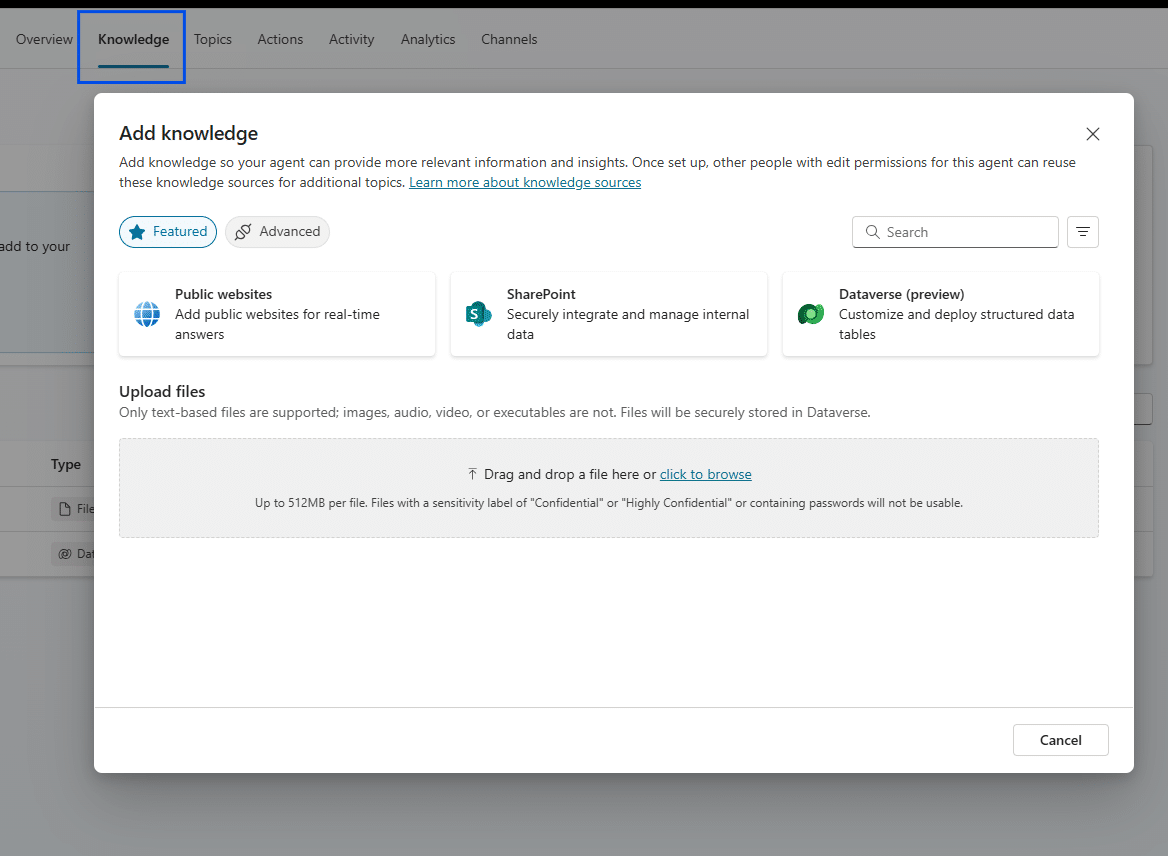
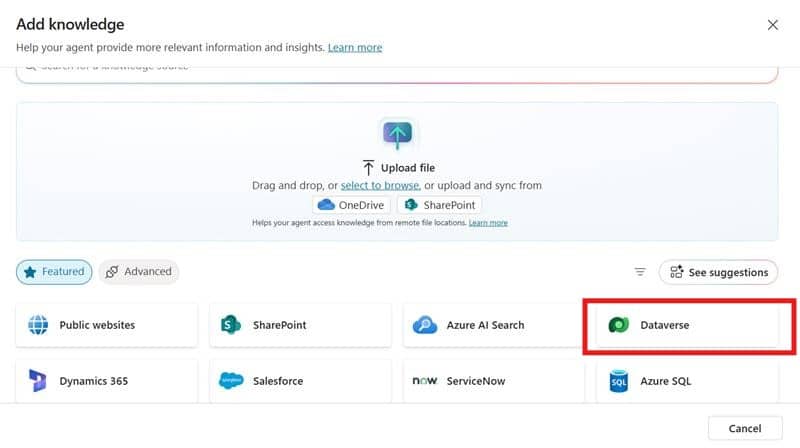
Step 3: Add Dataverse as the knowledge source
Choose Dataverse as your source. If multiple environments exist, select the correct one before proceeding and click Next to continue.
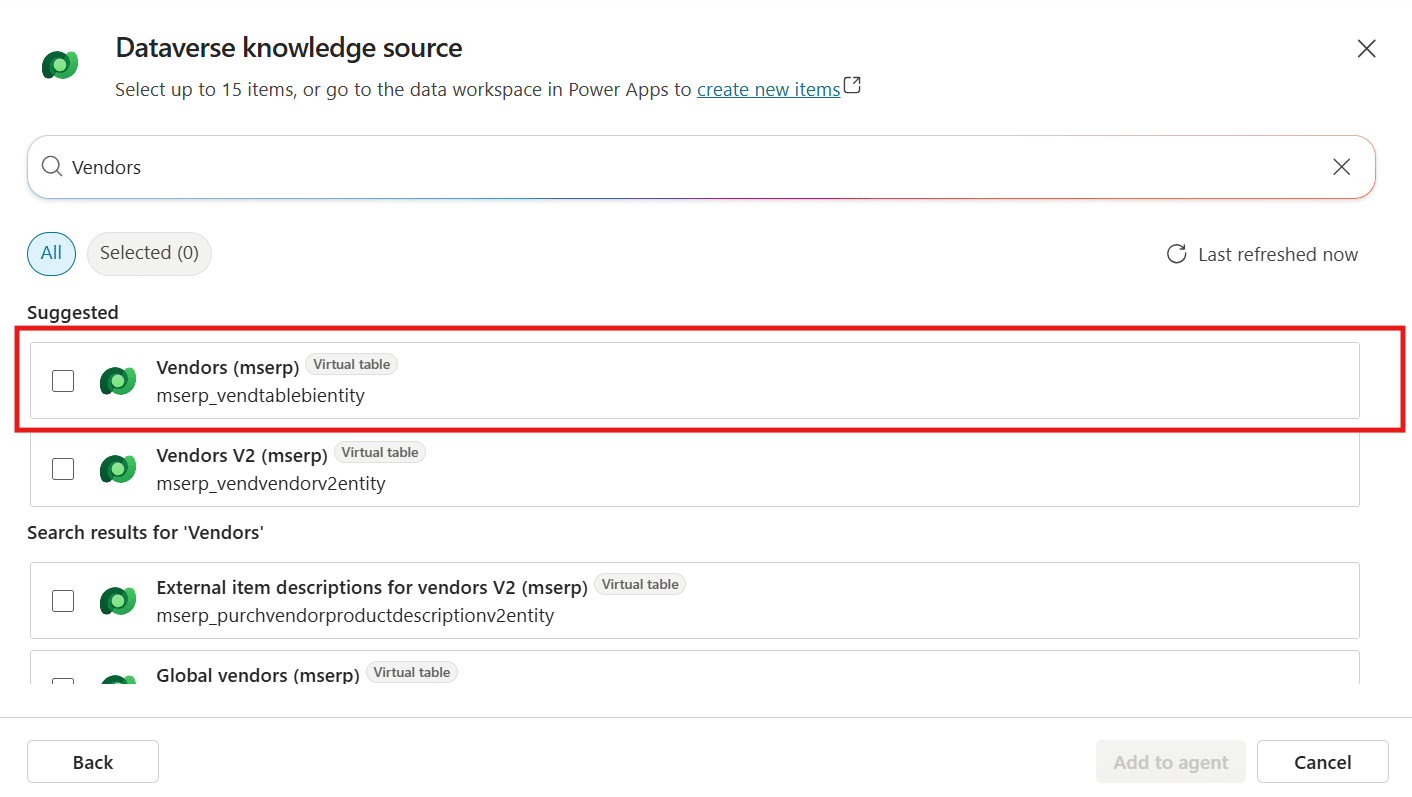
Step 4: Select and configure entities
Select the Dataverse entities you want Copilot to reference — for example, Vendors, Purchase Orders, Invoices, or other custom records.
Apply filters such as company codes or active record status to ensure the knowledge base aligns with your operational data.
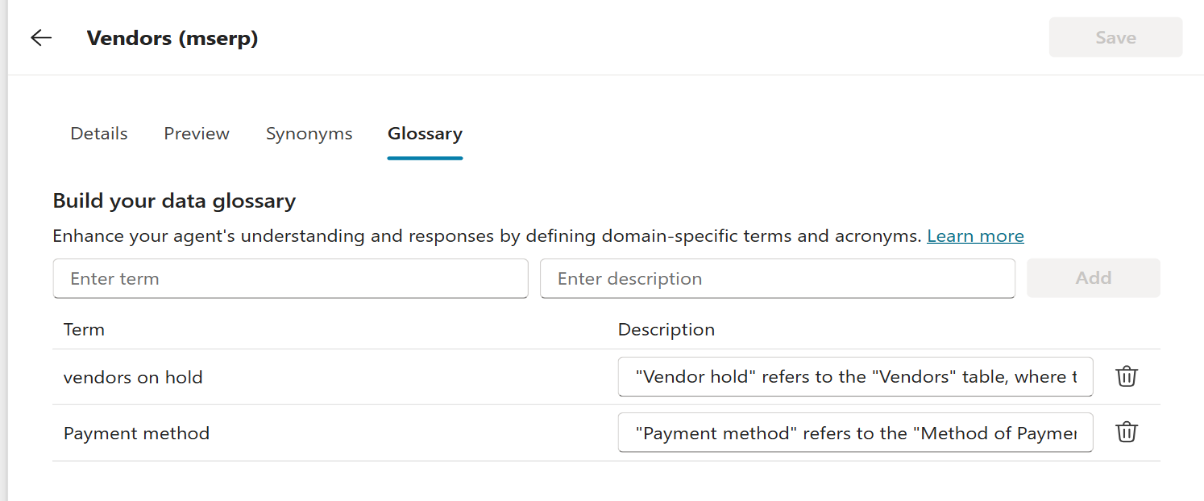
Step 5: Define context and terminology
Enhance Copilot’s understanding by configuring:
- Glossary entries: Add key business terms for clarity.
- Synonyms: Ensure natural-language phrases are recognized correctly.
- Descriptions: Define entity fields to improve context interpretation.
Example: “Vendors on hold” → maps to Outstanding Balance; synonym: blocked supplier; description: Total unpaid vendor balance.
Step 6: Publish and test the Copilot
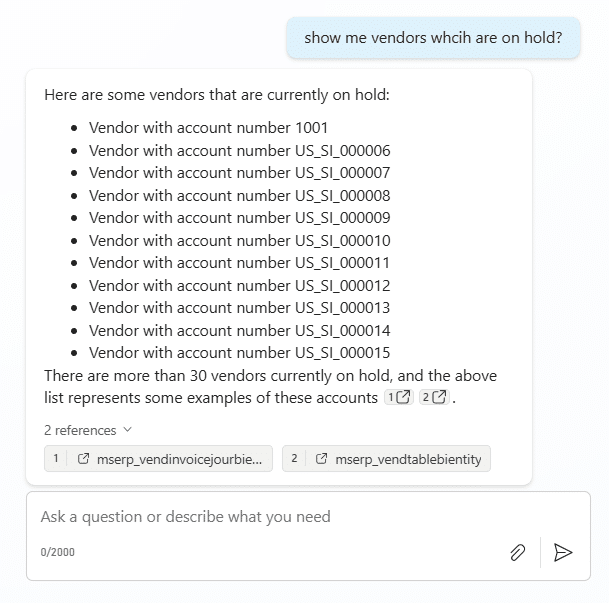
Once setup is complete, publish the Copilot and run test queries to validate accuracy. Try prompts such as:
- “Show vendors currently on hold.”
- “List invoices pending approval.”
Enhancing the experience
After the initial setup, you can extend functionality by:
- Combining standard and custom entities: Bring together financial, procurement, or project data for unified insights.
- Automating workflows: Use Power Automate to allow Copilot to take actions — like sending payment reminders or creating follow-up tasks based on live data.
Accelerate growth at an unprecedented pace
Discover how Confiz can help you take control of your daily operations, increasing growth and revenue.
Book a Free ConsultationConclusion
Connecting Dynamics 365 entities with Microsoft Copilot Studio isn’t just about creating a chatbot — it’s about enabling smarter, faster decisions. With real-time access to trusted business data, teams can obtain clear answers instantly, without needing to switch between reports or systems. The result? A more connected, informed, and agile organization.
Start the shift from searching to simply asking. Bring your Dynamics 365 data to life with Copilot Studio.
Looking to unlock the full potential of AI in Microsoft Dynamics 365? Confiz helps enterprises design and implement intelligent solutions that drive measurable impact across finance, operations, and customer engagement.
Reach out at marketing@confiz.com to explore how AI can transform your ERP strategy.