Ensuring secure and compliant workflows is critical in today’s data-driven business environment. As organizations adopt automation tools like Microsoft Power Automate, the risk of unintentional data exposure also grows. That’s where Data Loss Prevention (DLP) policies come in.
This blog explores how Data Loss Prevention policies in Power Automate work, why they’re essential, and how your business can benefit from implementing them.
What is a Data Loss Prevention Policy in Power Automate?
As Microsoft Power Platform grows in popularity across organizations, citizen developers and business users are creating flows and apps at a rapid pace. While this empowers teams to automate tasks and gain efficiencies, it also opens the door to unintended data exposure.
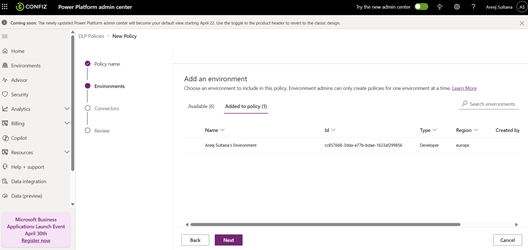
This is where Data Loss Prevention (DLP) policies come in. Power Automate DLP policies are a set of rules created by administrators to control how data flows between connectors – essentially defining what data can go where and under what conditions.
Importance of Data Loss Prevention
Imagine a scenario where an employee builds a Power Automate flow that moves files from SharePoint to their personal Google Drive. Even with good intentions, this can lead to compliance violations, data breaches, and security risks.
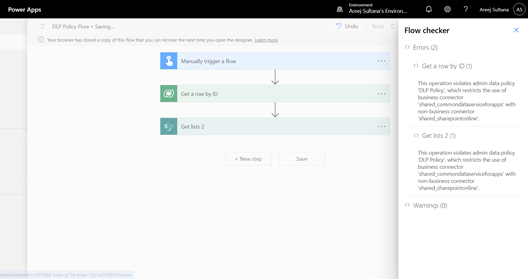
A Data Loss Prevention policy helps prevent such scenarios by restricting flows that move data from trusted (business) services to untrusted (non-business or personal) services. It ensures organizational data stays within compliant systems, protecting sensitive information from leakage.
How Data Loss Prevention works?
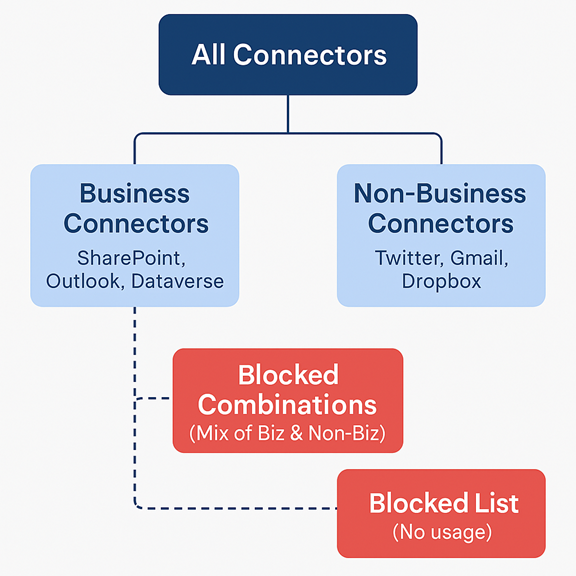
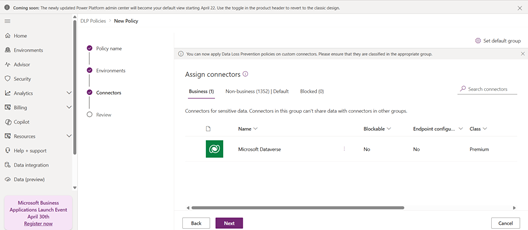
DLP policies work by classifying connectors into three buckets:
- Business connectors (e.g., SharePoint, Outlook, Dataverse)
- Non-Business connectors (e.g., Twitter, Dropbox, Gmail)
- Blocked connectors (completely restricted from use)
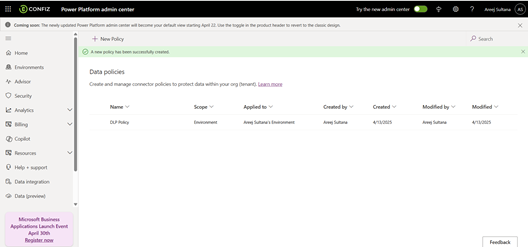
Administrators define these groups and enforce policies at the environment level or across the entire tenant. Once a policy is implemented, flows that attempt to use both business and non-business connectors together will be blocked automatically.