
In tight-margin markets, vendor agreements and rebates can either protect profitability or introduce hidden costs. Many organizations still manage rebates with spreadsheets and manual approvals, which leads to errors, delayed settlements, and poor visibility across procurement, finance, and commercial teams.
The Business Development Agreement (BDA) solution in Microsoft Dynamics 365, a purpose-built, growth-driven platform from Confiz, can help transform rebate programs from reactive bookkeeping to a proactive engine for profitability and collaboration.
In this post, we will explain how BDA automation improves accuracy, shortens settlement cycles, and strengthens vendor collaboration.
What is the Business Development Agreement (BDA) solution exactly?
BDA automation solution redefines rebate management for finance-led procurement teams. Whether your agreements hinge on purchase volume, value, item, brand, category, or fully custom terms, whether they run once or recur, this solution makes setup, calculation, and tracking seamless.
Benefits of using BDA for your business
Here are some benefits of using BDA for your business:
- Streamlined agreement management
• Centralizes all business development contracts and terms in one system.
• Reduces manual tracking and improves visibility across departments. - Automated financial workflows
• Triggers payments, rebates, or commissions based on predefined milestones or KPIs.
• Ensures timely and accurate financial transactions tied to agreement performance. - Improved partner collaboration
• Enhances transparency with vendors, distributors, or strategic partners.
• Facilitates better communication and accountability through shared metrics. - Accurate revenue recognition
• Aligns financial postings with contractual obligations.
• Supports compliance with accounting standards like IFRS and GAAP. - Real-time performance tracking
• Monitors agreement outcomes using dashboards and analytics.
• Helps identify underperforming contracts or high-value partnerships.
Take control of your business operations
Discover how Confiz services can simplify your complex workflows and improve decision-making.
Get a Free QuotePrerequisites to get started with BDA: Build before you scale
Before a single rebate is calculated, the system ensures you have a strong operational foundation, as the prerequisites:
- Enable vendor BDA check:
The first prerequisite is to enable the BDA check for the specific vendor on the vendor master form. The following navigation must be followed to enable this.
Navigation: Accounts Payable > Vendors > All Vendors.
Select a particular vendor and open it.
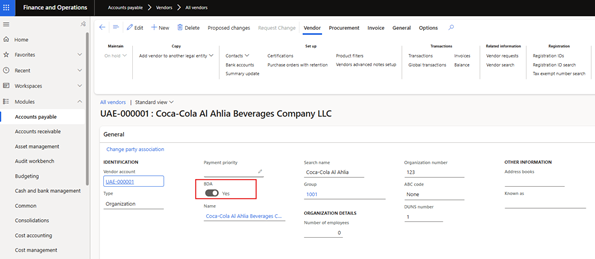
o This setting activates the BDA validation for vendors.
o It ensures that only those vendors who are eligible for BDA are considered during the rebate calculation process.
- Sales tax group on the vendor master
Ensure the vendor has a sales tax group attached. The following navigation must be followed to enable this.
Navigation: Accounts Payable > Vendors > All Vendors

3. Ensuring the definition of barcodes for items (SKU type specific)
The next prerequisite is to ensure a barcode is assigned to each item planned for the rebates. So, each item should have a unique barcode assigned, with one marked as the primary barcode, especially for those included in rebate programs; otherwise, the rebate would not be calculated for those Product Items.
Navigation: Product Information Management > Products > Released Products
Go to the Manage Inventory Menu and click on the barcodes under the warehouse submenu.
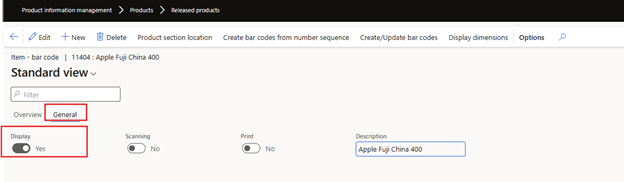
After that, go to the general menu and ensure that one of the barcodes listed for the item is marked as the primary barcode for that item.
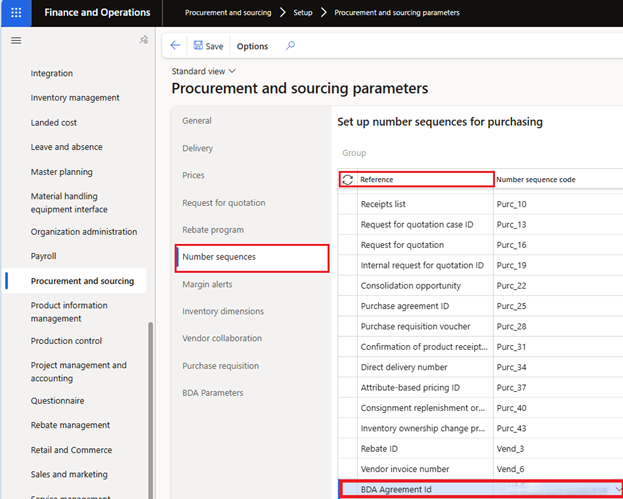
- Generate a number sequence for BDA
A unique number sequence will be defined and generated for BDA agreements to ensure accurate tracking and differentiation of related agreements. This number sequence will be enabled in the reference field after execution of a dedicated batch job specifically set up to create this custom reference. - Set BDA parameters
Another parameter necessary for the rebate calculation is the definition of specific journal names for generating debit/credit notes to post rebate accruals or settlements. The brand attribute field should also be defined here to provide rebates only for those specific brand values. This can be done through the following navigation.
Navigation: Product Information Management > Products > Released Products
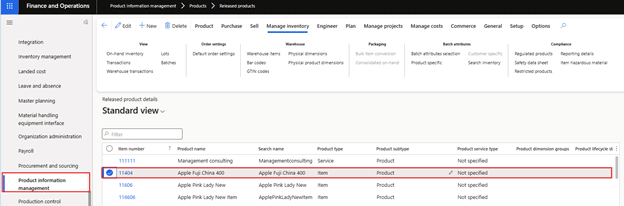
After that, go to the general menu and ensure that one of the barcodes listed for the item is marked as the primary barcode for that item.
- Generate a number sequence for BDA
A unique sequence of numbers will be defined and generated for BDA Agreements to ensure accurate tracking and differentiation of related agreements. This number sequence will be enabled in the reference field after execution of a dedicated batch job specifically set up to create this custom reference.
- Set BDA parameters
Another parameter necessary for the rebate calculation is the definition of specific journal names for generating debit/credit notes to post rebate accruals or settlements. The brand attribute field should also be defined here to provide rebates only for those specific brand values.
This can be done through the following navigation.
Navigation: Procurement and Sourcing Module > Procurement and Sourcing Parameters.
Go to the BDA parameters and assign respective journal names for posting rebate accruals or settlements.
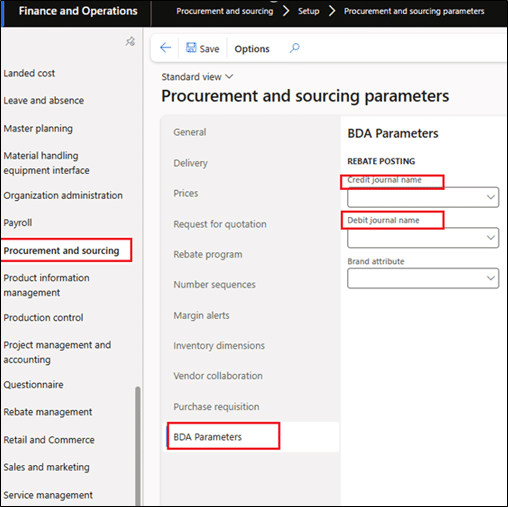
Another field necessary here is the brand attribute. Click Brand Attribute, then select the suitable brand type to apply a rebate to.

- Assign the main account for the rebate expense
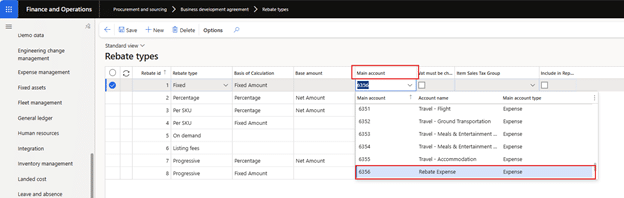
The main account for posting the rebate expense needs to be defined in the rebate type master form.
Navigation: Procurement and Sourcing Module > BDA > Rebate type
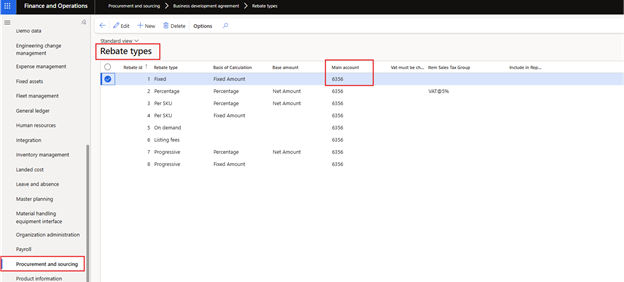
The Account given here will be directly populated on the voucher in the relevant invoice journal, ensuring the correct account is used for the rebate posting.
- Ensure the setup of the procurement/sales category hierarchy
Another prerequisite is to ensure that the sales and procurement category hierarchies are set up in the Dynamics environment for the items eligible for the rebate calculation. The procurement category hierarchy groups products for BDA analysis.
Navigation: Procurement and Sourcing Module > Setup > Categories and Attributes > Category Hierarchy Role Association.


This setup phase ensures your rebate engine is built on accuracy, not assumptions.
The Brains of the engine: BDA types & rebate types
1: BDA Types
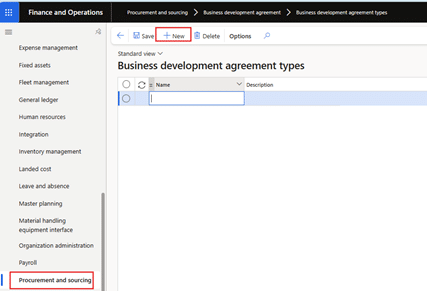
BDA types represent the different agreement categories used to define how rebates are structured, such as by item, brand, or category. Each BDA type determines the level at which the rebate applies and guides how the agreement is processed within the system.
Navigation: Procurement and Sourcing Module > BDA > BDA Types
Click on the new button. This will create a new line to add names and descriptions for that type.
2: Rebate types
Rebate types are incentives businesses use to boost sales, encourage loyalty, and drive specific customer behaviors. Each type, whether based on fixed amounts, percentages, or specific products, is designed to meet different business objectives and customer needs. Some common rebate types are as follows:
• Fixed
• Percentage Basis
• Per SKU
• On Demand
• Progressive
• Listing Fee
This can be done through the following navigation.
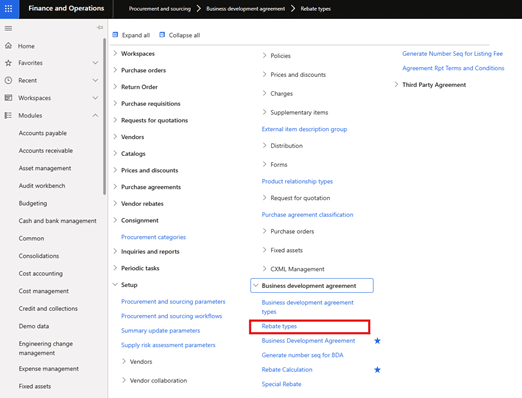
Procurement and Sourcing Module > BDA > Rebate Types
Click on the new button to add a rebate type. By clicking, a new line will be added, with the rebate ID automatically populated here, and the respective columns for Basis of Calculation and Base Amount to be selected from the drop-down options.
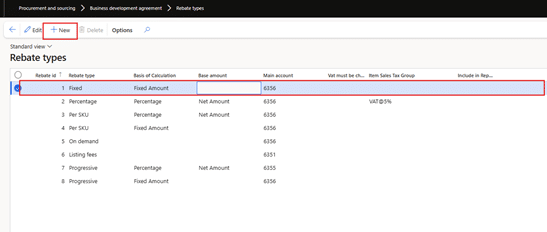
| Field | Description |
| Rebate type | A name/identifier for each type of rebate (e.g., Fixed, Percentage, Per SKU, Progressive, etc.). |
| Basis of Calculation | Defines whether the rebate is calculated as a Fixed Amount or as a Percentage of the transaction. |
| Base amount | The value used to calculate the rebate—typically Net Amount (i.e., excluding tax and other charges). |
| Main account | The GL account to which the rebate amount will be posted. For example, 61356 or 6135. |
| VAT must be charged | Indicates whether VAT applies to this rebate. For example, VAT@5% for one of the rebate types. |
| Item Sales Tax Group | If VAT is applicable, this field shows which sales tax group should be used. |
| Include in Report | Indicates whether VAT applies to this rebate. For example, VAT at 5% for one of the rebate types. |
Accelerate growth at an unprecedented pace
Discover how Confiz can help you take control of your daily operations, increasing growth and revenue.
Book a Free ConsultationFeatures that drive results
Confiz’s BDA solution doesn’t just manage rebates, it optimizes them: The BDA module allows you to define agreements with pinpoint accuracy:
• By Item – Perfect for SKU-specific incentives
• By Brand – Aligns rebates with brand-level strategies
• By Category – Ideal for broader product groupings
It transforms rebates from back-office admin into a front-line profitability driver. By combining structured agreement setup, flexible rebate modeling, and full automation, it empowers finance teams to manage all the rebates efficiently.
Conclusion
When rebates are accurate, timely, and visible, they become a strategic tool—not an administrative burden. BDA automation in Dynamics 365 Finance gives you centralized agreement control, automated financial workflows, and the analytics needed to spot high-value partnerships and underperforming contracts.
If you’d like a guided walkthrough or want to see how Confiz can implement BDA automation for your business, get in touch with us at marketing@confiz.com. We’ll show you how to put rebate management on a dependable, audit-ready footing and improve supplier collaboration.