As Microsoft Dynamics 365 Finance & Operations (D365 F&O) environments continue to scale, ensuring the reliability of custom code becomes a critical engineering concern. Extensions, integrations, and workflow logic often support core business operations, where failures can introduce operational risk and unplanned downtime.
To address this, Dynamics 365 Finance & Operations includes a built-in automated testing capability known as the SysTest framework. This framework allows development teams to validate custom logic through structured, repeatable tests, helping maintain system integrity as changes are introduced.
This article explains what the SysTest framework is, why it matters in enterprise implementations, and how to implement it effectively within a D365 F&O development lifecycle.
What is the SysTest framework?
The SysTest framework is an X++-based testing framework used to validate the behavior, accuracy, and reliability of custom code in Dynamics 365 Finance & Operations. It enables developers to write X++ automated testing logic that executes directly against application components.
Built on Microsoft’s test infrastructure, the framework supports repeatable test execution, allowing tests to be rerun consistently across development, build, and deployment environments. This capability is essential for system stability validation as new features, fixes, or optimizations are introduced.
In practical terms, SysTest ensures that customizations continue to function as intended, even as surrounding application logic evolves.
Why the SysTest framework matters
Automated testing is now a standard expectation in enterprise software development. In ERP systems, where custom logic often underpins financial, supply chain, or operational workflows, the cost of defects can be high.
The SysTest framework addresses this challenge by embedding enterprise automated testing directly into the D365 F&O development model.
Read more: Streamlining D365 F&O testing with the Regression Suite Automation Tool (RSAT)
Key reasons the SysTest framework is essential
Automated testing delivers the most value when embedded directly in the development lifecycle. The SysTest framework enables this by providing a structured way to validate custom logic as changes are introduced. The following points highlight why SysTest is a critical component of D365 F&O development.
1. Code quality assurance
Automated tests validate business logic against defined expectations through quality assurance for consistent behavior across scenarios and environments.
2. Early issue detection
Tests surface defects early in the development cycle, reducing rework during UAT or production support.
3. Deployment risk reduction
With automated coverage in place, releases become more predictable, lowering the risk of regression during deployments.
4. Support for safe refactoring
When optimizing or restructuring code, existing tests provide immediate feedback if behavior changes unexpectedly.
5. Business process validation
SysTest enables validation of custom logic that directly supports business workflows, ensuring outcomes align with functional requirements.
Benefits of Using the SysTest Framework
Implementing SysTest offers measurable advantages:
- Improved reliability — test automation ensures stable and predictable behaviour.
- Repeatable results — tests run consistently, regardless of who executes them.
- Fewer production issues — bugs are eliminated earlier, reducing support workload.
- Faster release cycles — with automation, development teams can deploy confidently and more often.
- Stronger system governance — ensures compliance with business, technical, and performance standards.
The framework ultimately aligns D365 development with modern DevOps and CI/CD practices.
Take control of your business operations
Discover how Confiz services can simplify your complex workflows and improve decision-making.
Get a Free QuoteHow to Implement the SysTest Framework: Step-by-step implementation
Setting up SysTest in your development environment is straightforward. Below are the practical steps:
Step 1: Identify the model to be tested
Determine the model containing the logic you want to validate, such as:
- Sales
- Procurement
- Human Resources
- A custom extension model
Step 2: Create a test project
In Visual Studio:
- Select Add → New Project → Finance and Operations
- Name the project clearly (for example, CustomModelTests)
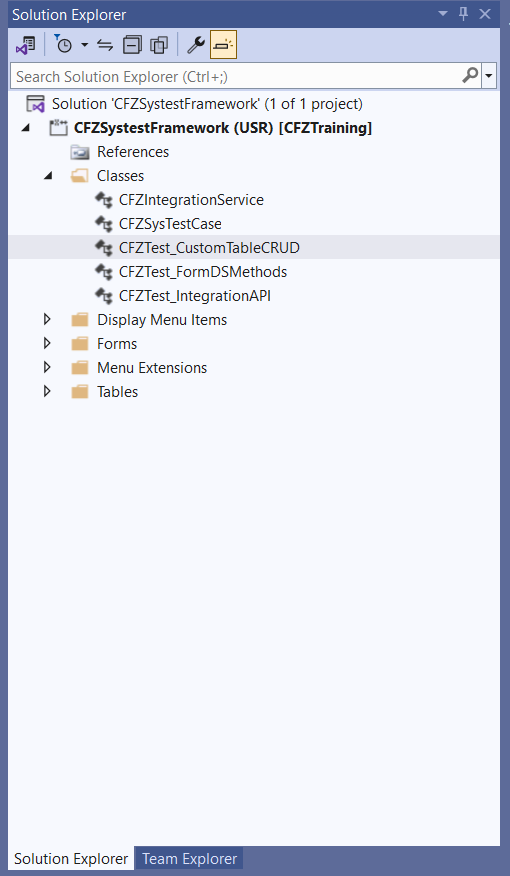
Step 3: Set the model reference
- Right-click the test project → Properties
- Set the Model property to the target model
This ensures the test project references the correct metadata and application classes.
Step 4: Create SysTest classes
Create test classes that extend the SysTestCase class. Each test method must be decorated with SysTestMethodAttribute, which identifies executable test logic.
Below is an example demonstrating CRUD validation using transactional rollback.
class CFZTest_CustomTableCRUD extends SysTestCase
{
const str TestItemId = “TST-0010”;
[SysTestMethodAttribute] // [SysTestMethod] also works, but this is explicit
public void testCreateItem_RolledBack()
{
ttsbegin;
try
{
// Arrange + Act: Insert
CFZSysTestCaseTbl item;
item.clear();
item.ItemId = TestItemId;
item.Name = “Test Item”;
item.Qty = 10;
item.insert();
// Assert: Exists
CFZSysTestCaseTbl created;
select firstonly created
where created.ItemId == TestItemId;
this.assertTrue(created.RecId != 0, “Record should exist after insert.”);
this.assertEquals(TestItemId, created.ItemId, “ItemId should match.”);
this.assertEquals(“Test Item”, created.Name, “Name should match.”);
}
finally
{
ttsabort; // revert all changes
}
// Outside tx: confirm nothing persisted
CFZSysTestCaseTbl check;
select firstonly check
where check.ItemId == TestItemId;
this.assertTrue(check.RecId == 0, “Insert must not persist after rollback.”);
}
[SysTestMethodAttribute]
public void testUpdateItem_RolledBack()
{
ttsbegin;
try
{
// Arrange: Insert initial row
CFZSysTestCaseTbl item;
item.clear();
item.ItemId = TestItemId;
item.Name = “Test Item”;
item.Qty = 10;
item.insert();
// Act: Update
CFZSysTestCaseTbl updated;
select firstonly forupdate updated
where updated.ItemId == TestItemId;
this.assertTrue(updated.RecId != 0, “Record to update should exist.”);
updated.Name = “Updated Name”;
updated.update();
// Assert
select firstonly updated
where updated.ItemId == TestItemId;
this.assertEquals(“Updated Name”, updated.Name, “Name should be updated.”);
}
finally
{
ttsabort; // revert all changes
}
// Check nothing persisted
CFZSysTestCaseTbl check;
select firstonly check
where check.ItemId == TestItemId;
this.assertTrue(check.RecId == 0, “Update must not persist after rollback.”);
}
[SysTestMethodAttribute]
public void testDeleteItem_RolledBack()
{
ttsbegin;
try
{
// Arrange: Insert initial row
CFZSysTestCaseTbl item;
item.clear();
item.ItemId = TestItemId;
item.Name = “Test Item”;
item.Qty = 10;
item.insert();
// Act: Delete
CFZSysTestCaseTbl deleted;
delete_from deleted
where deleted.ItemId == TestItemId;
// Assert: Not found (buffer empty)
select firstonly deleted
where deleted.ItemId == TestItemId;
this.assertTrue(deleted.RecId == 0, “Record should be deleted.”);
}
finally
{
ttsabort; // revert delete and insert
}
// Check nothing persisted
CFZSysTestCaseTbl check;
select firstonly check
where check.ItemId == TestItemId;
this.assertTrue(check.RecId == 0, “Delete test should not change DB after rollback.”);
}
}
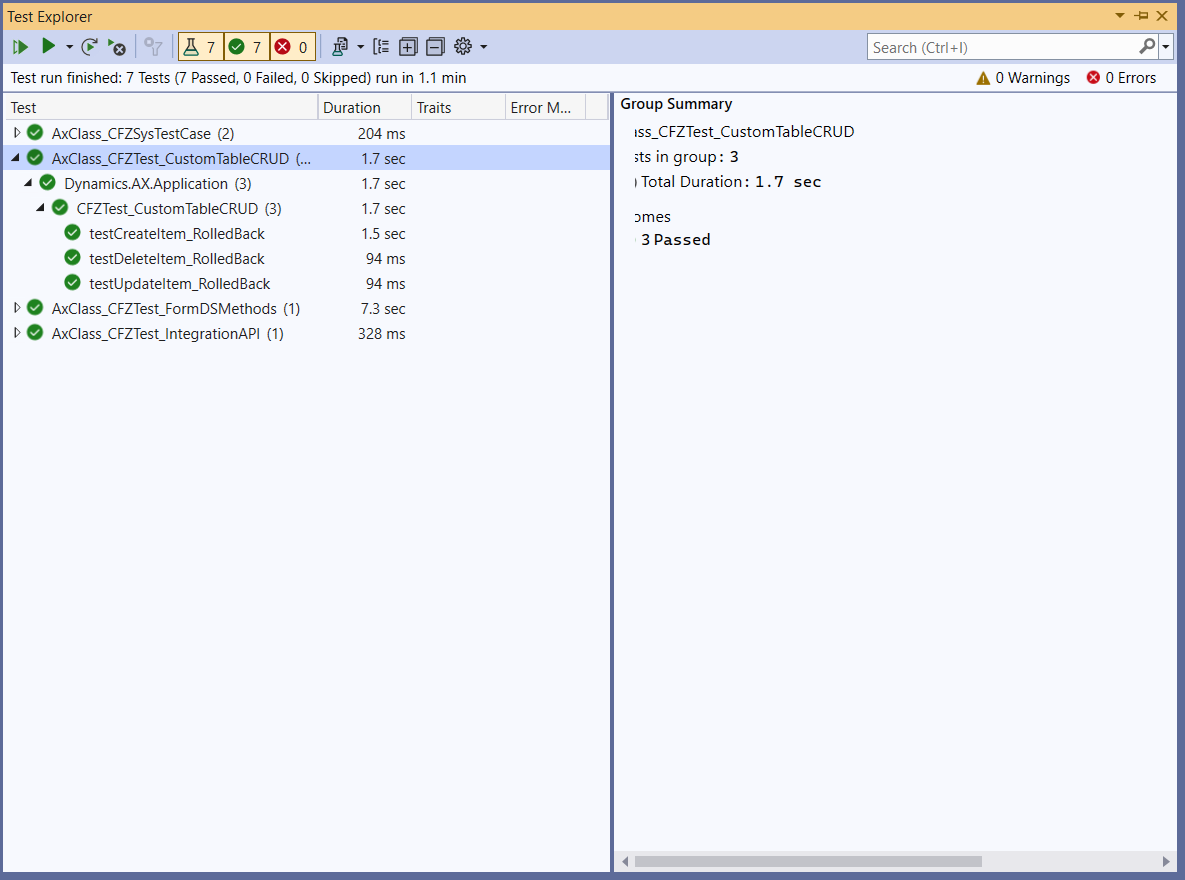
Step 5: Build and execute tests
- Compile the solution
- Use Test Explorer to run tests
- Review pass/fail results and resolve issues
Step 6: Integrate SysTest with build pipelines
To maximize value, SysTest projects should be included in automated builds:
- Add the test model to build definitions
- Configure test execution in Azure DevOps or CI/CD pipelines
- Fail builds when critical tests do not pass
This embeds deployment risk reduction directly into the release process.
Best Practices for Using SysTest
To get the most value out of the SysTest framework, follow these guidelines:
1. Use clear, descriptive test names
Makes understanding and maintaining tests easier.
2. Keep tests independent
Each test should run without relying on another test’s results.
3. Cover a variety of scenarios
Include positive, negative, edge, and stress cases.
4. Use assertions wisely
4. Assertions confirm expected behavior and validate results clearly.
5. Test early and test often
Frequent test execution ensures immediate detection of issues introduced by new code.
Accelerate growth at an unprecedented pace
Discover how Confiz can help you take control of your daily operations, increasing growth and revenue.
Book a Free ConsultationTroubleshooting
1. Tests not appearing in test explorer
Confirm [SysTestMethodAttribute] and project model compile succeeded.
2. Random failures
Check for shared state or reliance on non-deterministic data. Reset in setup().
3. Slow test runs
Remove DB-heavy flows from unit tests; move them to component/integration tests. Mock where feasible.
4. Permission/Context issues
Ensure tests run with proper security context on Dev/Build VMs.
Conclusion
The SysTest framework equips Dynamics 365 Finance & Operations teams with a practical mechanism to verify custom code as part of everyday development, not as an afterthought. By embedding automated X++ tests into the development lifecycle, organizations gain confidence that functional behavior remains intact as enhancements, fixes, and refactoring are introduced.
This approach enables teams to catch regressions earlier, protect critical business logic, and move through release cycles with greater predictability. For complex D365 F&O implementations, SysTest becomes a key enabler for sustaining development velocity without compromising reliability.
If you need support establishing or maturing SysTest practices within your D365 F&O environment, contact us at marketing@confiz.com.