
In enterprise resource planning (ERP) systems, performance and scalability are critical. As businesses grow, the demand for these systems increases, leading to potential bottlenecks and performance degradation.
To address these challenges, Microsoft Dynamics 365 Finance and Operations (D365 F&O) introduces priority-based throttling, a capability designed to protect system performance by ensuring that critical business processes continue to operate reliably even under heavy load. This mechanism plays a key role in ERP performance optimization by intelligently managing how requests are processed when system capacity is under pressure.
In this blog, we’ll explore Priority-Based Throttling, how it works, and why it’s essential for your Dynamics 365 Finance and Operations environment.
What is priority-based throttling?
Priority-based throttling is a request-governance mechanism that controls how inbound requests are processed in Dynamics 365 Finance and Operations. Instead of treating all requests equally, the platform evaluates each request based on its assigned priority and determines when and how to execute it.
High-priority operations, such as financial postings or order processing, are processed ahead of lower-priority activities like background integrations or large data exports. This approach is particularly effective during high-volume data operations, when uncontrolled concurrency could otherwise impact core business workflows.
By enforcing enterprise request prioritization, D365 F&O ensures that essential operations remain responsive while less critical requests are deferred.
How priority-based throttling works in D365 F&O
Priority-based throttling assigns a priority level to each request. These priority levels determine the order in which requests are processed.
Here’s a breakdown of how it works:
1. Priority levels
Requests are categorized into different priority levels, such as High, Medium, and Low. High-priority requests are processed first, followed by medium and low-priority requests.
2. Throttling rules
Administrators can define throttling rules based on request type, user role, or specific business processes. For example, a high-priority rule might be applied to financial transactions, while a low-priority rule could be used to data exports.
3. Request queuing
When the system is under heavy load, lower-priority requests are queued and processed only when resources become available. This ensures that less critical operations do not delay high-priority tasks.
4. Dynamic adjustment
The system dynamically adjusts the throttling rules based on real-time load and resource availability. This flexibility allows the system to adapt to changing conditions and maintain optimal performance.
Take control of your business operations
Discover how Confiz services can simplify your complex workflows and improve decision-making.
Get a Free QuoteWhy priority-based throttling matters
Priority-based throttling provides tangible operational benefits across enterprise environments:
1. Protects critical business operations
By isolating and prioritizing key transactions, organizations ensure that critical business processes are not disrupted during peak usage periods.
2. Improves user experience
Users performing high-priority actions experience consistent response times, even when background workloads increase.
3. Enables scalable growth
As transaction volumes and integrations expand, throttling supports controlled scalability without compromising system responsiveness.
4. Optimize resource utilization
Intelligent request handling improves resource allocation and optimization, ensuring system capacity is used efficiently.
5. Strengthens ERP system stability
By preventing request overload, throttling significantly reduces the risk of performance degradation or service interruptions, reinforcing overall ERP system stability.
Implementing priority-based throttling for integrations in D365 F&O
To implement Priority-Based Throttling in your Dynamics 365 Finance and Operations environment, with version 10.0.19 and above. To make the most of this feature, organizations should focus on three key aspects: Configuration, Retry, and Monitoring.
1. Configuration
The first step is to configure priority levels for integration accounts so that critical processes always get preference.
Steps to configure throttling priorities in D365FO:
- Log in with an administrator account.
- Navigate to System Administration > Setup > Throttling priority mapping.
- Click New to create a mapping.
- In the Authentication type field, select User or Microsoft Entra application based on your integration scenario.
- If the Microsoft Entra ID application type is selected, in the Client ID field, choose the application that you registered in the Microsoft Entra application.
- If the User type is selected, in the User ID field, choose an appropriate service account user ID.
- Assign the appropriate priority and then select Save.

2. Retry
When an integration request exceeds the allowed threshold, the system responds with a 429 (Too Many Requests) error. Instead of failing outright, the response includes a Retry-After header value that indicates how many seconds to wait before resubmitting the request.
The following example shows this operation.
if (!response.IsSuccessStatusCode)
{
if ((int)response.StatusCode == 429)
{
int seconds = 30;
//Try to use the Retry-After header value if it is returned.
if (response.Headers.Contains(“Retry-After”))
{
seconds = int.Parse(response.Headers.GetValues(“Retry-After”).FirstOrDefault());
}
Thread.Sleep(TimeSpan.FromSeconds(seconds));
// Retry sending the request.
}
}
3. Monitoring
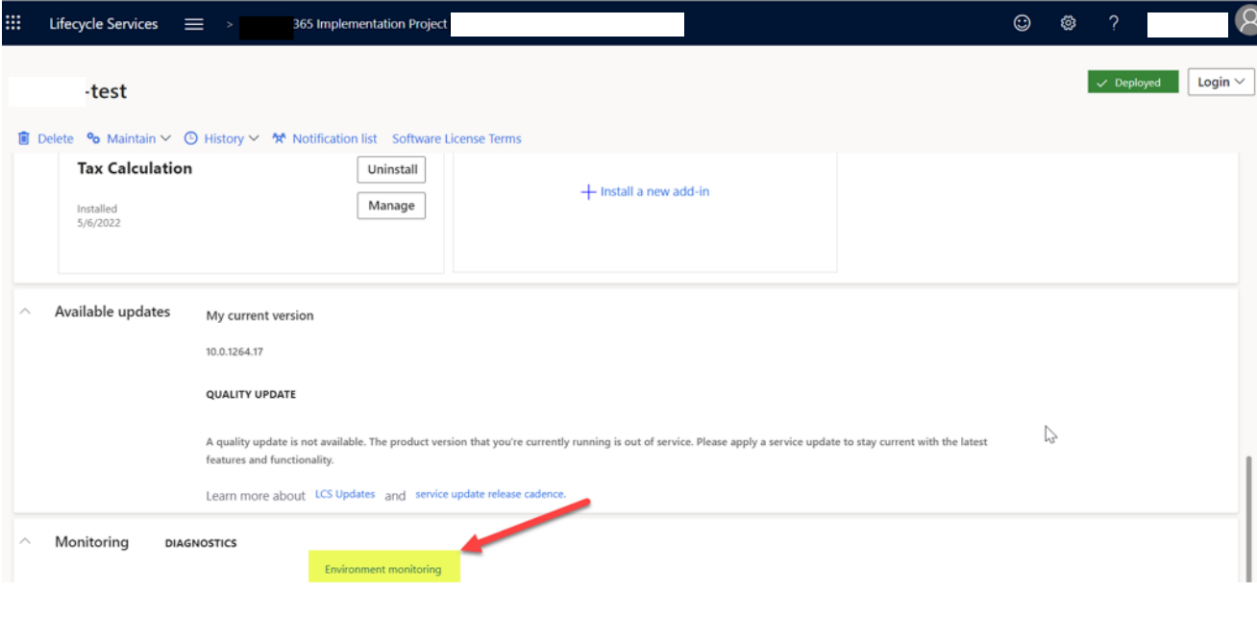
All throttled exceptions are logged and can be tracked via Lifecycle Services (LCS). This makes it easy for administrators to monitor integration performance and identify potential bottlenecks.
Read more: Understanding Lifecycle Services (LCS) tools for Microsoft Dynamics 365 Finance and Operations
Steps to monitor throttled requests in LCS:
- In LCS, open the appropriate project.
- In the Environments section, select the environment to view, and then select Full details.

- On the Environment details page, select Environment monitoring to open the monitoring and diagnostics portal.
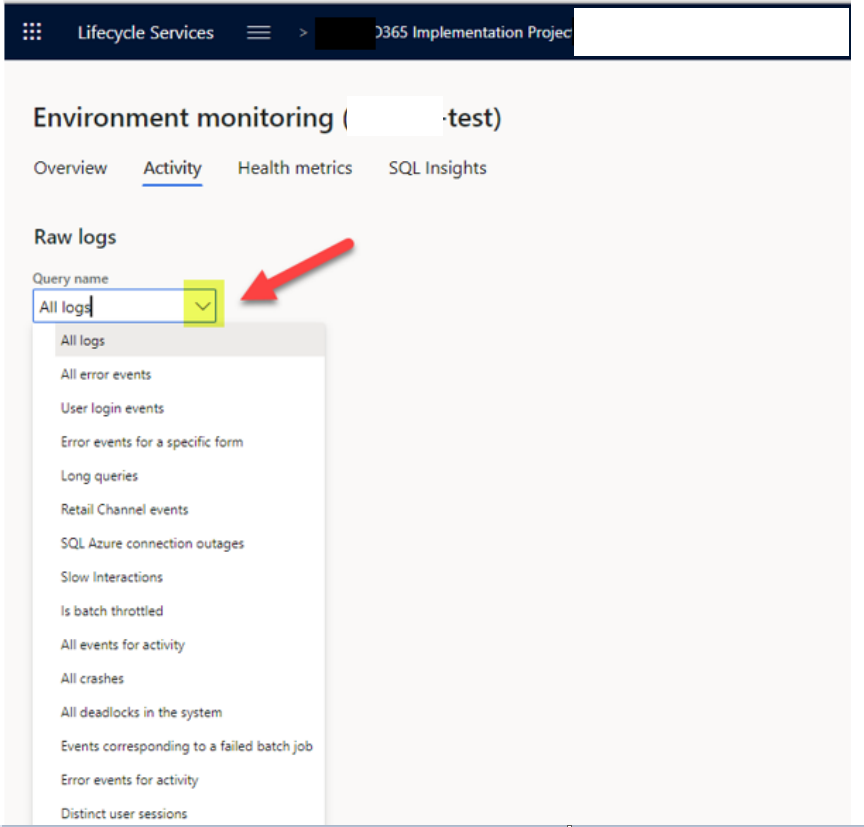
- On the Environment monitoring page, select the Activity tab to view the Raw logs page.

- Select the query name, and then select Requests throttled for all OData and custom service requests that have been throttled.
- Specify a date range.
- Select Search to view the throttling logs.
Accelerate growth at an unprecedented pace
Discover how Confiz can help you take control of your daily operations, increasing growth and revenue.
Book a Free ConsultationReal-world use cases
Here are some examples of how Priority-Based Throttling can be applied in real-world scenarios:
1. Financial transactions
High-priority throttling ensures that financial transactions, such as invoice processing or payroll runs, are completed without delay.
2. Order fulfillment
Order processing and fulfillment tasks are given high priority to ensure timely delivery to customers.
3. Data exports
Non-essential data exports, such as reports or analytics, are assigned low priority to avoid impacting critical operations.
4. Integration requests
Integration requests from third-party systems can be prioritized based on their importance to business operations.
Conclusion
Priority-based throttling in Dynamics 365 Finance and Operations provides a deliberate way to control how system capacity is consumed when demand spikes. By differentiating between essential and non-essential requests, the platform can continue processing core transactions even when integrations, exports, or background jobs compete for resources.
This approach allows organizations to absorb peak load without sacrificing responsiveness, limit the impact of high-volume operations, and maintain predictable system behavior during the busiest operational windows.
If you need support configuring or fine-tuning priority-based throttling in your D365 F&O environment, contact us at marketing@confiz.com.