
Accurate inventory valuation is essential for understanding true profitability and maintaining reliable financial reporting. Within Microsoft Dynamics 365 Finance & Operations (D365 F&O), multiple costing models are available. Still, the weighted average costing model remains one of the most widely used, particularly for businesses that experience frequent fluctuations in purchase prices.
Weighted average costing helps organizations avoid sharp cost variances by recalculating an average unit cost every time inventory is received. This approach creates a more stable, predictable valuation method that supports day-to-day decision-making in both finance and supply chain operations.
In this blog, we’ll break down exactly how the weighted average model behaves inside D365 F&O. Using a single test item, we’ll walk through its cost changes across:
- Purchase orders
- Movement journals
- Sales orders
- Inventory recalculation
By the end, you’ll have a clear, step-by-step understanding of how D365 F&O calculates and updates weighted average cost behind the scenes.
What is the weighted average costing model?
The weighted average costing model determines an item’s cost by dividing the total inventory value by the total quantity on hand. Instead of tracking the price of each receipt, the system maintains a blended average that reflects all inventory entering stock.
In Dynamics 365 Finance & Operations, the weighted average cost is recalculated automatically whenever a new transaction—such as a purchase receipt, inventory adjustment, or movement journal—is posted. This continuous recalculation ensures that item valuation is based on the combined effect of all receipts, not just the most recent purchase price.
The result is a more stable and predictable inventory valuation method that supports accurate financial reporting and consistent operational planning.
Step-by-step walkthrough of weighted average costing in D365 F&O
To understand how Dynamics 365 Finance & Operations calculates and maintains the weighted average cost, let’s walk through a series of simple scenarios using a single test item. Each scenario shows how different purchase prices impact the item’s running average cost.
1. Purchase order scenarios
We will create multiple purchase orders with varying unit costs and observe how the weighted average adjusts after each product receipt.
Scenario 1: Purchase order with a cost $10
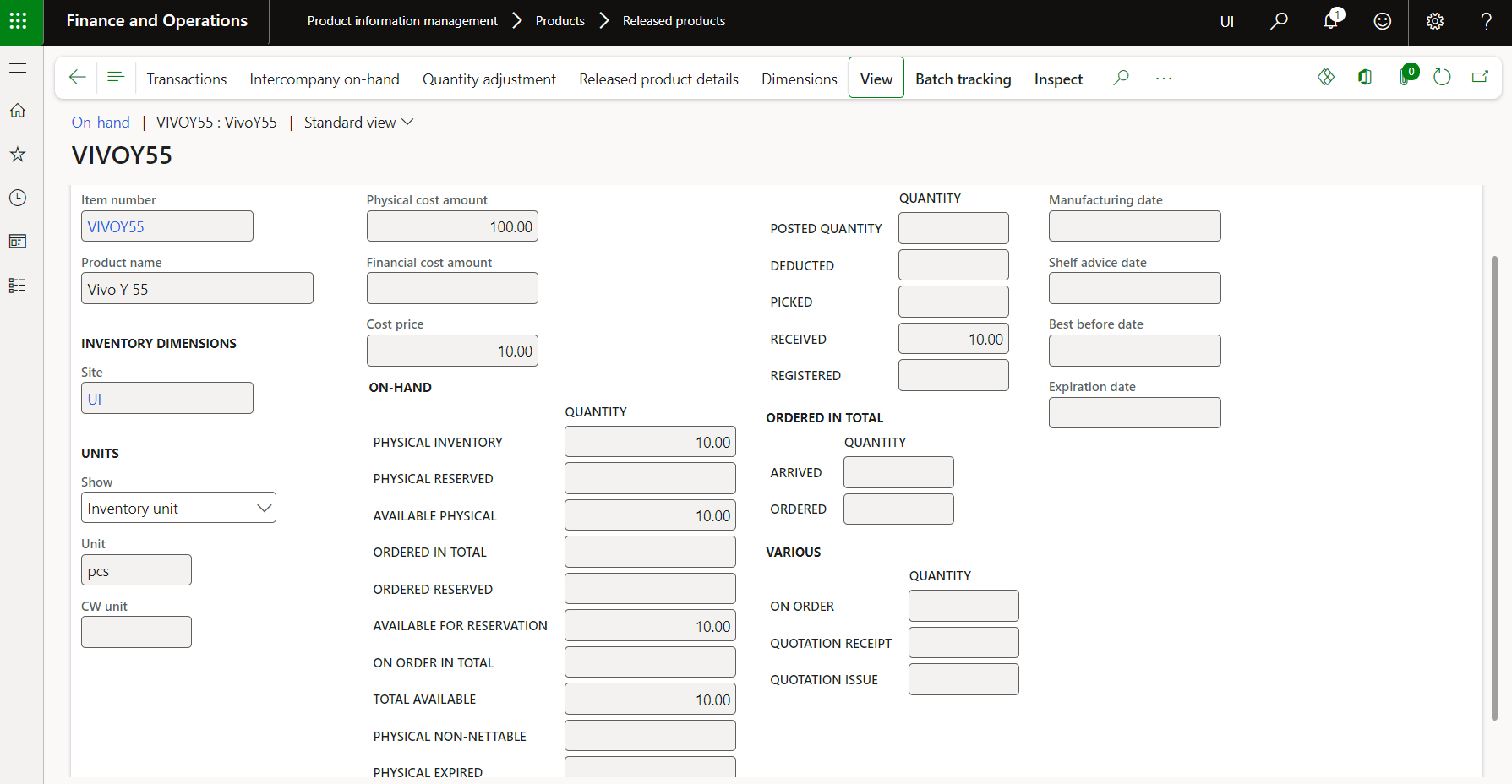
A purchase order is created, and product receipt is posted for $10 per unit. At this stage, D365 sets the item’s cost to $10.
a) PO created – No cost impact
No impact on the cost of creation or confirmation.
b) Product receipt – Cost updated $10
Product receipt posted, and the purchase order status is received. Cost price updated to $10.
Scenario 2: Purchase order with a cost $15
Created and confirmed the 2nd purchase order for a cost $15.
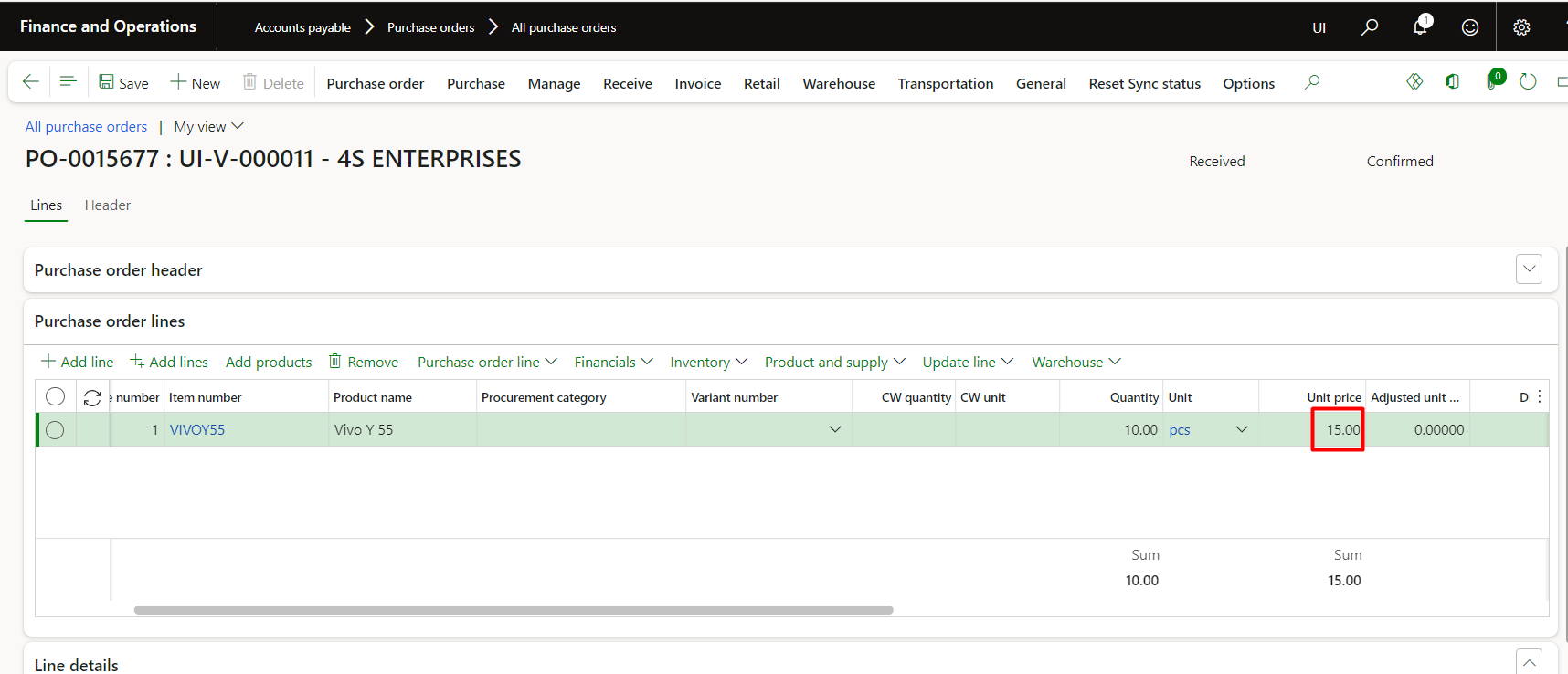
a) PO created – No cost impact
No impact on cost of creation or confirmation.
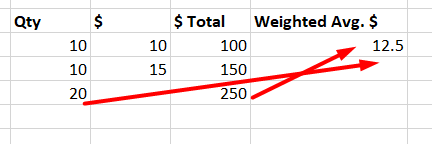
b) Product receipt – Cost updated $12.50
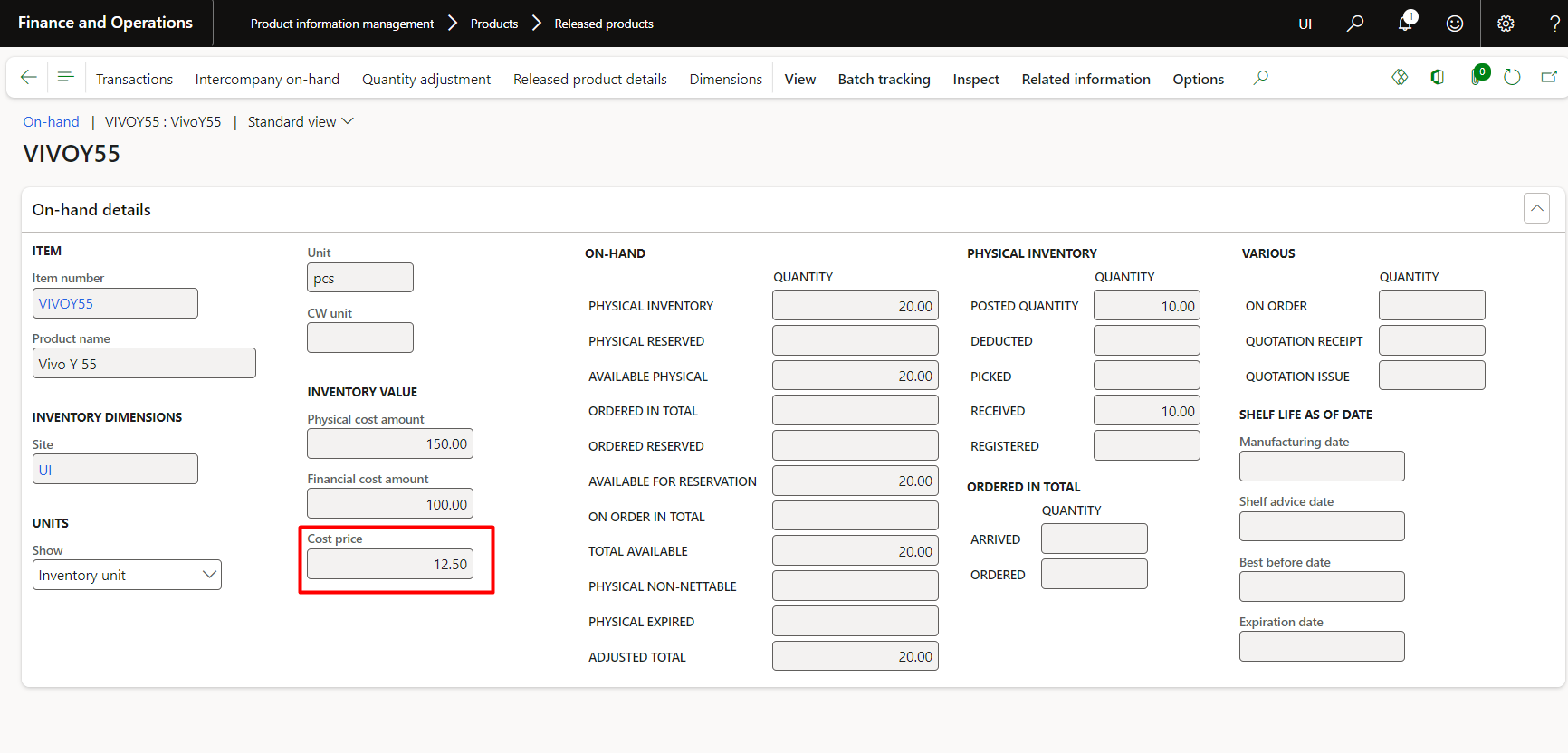
Upon receipt of the product, it adjusted the cost to $12.50.
Because:
Below is the proof of that item:
Read more: Mastering Consignment Inventory in Advanced Warehouse Management for Dynamics 365 F&O
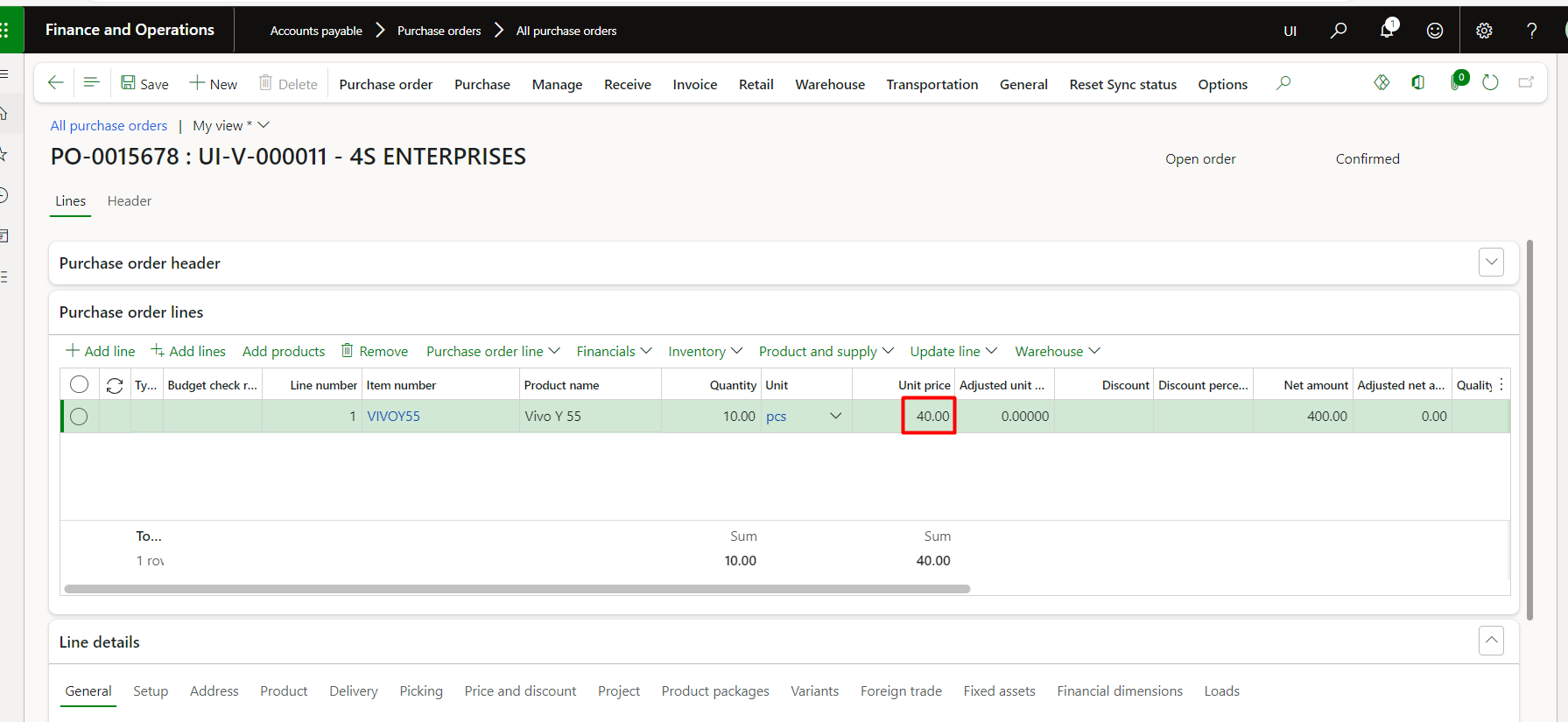
Scenario 3: Purchase Order for a cost of $40
When a third purchase order at $40 is posted, the cost again updates to reflect the new weighted average.
Each time you receive inventory, D365 automatically adjusts the item’s running cost.
You can verify these calculations using the Inventory Value Report by Storage, which displays the updated weighted-average rate in real time.
a) PO created – No cost impact
No impact on the cost of creation or confirmation.
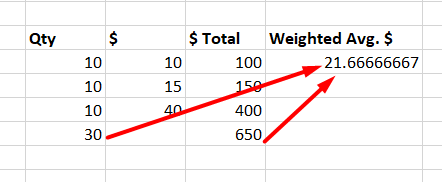
b) Product receipt – Cost updated $21.67
Cost is updated because:
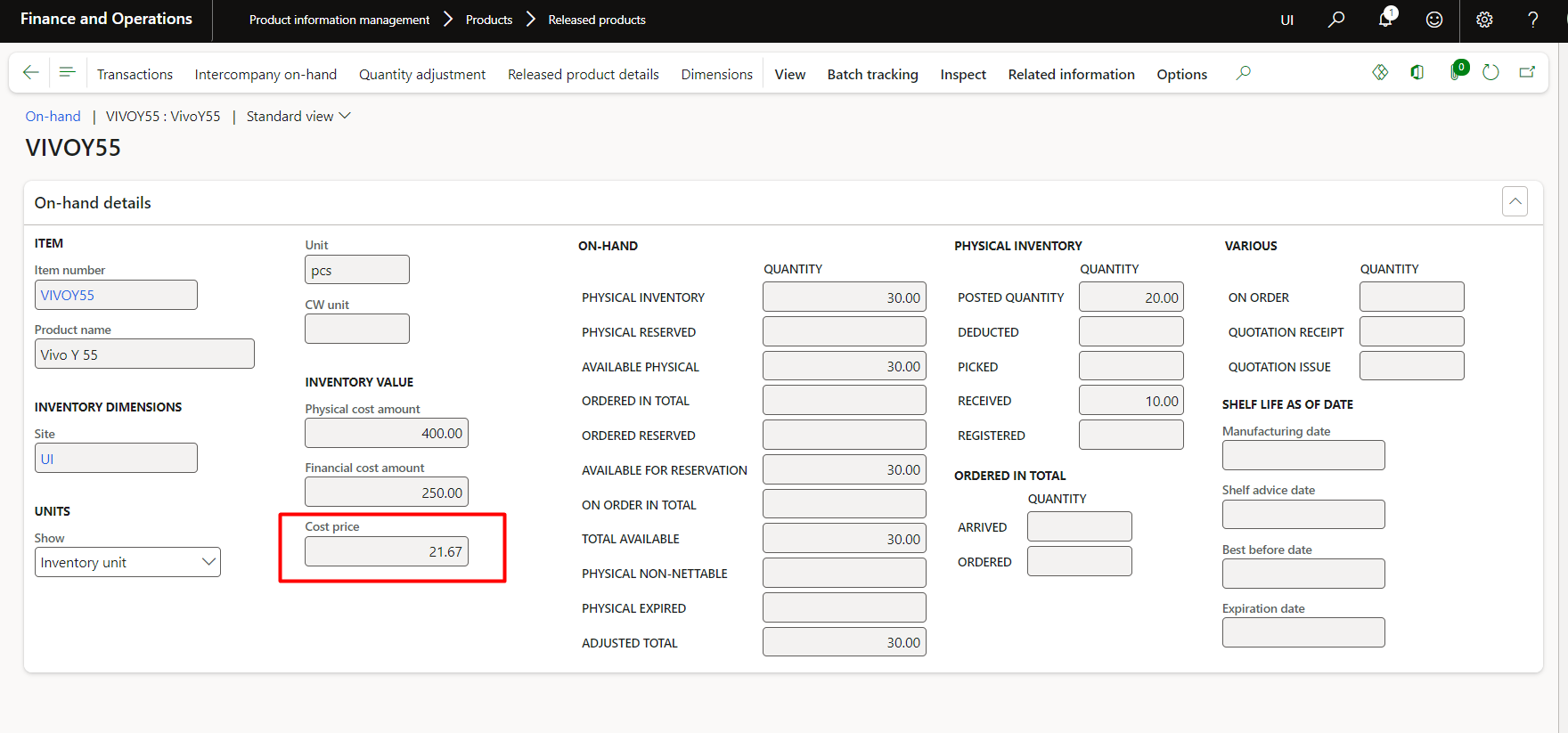
Therefore, the cost is updated on the item:
Take control of your business operations
Discover how Confiz services can simplify your complex workflows and improve decision-making.
Get a Free Quote2. Inventory value storage report
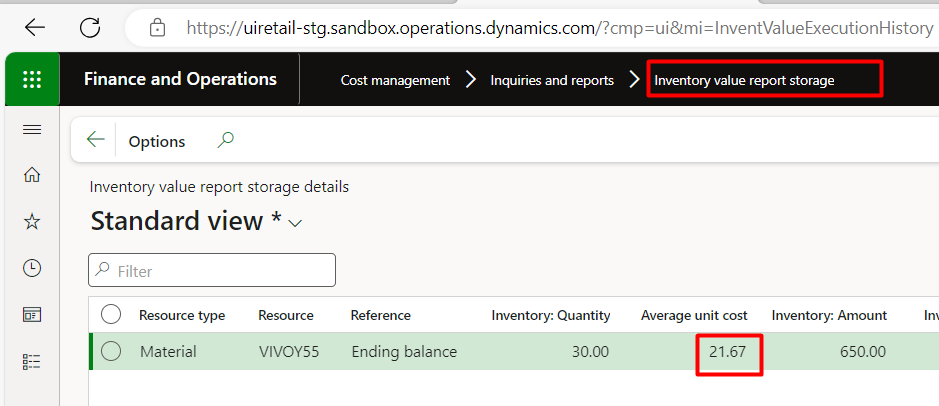
The Inventory Value Report by Storage confirms the new weighted-average cost, which matches the item’s on-hand cost.
Report columns are set as per the screenshot below:
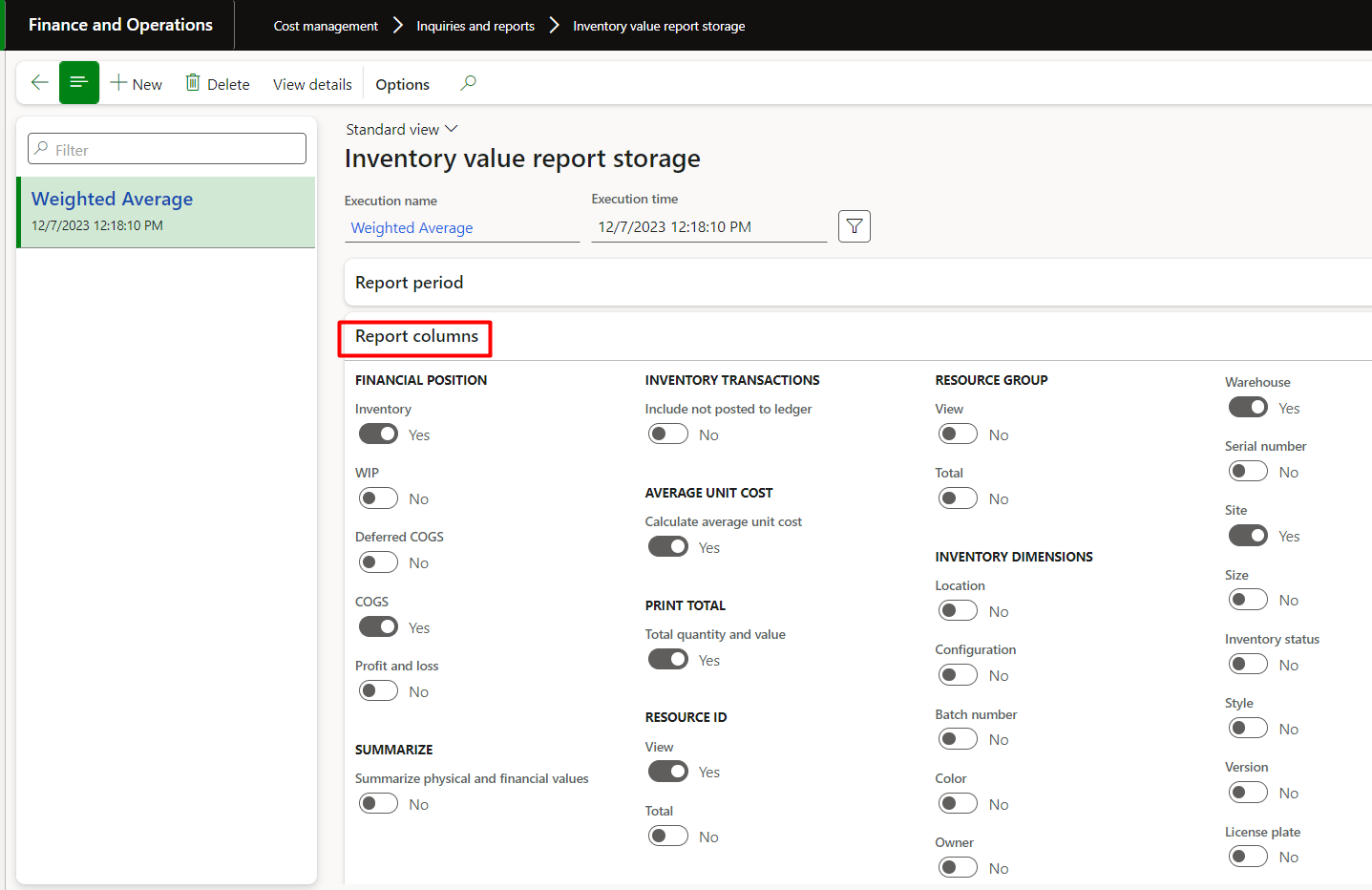
It will show the exact weighted average value which is shown on the item:
a) Movement journal scenarios
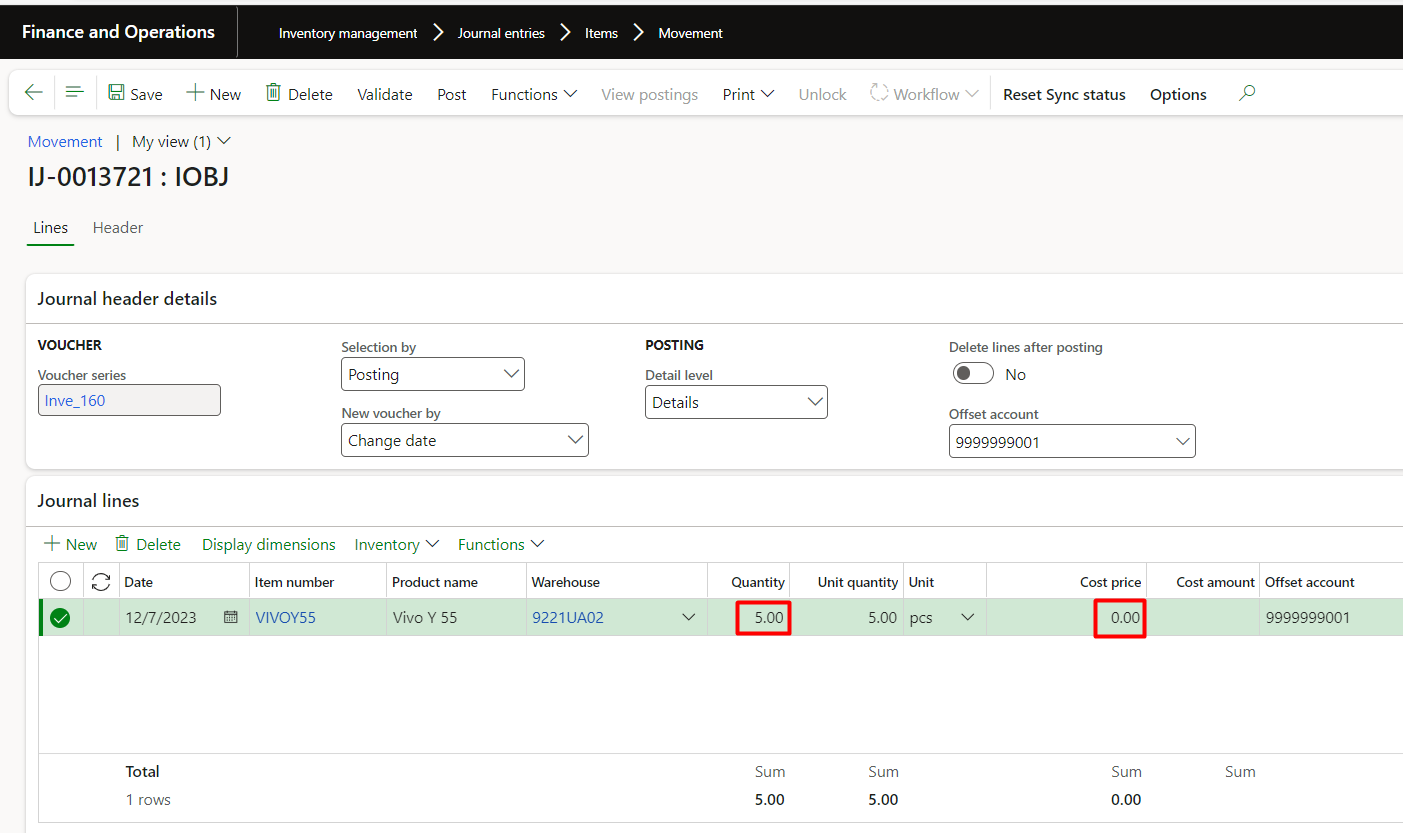
Now, let’s test what happens when we use movement journals for the same item.
If we post additional quantities without defining a cost, D365 still retains the previous running weighted average.
So even if we add five more units at no cost, the system maintains the same average rate to keep the inventory valuation consistent.
In the movement journal scenario, the costing behavior for the weighted average model will remain same as we observed in the purchase order. Below is the proof of concept:
+5 quantities without cost:
3. Weighted average cost after movement journal
Weighted average cost after movement journal of 5 quantities without cost:
Because:
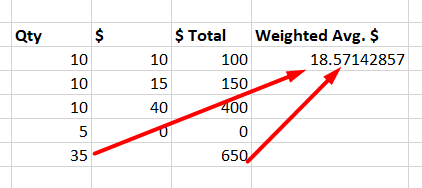
Therefore, showing the same value on item in D365:
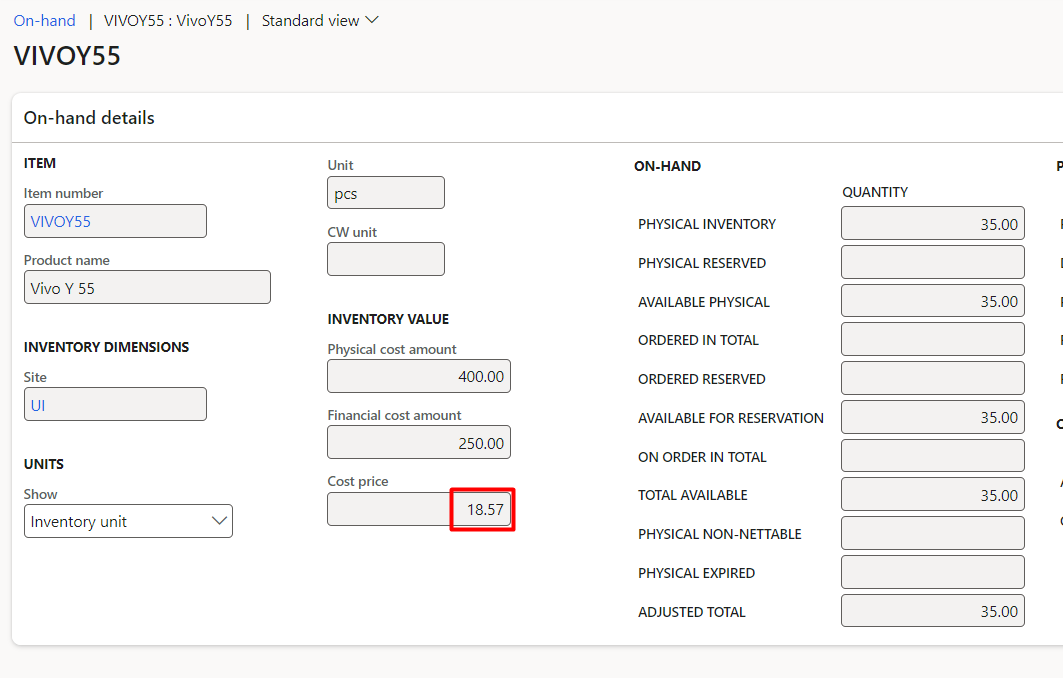
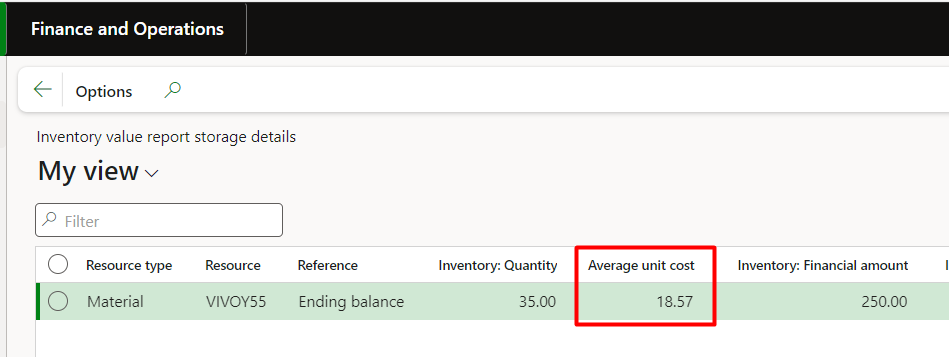
a) Inventory value report storage
The Inventory Value Report by Storage again displays the same weighted average rate as shown in the item record:
4. Sales order scenario — Understanding cost consumption
Next, let’s see how the weighted average cost behaves when we sell the item.
When a sales order is created, there’s no immediate impact on inventory cost — it’s only reserved.
However, once the packing slip is posted, the physical cost is deducted based on the current weighted-average cost per unit.
Further readings: Consignment inventory in Dynamics 365 F&O: Receiving and consuming your consignment
Below is the proof of concept:
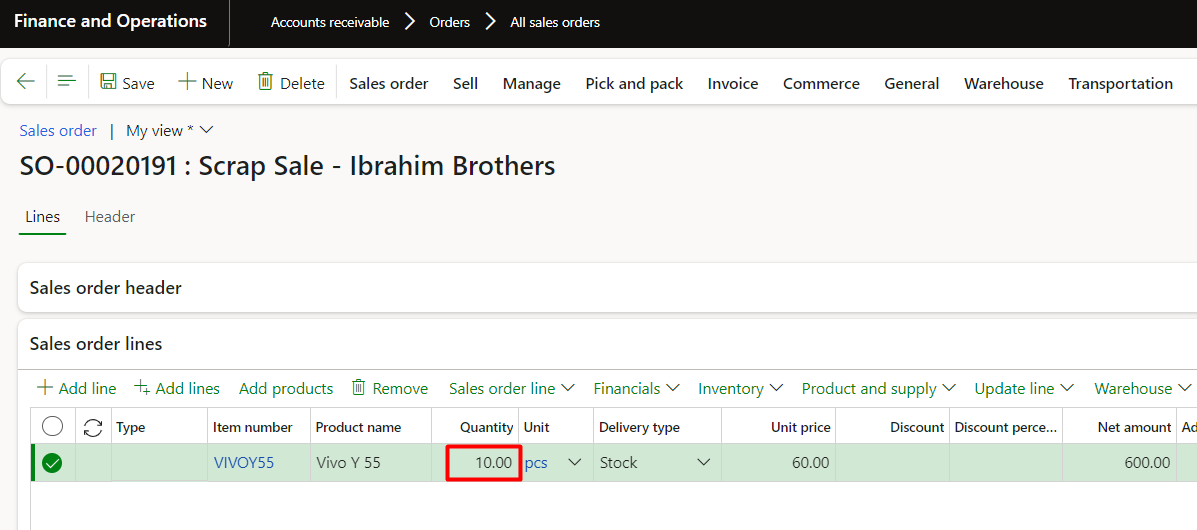
a) Packing slip
Posted packing slip for the 10 quantities in sales order:
b) Physical and financial cost changed
Cost price has no change, but the physical cost reduced with weighted average rate as mentioned above
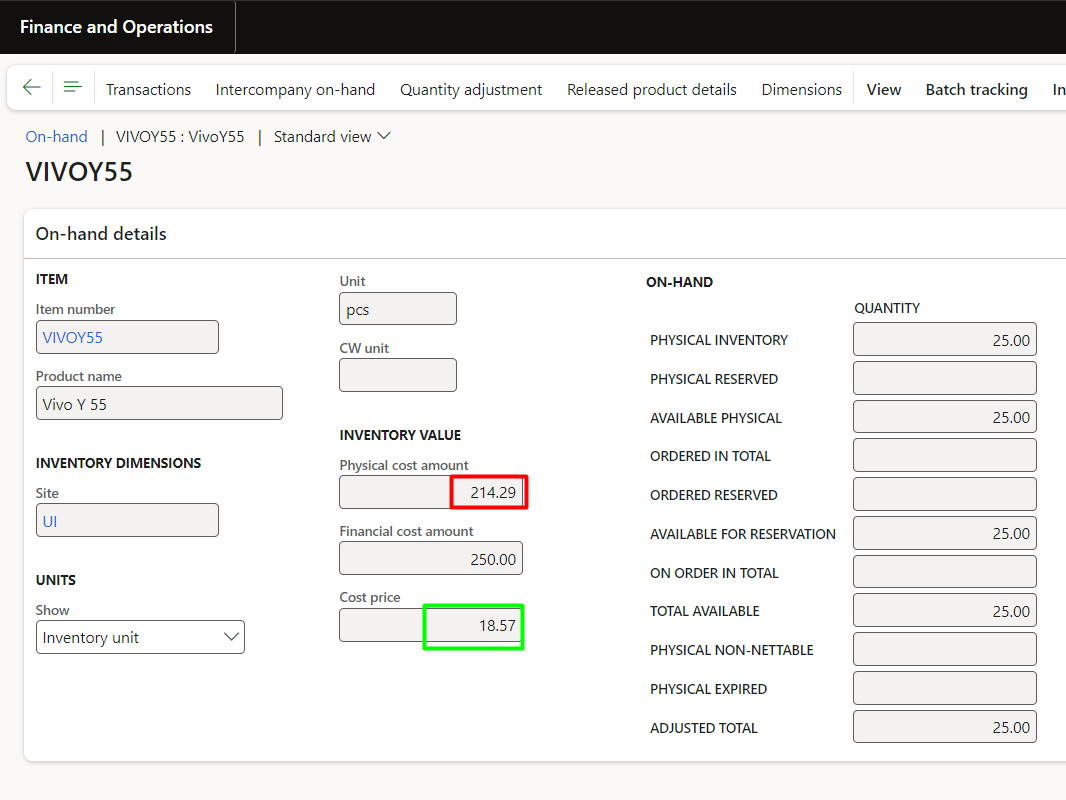
Because:

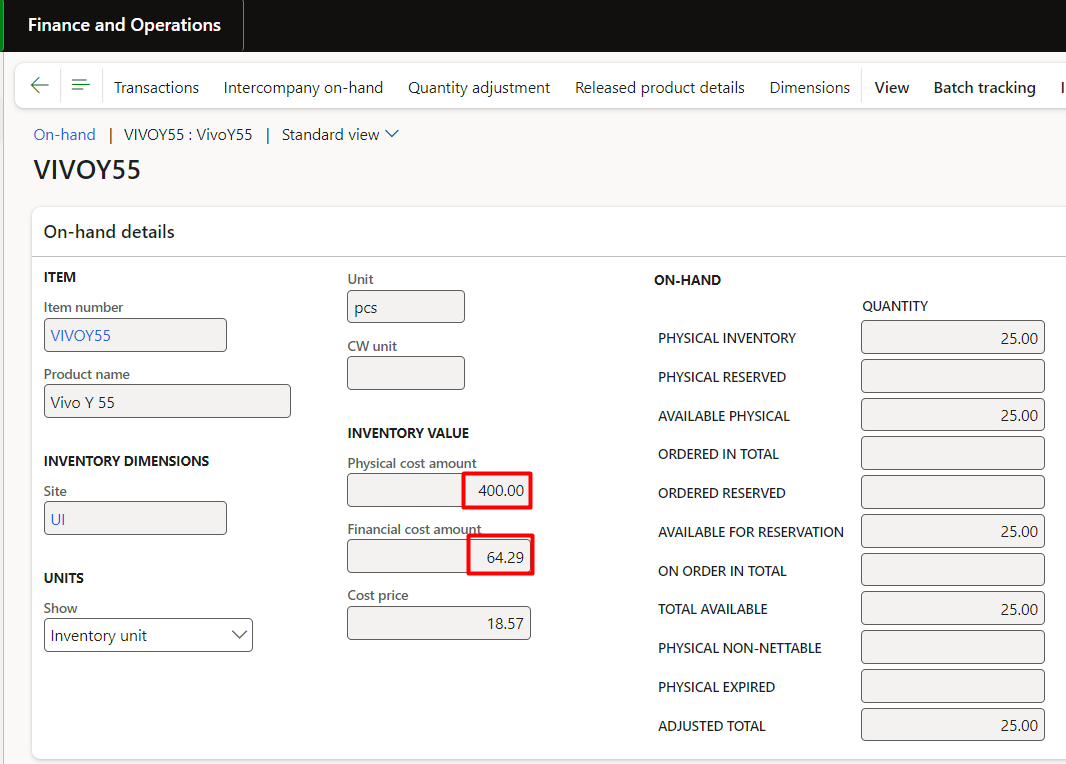
5. Invoice the sales order
When the invoice is posted, D365 finalizes the cost (converting physical to financial) and reflects the same weighted average cost in COGS (Cost of Goods Sold).
The financial cost was reduced by 10 x $18.57 = $185.70, and the physical cost reversed to $400.
6. Inventory recalculation — Adjusting the true cost
Over time, differences can occur between physical and financial costs, especially when:
- Some purchase orders are not invoiced.
- Journals are posted without cost.
- Sales consume inventory based on temporary average rates.
That’s where Inventory Recalculation helps. It realigns costs to reflect the true weighted average based only on invoiced transactions.
a) Scenario Summary
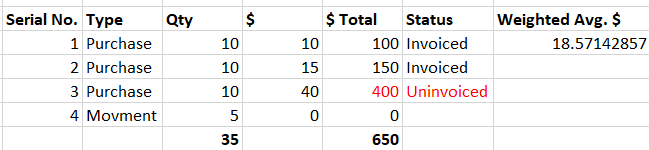
- Three purchase orders were created; two were invoiced, and one was only received.
- One movement journal was posted without cost.
- A sales order consumed inventory using the previous running average ($18.57).
Below is the summary of the above bullets (weighted average rate is before recalculation):
7. Recalculation voucher
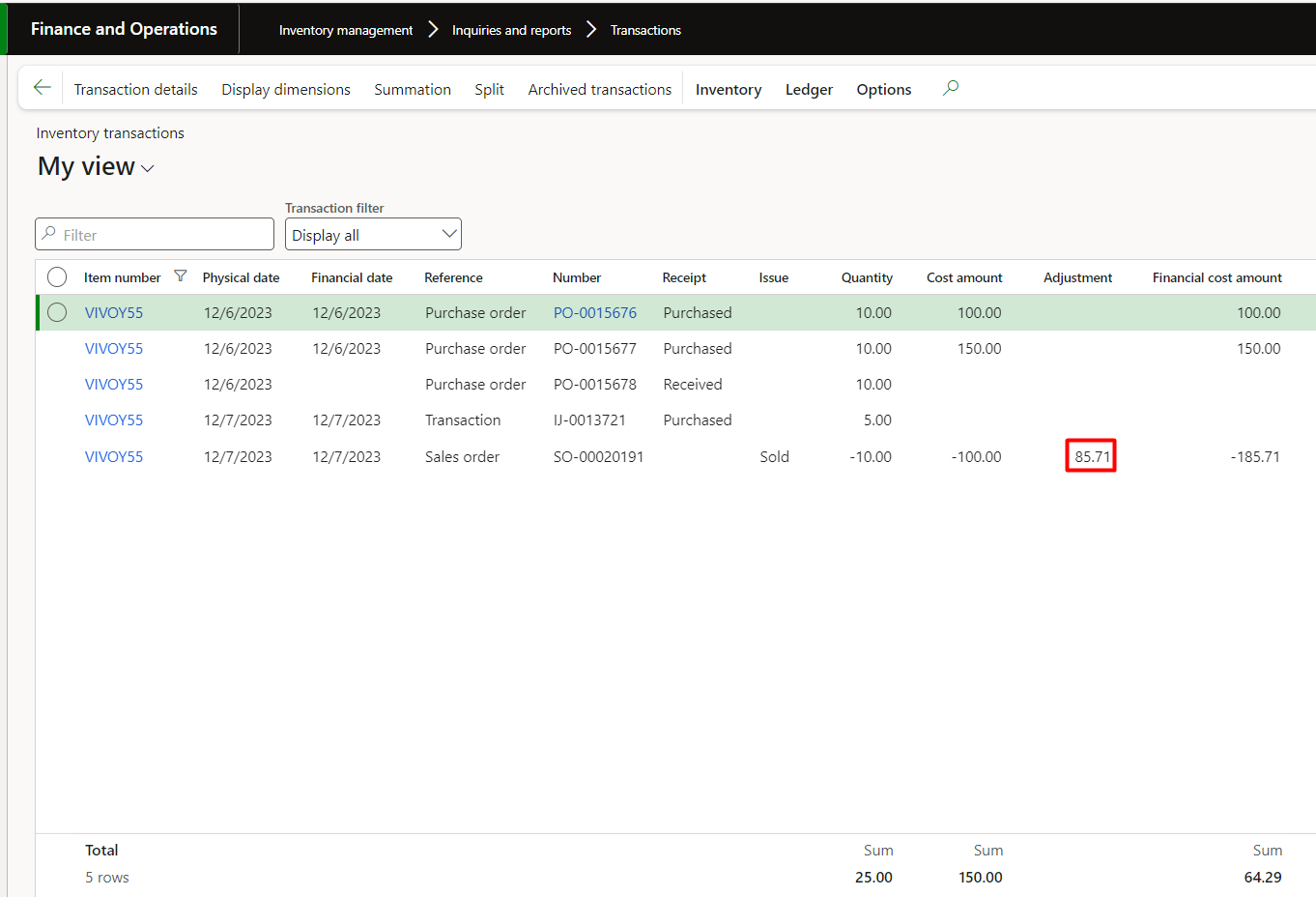
It increased the item value by $85.71 and decreased the COGS by $85.71.
How?
Upon recalculation, the system posted the following voucher. Let’s see the explanation before reviewing the voucher screenshot:
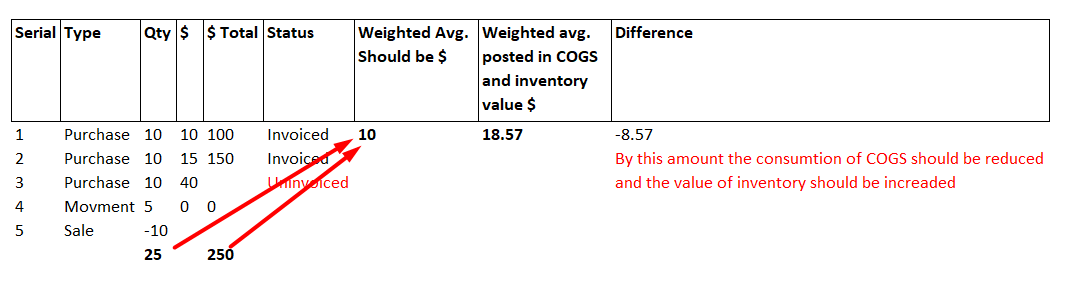
- We see the weighted average cost was $18.57 per unit before recalculation
- Upon recalculation, the system calculated the new rate and posted the differential amount to GL.
- It excluded the unvoiced purchase order cost.
- It calculated the invoiced total value (100+150=250)
- It calculated the total inventory after sales order (35-10= 25)
- Calculated the temporary rate by invoiced cost and available inventory, that is 250/25 = $10
- It assumed that $10 should be the COGS (consumption). But at the time of sales order posting, the system picked the running weighted-average cost of $18.57.
- At the time of recalculation of the voucher, it calculated the difference $18.57-$10 = $8.57 and posted the difference 10 x $8.57 = $85.71.
- Therefore, to reduce consumption:
- Dr: Inventory $85.71
- Cr: COGS $85.71
Below is the screenshot of the calculation from where we can understand how the difference came in weighted average per unit cost:
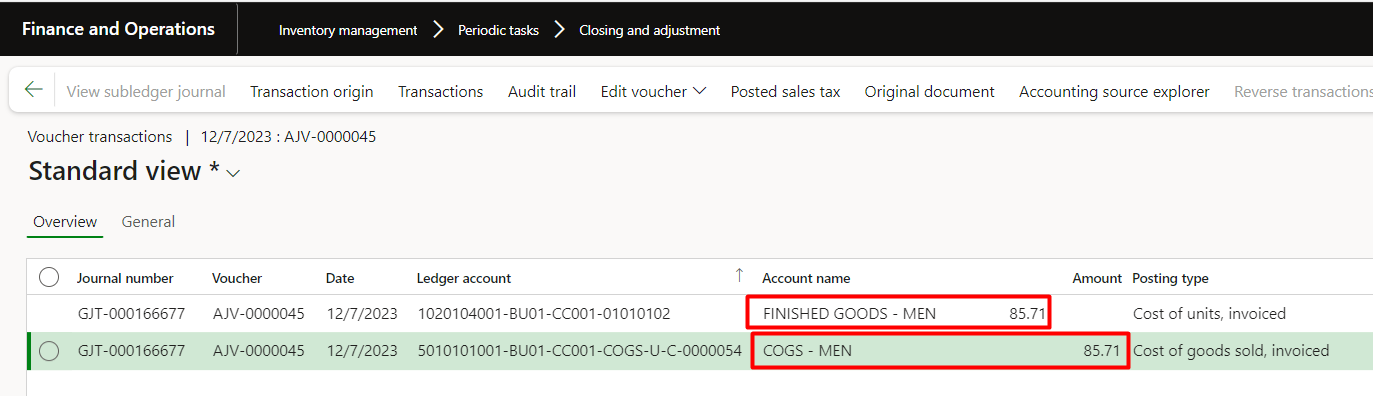
We can also verify the adjustment amount in inventory transactions:
8. Adjusted the new weighted average rate
After recalculation, the system will automatically adjust the current running average rate for the item. This rate will be shown in the storage report’s inventory value. This value will also be shown at the time of creating counting journals.
How?
- As we see above, the system temporarily calculated $10 running average cost (due to one purchase order not being invoiced and the movement journal being FOC).
- Therefore 10 x $10 = $100. This cost should be subtracted from the overall value $650 because it is sold. Now the remaining value shall be divided by the remaining quantity, i.e. $650-$100=$450.
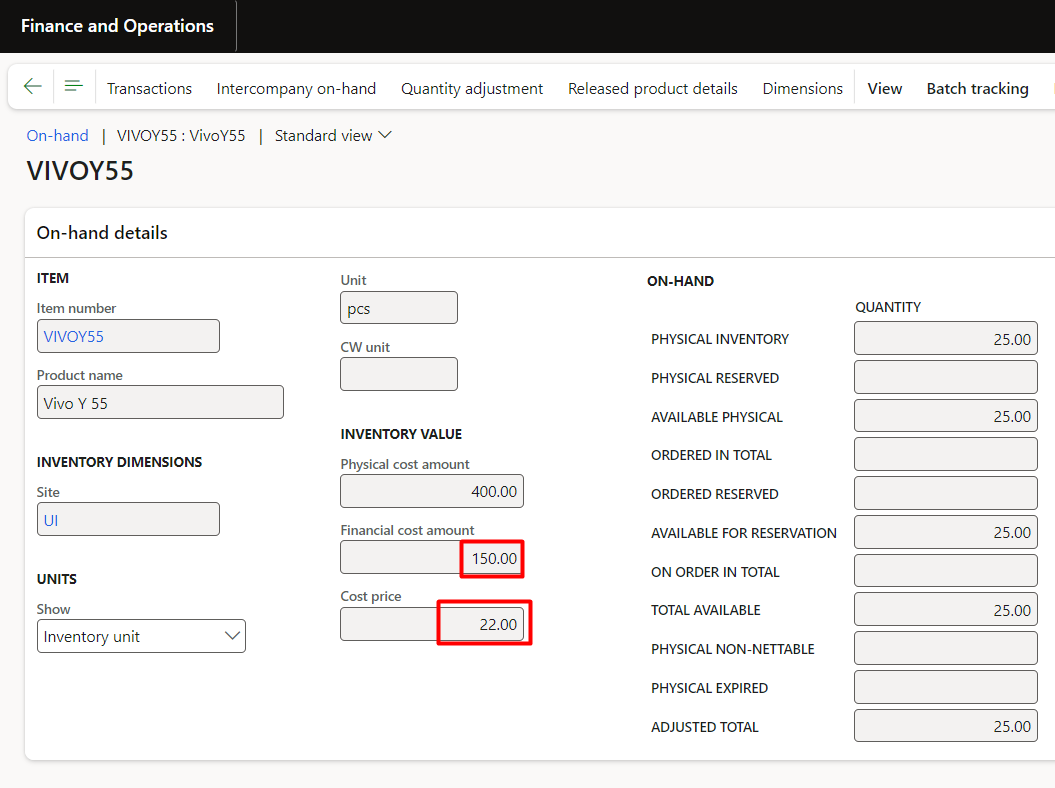
- So the available items cost should be $450, and the available quantity is 25. Therefore, the new recalculated weighted average is $450/25= $22
9. Weighted average cost after recalculation
Below is the adjusted rate for the item that is $22:
Important tips for working with the weighted average inventory valuation model in D365 F&O
To maintain accurate and reliable costing when using the weighted average inventory valuation model, keep the following best practices in mind:
1. Run inventory recalculation before period close
Executing recalculations at the end of each period ensures that all costs are aligned and that your financial reporting reflects the correct weighted-average values.
2. Recalculate if backdated transactions are entered
Any backdated purchase, journal, or adjustment can affect historical costs. Rerunning the recalculation helps restore accurate valuation.
Accelerate growth at an unprecedented pace
Discover how Confiz can help you take control of your daily operations, increasing growth and revenue.
Book a Free Consultation3. Review the Inventory Value Report regularly
This report provides a clear snapshot of current item costs and is essential for validating that the weighted-average rate is being applied correctly.
4. Monitor un-invoiced transactions
Receipts that have not yet been invoiced can temporarily skew the weighted average cost. Once invoicing is complete, recalculation helps normalize the valuation.
Conclusion
The weighted-average costing model in Dynamics 365 Finance & Operations provides a stable, consistent way to value inventory by recalculating costs with each transaction. Understanding how it behaves across purchase orders, movement journals, sales consumption, and inventory recalculation help finance and supply chain teams maintain accurate costs and strengthen reporting.
Although this example focused on a single item, the same principles apply across your entire inventory. With proper setup and routine recalculation, weighted average remains one of the most dependable costing methods in D365 F&O.
Looking to optimize your inventory valuation approach in D365 F&O? Contact us at marketing@confiz.com.