
Modern ERP implementations rarely stop at standard functionality. Businesses often need their ERP to exchange data with external platforms, trigger custom logic, or support processes that do not fit neatly into out-of-the-box entities and integrations.
That is why custom services have become valuable. In Microsoft Dynamics 365 Finance and Operations, developers can expose business logic through service endpoints, making it available to external applications in a controlled, secure, and scalable way. For organizations evaluating Dynamics 365 F&O custom services, this approach is especially useful when integrations need more than basic data import, export, or CRUD operations.
In practical terms, custom services help you connect Finance and Operations with e-commerce platforms, mobile apps, middleware, vendor systems, and internal applications without forcing every requirement into standard entities. If you are exploring a custom service in D365FO X++, this guide will help you understand the architecture, setup process, latest considerations, and best practices that matter today.
What are custom services in Dynamics 365 Finance and Operations?
Custom services allow developers to expose X++ business logic as service operations that external systems can call. Microsoft documents that service groups in the finance and operations apps are deployed on both SOAP and JSON endpoints, and that JSON-based custom services are available specifically for these apps.
This makes custom services a strong fit when you need to:
- Run business logic on demand
- Validate or transform data before processing
- Return controlled response payloads
- Expose functionality that standard data entities do not support well
For teams building custom Dynamics 365 Finance and Operations services, the goal is not just connectivity. It is controlled extensibility.
When should you use custom services instead of OData?
One of the biggest mistakes in integration design is using the same pattern for every requirement. Finance and Operations offers multiple integration options, including OData, data management APIs, recurring integrations, and custom services. Microsoft’s service endpoint guidance shows that OData and custom services serve different purposes, while older AX 2012 patterns, such as document services and query services, have been replaced.
Use custom services when you need:
- Business logic execution, not just data exposure
- Multi-step processing inside one service call
- Validation beyond entity rules
- Custom request and response contracts
- Tightly controlled external operations
Use OData when you need:
- Standard CRUD operations
- Entity-based integrations
- Simpler reporting or external reads
- Lower-complexity app integrations
That distinction is important for organizations reviewing Dynamics 365 Finance and Operations customization services and deciding how to design the integration architecture correctly from day one.
Benefits of custom services in Dynamics 365 F&O
A well-architected custom web service in D365FO gives organizations precise control over how data is exchanged between Finance and Operations and external systems. Instead of forcing every integration requirement into standard entities, table customizations, or batch processes, custom services provide a cleaner and more maintainable way to expose business logic.
They are especially valuable when businesses need to support specialized workflows, validate incoming data, or perform controlled operations beyond the standard create, read, update, and delete scenarios. This is one of the key reasons enterprises invest in Dynamics 365 Finance and Operations custom services as part of a modern integration strategy.
Here is where custom services deliver the most value:
1. Flexibility for complex business requirements
Custom services allow developers to define exactly what external systems can send, receive, and execute. You can create tailored data contracts, shape request and response payloads, and expose only the methods required for a specific business scenario. This makes integrations more focused, efficient, and aligned with real operational needs.
Rather than adapting your business process to fit a generic interface, custom services let you design the interface around the process itself. This is particularly useful in advanced Dynamics 365 Finance and Operations customization projects where business logic cannot be handled effectively using standard entities alone.
2. Better process control and business validation
One of the biggest advantages of custom services is the ability to place business rules exactly where they belong, at the point of execution. Before data is committed, the service can validate input, enforce workflow conditions, trigger downstream actions, and ensure that only accurate and approved data enters the system.
This level of control is critical for integrations involving approvals, financial operations, inventory transactions, or custom business events. Instead of relying on external systems to interpret ERP logic, the ERP itself remains the source of truth.
Read more: How to create a custom workflow in Dynamics 365 Finance and Operations
3. Stronger security and governed access
Custom services support a more controlled integration model by allowing access through approved applications, mapped security, and role-based authorization. This means organizations can expose necessary functionality without opening broader access to tables, forms, or unrelated operations.
For regulated industries and security-conscious organizations, this matters a great deal. Sensitive actions can be wrapped inside service methods and protected through the same security framework that governs the rest of the application. This makes custom services a safer choice for external integrations that need both access and accountability.
4. Scalability for growing integration needs
As businesses expand, their integration needs rarely stay static. New channels, systems, vendors, mobile apps, and automation tools often need access to ERP logic. Custom services make it easier to scale by creating purpose-built endpoints for distinct use cases rather than overloading one generic integration approach.
This modular design improves long-term maintainability. Instead of building one oversized service that tries to do everything, teams can develop focused service operations that are easier to test, secure, document, and extend. That is why many organizations treat custom services not as one-off technical components, but as part of a broader enterprise architecture.
Take control of your business operations
Discover how Confiz services can simplify your complex workflows and improve decision-making.
Get a Free QuoteSteps to create custom services in Dynamics 365 Finance and Operations
A custom service deployed in Dynamics 365 behaves similarly to an API. The Dynamics 365 custom service is deployed to two endpoints: JSON and SOAP. In this blog, we will focus on the JSON-based custom service. This feature allows X++ classes to be used as JSON services, meaning the returned data is formatted as JSON. JSON, or JavaScript Object Notation, is a compact and lightweight format widely used for data exchange between clients and servers. Now let’s dive into the steps to create Dynamics 365 custom services:
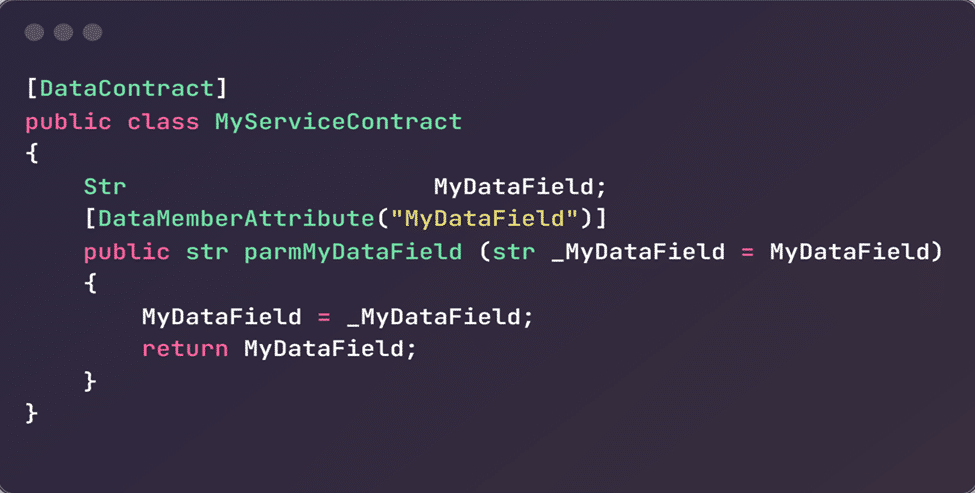
Step 1: Define the service contract
A service contract in Dynamics 365 Finance and Operations is defined using Data Contracts, which specify the data structure to be exchanged. To define the service contract, follow these steps:
- In Visual Studio, open your Dynamics 365 project.
- Right-click on your project and select Add > New Item.
- Choose Dynamics 365 Items > Class and name it MyCustomContract.
Here is a sample X++ code:
Step 2: Implement the service operations
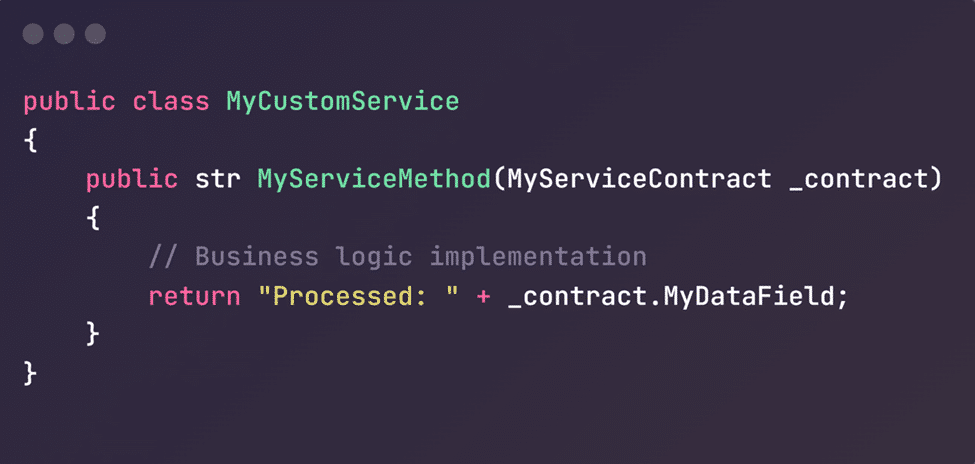
Service operations contain the business logic to be executed. They are implemented in classes with methods marked with specific attributes. To implement service operations:
- Right-click on your project and select Add > New Item.
- Choose Dynamics 365 Items > Class and name it MyCustomService.
Here is a sample X++ code:
Step 3: Create the service and service group
To make the service available, you must create a service definition and service group in the Application Object Tree (AOT) using Visual Studio.
Creating service definition
- Right-click on your project and select Add > New Item.
- Choose Dynamics 365 Items > Service and name it MyCustomService.
- Select the class in service properties.
- Add a new service operation named MyServiceMethod.
- Select method “MyServiceMethod” in service operation properties.
Creating a service group
- Right-click on your project and select Add > New Item.
- Choose Dynamics 365 Items > Service Group and name it MyCustomServiceGroup.
- Add your service to the service group in the MyCustomServiceGroup.
Step 4: Deploy and consume the service
Once registered, deploy the service and generate the necessary artifacts. External systems can consume the service via standard protocols like REST. Integration through custom services provides a powerful mechanism to extend the ERP’s capabilities, enabling seamless and secure data integration. By following best practices and leveraging the flexibility of custom services, businesses can enhance their operational efficiency and responsiveness in an ever-evolving digital landscape.
Calling custom services with Postman (A testing technique)
After completing the initial Dynamics 365 Finance and Operations development, which results in an API, thorough testing is essential. Among the various tools available for API testing, Postman stands out as a popular choice. Here’s a guide on how to use Postman to call your custom services in Dynamics 365 Finance and Operations.
1: Get the authentication token
Request: POST https://login.microsoftonline.com/{tenant}/oauth2/token Headers: Content-Type: application/x-www-form-urlencoded Body (x-www-form-urlencoded):
- grant_type: client_credentials
- client_id: your-client-id
- client_secret: your-client-secret
- resource: https://your-dynamics-url
- Response: Access token
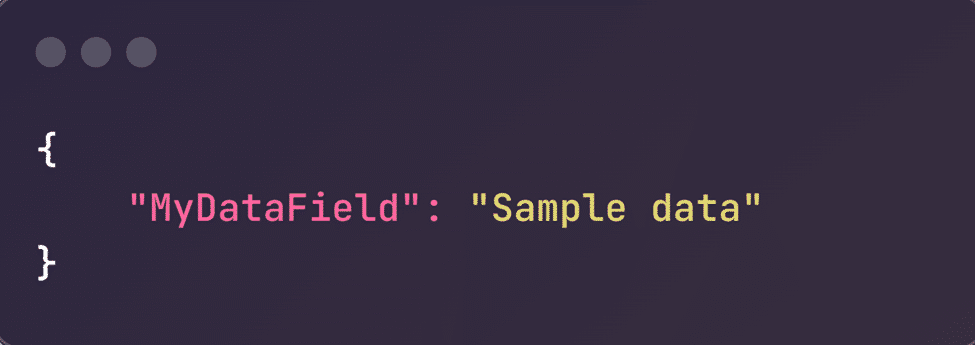
2: Call the custom service
Request: POST https://your-dynamics-url/api/services/MyCustomServiceGroup/MyCustomService/MyServiceMethod Headers:
- Authorization: Bearer {access_token}
- Content-Type: application/json
Body (raw JSON):
Response: JSON

Best practices for creating custom services in Dynamics 365 Finance and Operations
Building a custom service is not just about making an endpoint available. The real value comes from designing it to be secure, reliable, scalable, and easy to maintain over time. As organizations expand their integration landscape, poorly designed services can create performance bottlenecks, inconsistent data handling, and long-term maintenance issues. That is why following best practices is essential for any successful Microsoft Dynamics 365 F&O customization initiative.
1. Design for performance from the start
Custom services should be built with efficiency in mind, especially when they are expected to handle large transaction volumes or frequent external calls. Service methods should remain focused, avoid unnecessary database operations, and return only the data required by the consuming system. Heavy loops, excessive queries, and oversized payloads can quickly affect response times and overall system performance.
For teams working on Dynamics 365 FO custom development, performance planning should begin at the design stage, not after deployment. A lean, purpose-built service is almost always more effective than one trying to serve too many use cases at once.
2. Implement strong error handling and logging
A custom service should fail gracefully when something goes wrong. Instead of returning vague or unhelpful errors, it should validate inputs carefully, catch exceptions where appropriate, and provide meaningful feedback that helps technical teams identify the issue quickly. At the same time, errors should be logged in a way that supports troubleshooting without exposing sensitive internal details to external consumers.
This becomes even more important in enterprise integration scenarios, where a single failed service call can disrupt downstream processes across multiple applications. Good error handling improves supportability, reduces diagnostic time, and increases trust in the integration layer.
3. Secure every service operation
Security should never be treated as an afterthought. Custom services often expose important business logic, which means they must be protected by proper authentication, authorization, and access control. Role-based security, application access approval, and carefully assigned user permissions all help ensure that only authorized consumers can invoke the service.
For organizations investing in Microsoft Dynamics 365 FO customization services, a secure service design helps protect data integrity and reduce compliance and operational risks. The goal is to expose only what is necessary and to do so in a tightly governed way.
4. Keep contracts and logic clean
Well-structured services are easier to maintain and less likely to break as the application evolves. Data contracts should remain simple, stable, and aligned to the business purpose of the service. Service methods should focus on business execution rather than unrelated logic, and reusable code should be kept in the right architectural layers wherever possible.
This disciplined approach is especially useful for projects that also involve custom Dynamics 365 Finance and Operations services, where multiple integrations may depend on a consistent and predictable service framework.
5. Maintain clear documentation
Even a technically strong service can become difficult to support if it is poorly documented. Each service should include documentation for the request structure, response format, authentication requirements, expected validations, common error messages, and endpoint usage. Good documentation reduces dependency on individual developers and makes future enhancements much easier.
This matters even more when a business has a growing integration footprint and wants to align its ERP extensions with broader goals for Dynamics 365 Finance and Operations customization services.
Accelerate growth at an unprecedented pace
Discover how Confiz can help you take control of your daily operations, increasing growth and revenue.
Book a Free ConsultationUse cases of Dynamics 365 custom services
Custom services can be used in a wide range of business scenarios where standard integrations are insufficient or where organizations need greater control over how business logic is exposed. Their value lies in the ability to create targeted, secure, and process-driven integrations that support real operational needs rather than forcing every requirement into a one-size-fits-all framework.
Here are some of the most practical and common use cases:
1. Third-party system integrations
One of the most common use cases is connecting Finance and Operations with external systems such as logistics providers, e-commerce platforms, supplier portals, banking tools, and industry-specific applications. In these scenarios, custom services can validate incoming data, trigger internal business logic, and return structured responses to the calling system.
This makes them particularly useful when organizations need Microsoft Dynamics 365 Finance and Operations customization that goes beyond simple entity-based integration.
Further readings: Migrating from legacy systems to Dynamics 365 Finance & Operations: A practical use case
2. Advanced reporting and controlled data exposure
Some organizations need to expose ERP data to external analytics or reporting tools, but not in the raw form stored internally. Custom services can aggregate, filter, and structure the required data before making it available to reporting platforms. This gives businesses more control over what is shared, how it is formatted, and when it is made available.
In this sense, custom services support a more controlled approach than simply exposing tables or pushing data without transformation.
3. Mobile and field-based applications
Custom services are also highly effective in mobile app scenarios where users need access to focused ERP functionality without the full complexity of the application. For example, mobile apps used in warehousing, approvals, inspections, or field operations may need to submit transactions, retrieve status data, or validate business rules in real time.
This is where a custom connector implementing Dynamics 365 Finance and Operations becomes highly relevant, because many mobile or low-code integrations rely on well-designed services behind the scenes.
4. Workflow and approval extensions
In some business scenarios, standard workflows need to be extended with custom validation, external triggers, or integration logic. Custom services can support these requirements by exposing operations that work alongside approval frameworks and business events. This is particularly relevant for teams that also need to create custom workflows in D365FO X++ as part of broader process automation.
5. Legacy modernization and specialized extensions
Organizations moving from older AX environments often need to modernize bespoke integrations while preserving important business logic. In such cases, custom services provide a cleaner, more scalable way to expose functionality than older patterns used in Microsoft Dynamics AX custom development projects. They also support a more future-ready architecture for businesses modernizing legacy extensions without rewriting everything at once.
6. Industry-specific operational scenarios
Custom services are especially valuable when businesses operate in industries with unique workflows, compliance rules, or transaction models. Whether the requirement involves custom fulfillment validation, financial controls, partner integration, or specialized operational logic, service-based extensions offer a practical way to expose only the necessary functionality.
That is why they remain a core part of many Dynamics AX custom development modernization efforts, as well as newer cloud implementations.
Conclusion
Custom services are a powerful way to extend Dynamics 365 Finance and Operations without overcomplicating the core system. They allow businesses to expose custom business logic, support specialized integration scenarios, and create more controlled, secure, and scalable data exchange across their digital ecosystem.
More importantly, they help organizations move beyond one-size-fits-all integrations. With the right design approach, custom services can improve process accuracy, reduce manual effort, strengthen governance, and give teams the flexibility to confidently support evolving operational needs.
Ready to get more from Dynamics 365 Finance and Operations? Connect with us at marketing@confiz.com, and let’s build smarter, more scalable integrations for your business.